Forum Discussion

Gray "Video" box when editing SL
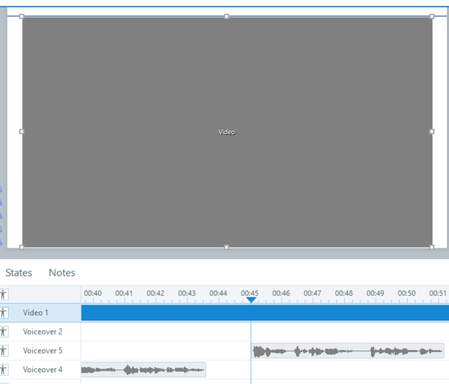
After some testing on my end, it seems like the issue occurs when the video has been edited by Clipchamp, the Microsoft video editor. I created a test file - I uploaded an older video that was edited in a different software (I'm not sure which, possibly Adobe Premier Pro) into the first slide. That one appears as expected. I then edited that video with Clipchamp (all I did was clip it shorter) and saved the edited video. I uploaded it to the second slide and the gray box issue happens. It plays fine, it previews fine, I just can't see it when it is paused/stopped on the editing stage. Both files are mp4.
To answer the questions from the post:
I have the most current version of SL installed (3.127.38181.0)
It happens with multiple projects, but not all of my projects. When I open older projects, the videos display as expected. These videos were edited in other applications, mostly Adobe Premier Pro. When I open more recent projects, specifically those with videos edited in Clipchamp, the Gray Box issue occurs. This was NOT an issue when the project was created in May - the Clipchamp edited videos displayed as expected on the stage. Only now when I open those projects they no longer display as expected.
And the new "test" project file I created shows the first slide with the video displaying as expected, and the second slide with the same video edited in Clipchamp displaying as a Gray Box.
I do not want to post a project publicly due to employer privacy concerns, so I have submitted a support case with this information to get more help.
- KellyAuner29 days agoStaff
Hi, ReneeKowalchik-!
I see you've connected with my teammate, Mick, in your support case. You're in great hands!

Related Content
- 10 years ago