Forum Discussion

Hiding Layers When Seek Bar is Enabled

Another Storyline issue. Shocking! Why add the functionality to hide layers when using the seekbar? I think probably because that would be too easy and make too much sense.
Michael Lawrence's solution to this issue seems to work, although it doesn't seem to matter where I put the cue point.
I have developed two other solutions to this issue, neither of which is ideal.
1. My layers are usually triggered by a button. If that is the case, use the trigger shown in the attached file (HideLayers1.jpg) to hide the layer when you use the seekbar to go to an area of timeline where the button that showed the layer no longer appears.
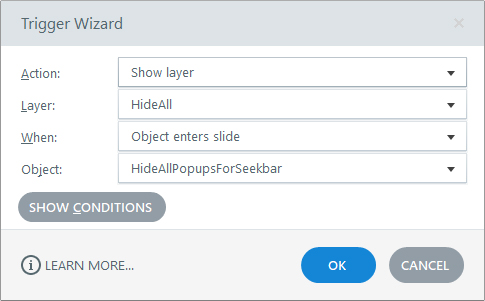
2. If that doesn't work, you can add an empty layer, let's call it "HideAll" . You can then add an invisible rectangle named "HideAllPopupsForSeekbar" onto your timeline and extend it according to where you want the layers to hide when using the seekbar. Then add the trigger shown in the attached HideLayers.jpg
- JaysonSamson-864 years agoCommunity Member
I had the same issue. The option 1 suggested by Paul Colby works for me.


Related Content
- 3 months ago