Forum Discussion

How can I delete unused variables?
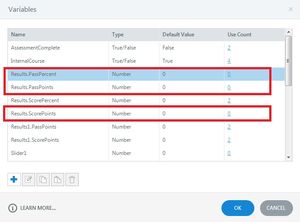

Re-opening this thread as I feel like the initial issue was not solved, while I appreciate you can delete variables in bulk now, I can not delete built-in variables, such as the ones created when adding a result slide(which I feel is what Deepak was initially trying to say)
Because a majority of the content I have created is being used across multiple different learnings, I have been duplicating the module and then adding the more task-specific content required for the role.
I think in doing so it has created up to 15 different result.passpoints etc. to select from *see attached image* on my results slide. I am only assuming this is how it's created that many as I have no idea how it would have otherwise. You can appreciate the issues I am now having with trying to get this to function properly when it comes to the quiz and referring it to the correct variable.
I saw the comment above to copy the content into and new storyline file to try and start fresh with a result slide there, but there is so much content and whenever I paste it over, the formatting is lost(even when pasting with source formatting)
I apologise if there is a different thread answering my questions and I have missed it, this is a difficult/confusing question to ask haha.
Thanks for any help in advance, I have also already put in a feature request to be able to delete or remove these built-in/system created variables.

Related Content
- 12 months ago
- 12 months ago
- 12 months ago
- 12 months ago
- 6 months ago