Forum Discussion

How can I export all of the audio from a Storyline?
I've just recorded the narration for my first Storyline course. In Presenter, I usually open the audio editor and export ALL of the narration to a file. It shows up nicely with slide numbers and names. I can't find this feature in Storyline. I see that I could work with/export the audio one slide at at time, but doing that would be really tedious. Since Storyline crashed halfway through my first attempt to record and didn't keep any of the audio, I think it's going to be really important to have a back up copy.
27 Replies
- LewisEigenCommunity Member
Joyce Hensen said:
I've just recorded the narration for my first Storyline course. In Presenter, I usually open the audio editor and export ALL of the narration to a file. It shows up nicely with slide numbers and names. I can't find this feature in Storyline. I see that I could work with/export the audio one slide at at time, but doing that would be really tedious. Since Storyline crashed halfway through my first attempt to record and didn't keep any of the audio, I think it's going to be really important to have a back up copy.
I had asked the same thing--exporting the audio file. I had a different reason--namely that we have some lectures that we are putting gup in Storyline. Then we were asked if we also could publish and MP3 version as a podcast. Normally this would be easy, but there is not yet an easy way to do this. I have submitted a new feature request before your post.Until something is added, I was going to export each frame's audio and then using an Audio editor concatenate all the audio files into one. Then convert that. One of my colleagues realized that the concatenation can be some by opening up a new Storyline project, and adding via cutting and pasting add each slide's audio at the end of the previous audio file. We end up with a single slide with all the audio, and we just export that and convert it.
This workaround is conceptually simple, but a big pain to implement. I think it will have to do until Articulate accepts our suggestion for an efficient eans of doing it.
Hi Lewis and welcome to E-Learning Heroes! Thanks for sharing your solution with the community as well as the feature request that you submitted.
- NikhilBezalwar-Community Member
Hey guys.. Just checking if there is any update on this. This post is from over 3 years back and at that time the Storyline guys here did mention that it would be a good feature request. Just wondering if this has been introduced yet. We are doing a lot of eLearning course localization in Storyline and this could be a deciding factor in choosing our tool for eLearning
No update on this behavior Nikhil. You must export audio clips individually.
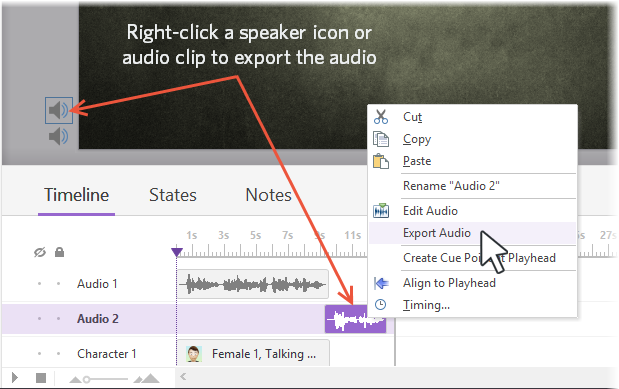
You can export audio from Articulate Storyline as a backup or to use in other projects. Just right-click an audio clip in the timeline or a speaker icon next to your slide, and select Export Audio.
- KeithiaKirka940Community Member
Hello. I just switched to SL3 from SL2. I see this post was last updated about a year ago. Is there any update? Do we still have to export one slide at a time. I'm having to export all my audio out to Adobe Audition because of the Edit audio issue of not being able to zoom in and edit out small blips. Please as the tech staff if they will consider adding this as a feature. I'll also put in a feature request.
Hi Keithia,
So sorry you're running into that audio-editing bug in Storyline 3. At this time, you can export audio one clip at a time, but I really appreciate you putting in a feature request for exporting all audio files at once. I think lots of folks would benefit from a feature like that! Thanks for letting us know how we can make things better. 🙂
- -b3b12fac-cde6-Community Member
Tested at SL2
1) Rename "story" to "zip"
2) open folder MEDIA from Explorer on Win
the end
- EmersonCollinsCommunity Member
The ability to export all audio files at one time would be a great feature. When you publish the file out, Storyline generates the audio files but to no understandable naming convention.
When you insert an audio file into Storyline, why doesn't it use the audio file name as the layer name? In many of our projects, we use dozens of audio files and reuse those audio files for other modules. Without the audio file name in Storyline, it is difficult to find the name of the original audio file. Must tell you, other programs handle audio files much better than Storyline.
- JustinLovett-75Community Member
So I am assuming this feature request from 7 years ago still has not been processed? Because let's all be honest, having the ability to export audio files for captioning is really useful. Especially in bulk with common sense naming conventions.
- JoyceHensenCommunity Member
Nope... still waiting. It's my impression that there will still be bug fixes for SL, but no new features. To get new features you have to buy a new product. I don't know whether they are working on this for 360.








Related Content
- 1 year ago
- 9 months ago
- 9 years ago
- 9 years ago