Forum Discussion

MariaThornton
3 years agoCommunity Member
How do you import a quiz in a Storyline file into a Rise 360 course?
Hi everyone
Does anyone know where I can go to get a blow by blow screen shot of how to import a quiz from a Story line file into a new course in Rise 360?
I'm stuck and not very good at Storyline yet (I much prefer Rise).
thanks in advance
Maria
1 Reply
- YogeshDhingr506Community Member
Dear Maria,
Please follow the below steps:
- Create quiz in Storyline and publish it for review 360.
- Open course in Rise and add new content as Interactive
- select storyline file
- Browse the course from Review 360
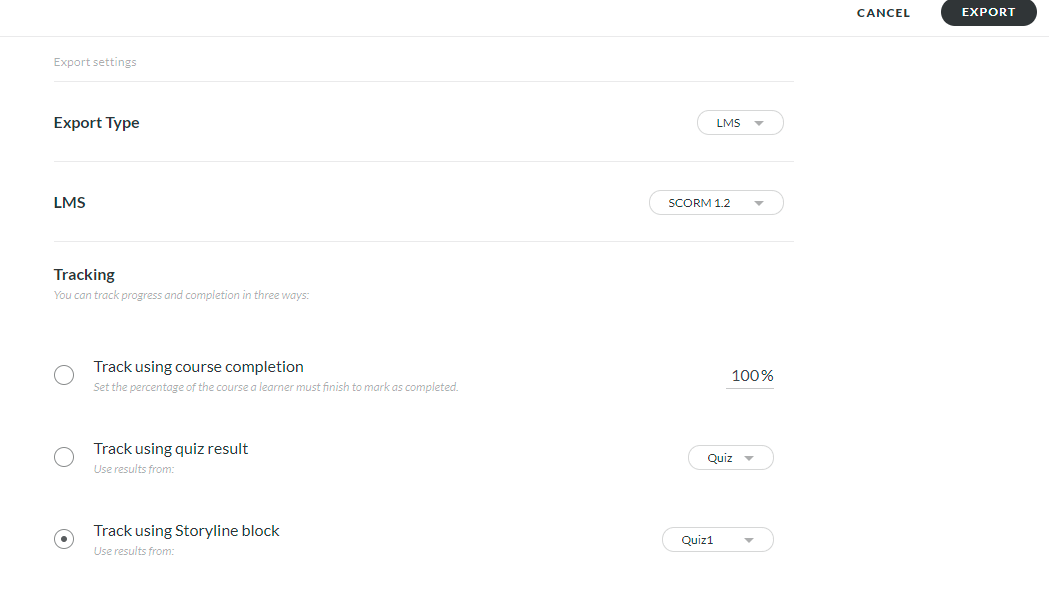
- If you to track your Rise course result based on the Storyline quiz
- Go to Export course and Under Tracking Select Track using storyline block
- Select your course.
Attaching the SS for the same.
Hope this will work for you.
Thanks