Forum Discussion

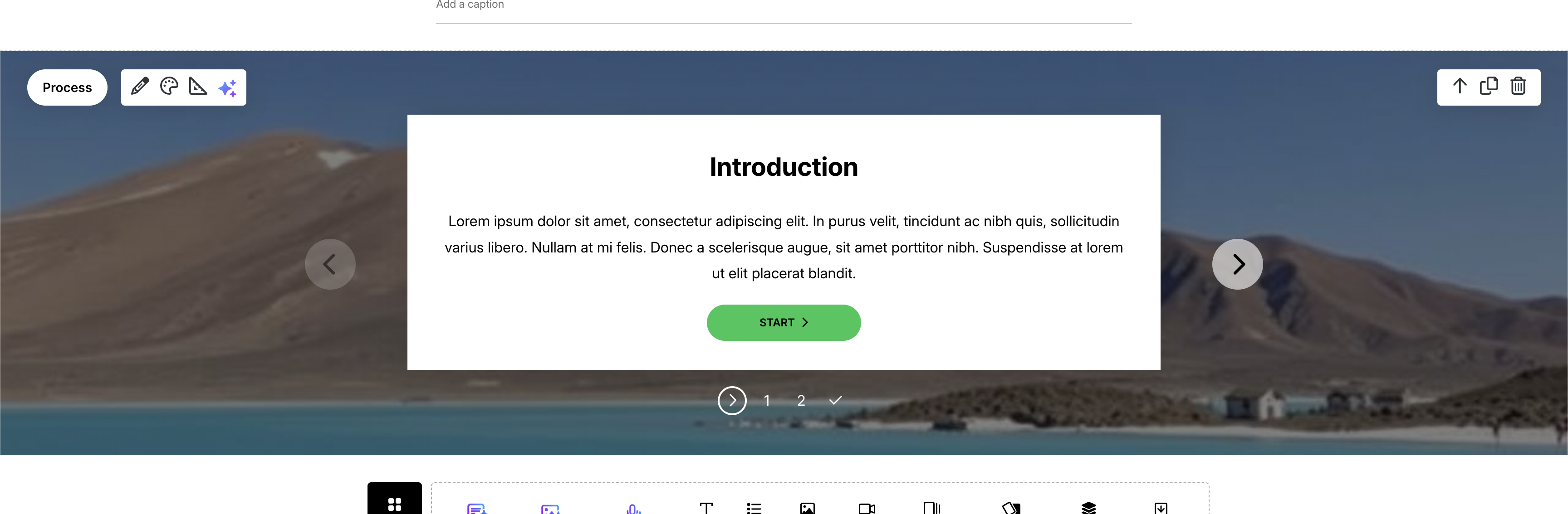
Image used as background behind Process block has been greyed over
Exactly as the title says.
I have inserted an image as the background behind my Process cards in the "Process" block. However the image has been "greyed" out, rather than showing in it's original colours.
I can't find a setting to alter this, can anyone advise?
5 Replies
Hi Michelle_Eire,
I'm sorry to hear that you encountered this issue. I tested the functionality on my end, and everything appears to work normally. The background image used in the Process block wasn't grayed out at all.
I'd like to ask a few questions to clarify your experience:
- Is this happening to any image you upload as a background in a Process block?
- Does this happen on other browsers?
- Have you tried clearing your browser's cache?
If this issue persists, please open a case with our support team here so we can request a copy of your background image and course for testing.
- Michelle_EireCommunity Member
Apologies, I realize I wasn't clear in my original post.
The image is there, but it is not showing the brightness of the original image. I have attached 2 screenshots for reference - 1 of the original image, 1 of the image as a background to a process block.
Is it possible to have the background image be shown with the brightness and vibrance of the original image?
- PhilFossCommunity Member
Michelle_Eire check the 'overlay' setting on that image.
- Michelle_EireCommunity Member
Thank you PhilFoss that was the problem! I wasn't aware of that setting.
I really appreciate you taking the time to respond.
- WenjuanZou-00d4Community Member
PhilFoss This is so helpful, I'm having the same issue, thank you so much!





Related Content
- 7 months ago
- 1 year ago