Forum Discussion

Issue with click sounds on buttons
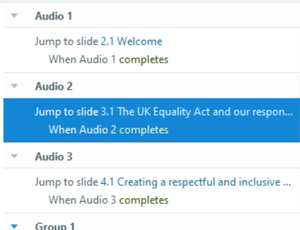

Hi Maria,
Can you confirm, the issues I have had with triggers linked to media completions were not limited to previews, they were deep and occurred in published projects.
The most deeply problematic one, and it still existed up to yesterday's version, was triggers to jump to next slide, prev slide or layers that were sound triggered so a "click" sound had time to complete (.25s), SL seems to remember what that audio clip was used for originally and keeps applying that over and over.
For instance, one on slide I would drop a "click" audio element, then name it ClickNext on the slide, connect my NEXT button to that audio, then tell that audio to jump to the next slide when the audio completes. Fine.
Then I would duplicate that audio clip, change the name to ClipPrev, then connect the PREV button to that sound, and set that clip to jump to previous slide when completed. Up til Sept 2019 that worked gloriously.
But it stopped working after that. It seems that SL was somehow detecting that the audio clip was a copy of a previously used media, and reapplied the prior trigger. So when I clicked PREV, it played the ClickPrev audio, but then applied the trigger from the first instance of when I used one of those clips.
I had used the same audio clip, renamed ad nauseum as needed all through dozens of courses, it worked just fine until after Sept 2019, then it broke completely. I had to start redoing all the progress elements in my projects.
So what exactly got fixed? Did any of that above?
To test this fully -
- Drop 3 copies of the exact same short audio clip on a slide
- Attach each to 3 diff buttons
- Give each audio element something unique to do when they audio completes.
- Now click each button, do the unique triggers work?
In the past, for me, they didn't, it would do whatever was programmed into the first instance of that audio clip.
Thanks for checking.

Hello Jerry!
Great question! Originally this bug was logged just for the behavior in Preview. Similar to your statement, we found that releasing a fix in Storyline 360 (Build 3.49.24347.0) caused a regression that affected the web output. Our team released the fix so that triggers set to occur when media completes work when previewing a project and in the published output.
Please don't hesitate to reach out to our Support Engineers in a support case if you still see this bug!
Related Content
- 2 months ago
- 2 months ago
- 4 months ago