Forum Discussion

Learning Journal In Rise
UPDATE DECEMBER 2024
Download at your own risk! It appears that Articulate recently made a change that could cause the learning journal to stop functioning. Such changes have happened in the past and will continue to happen. However, I will not be updating the learning journal code at this time. To remove the learning journal, simply remove any STATEMENT-NOTE entries that refer to the learning journal.
E-Learning Super Hero SamHill has created a newer version of a Learning Journal that has more features and is actively supported. I encourage you to check it out here.
- - - - -
UPDATE JUNE 2020
Firstly, Articulate recently implemented a small update to Rise. As a result, all new exports from Rise will need to include the most recent version of LearningJournal.js which is found at the usual link.
Secondly, at any time Articulate could update their code and bring a breaking change to the Learning Journal. Over a year ago, I shared this functionality freely with the community and the code comes with no warranty or support either implied or expressed. If at any time you want or need to remove the Learning Journal from your modules, simple remove any STATEMENT-NOTE entries that refer to the Learning Journal.
* * * *
I built a cool Learning Journal feature for Rise that has been very well-received. I thought I'd share it in case anyone wanted to a. use it or b. improve on it.
The Learning Journal allows the learner to enter text responses to journal prompts throughout a Rise course. At the end of the course, the learner can print their learning journal of all their responses. The responses are saved to the browser so that they persist on future visits to the Rise course.
EDIT May 2019: At the request of a member of the forum, I created a HOW-TO video below that shows each step of the HOW-TO document in action.
Example Rise Course
http://amelangrise.s3.amazonaws.com/learningjournal/index.html
HOW-TO Document
https://github.com/mikeamelang/learning-journal/raw/master/Learning%20Journal%20HOW-TO.docx
HOW-TO Video
https://360.articulate.com/review/content/33873893-2ea1-46d9-9415-3efca951d74c/review
Learningjournal.js file (right-click and save)
http://raw.githubusercontent.com/mikeamelang/learning-journal/master/Learningjournal.js
Learningjournal.css file (right-click and save)
http://raw.githubusercontent.com/mikeamelang/learning-journal/master/Learningjournal.css
Project github site
https://github.com/mikeamelang/learning-journal
I would love any feedback and help to improve the functionality and code.
Mike Amelang
304 Replies
- ManoelFrancoCommunity Member
This is great! Thank you
- KariMcKayCommunity Member
UPDATE (In case anyone else has a similar problem). When I copied the coding for Rise from the .js file, it didn't leave the visual space after each line (and I didn't realize that it wasn't correct.) (Essentially, the system was reading everything as one line of text with soft returns (shift+Enter) in between rather than full, hard returns. I went to the end of every line, and pressed Delete until the next line of text moved to that line. Then I pressed Enter. (Repeat for each row of text). Rise showed a distinct space in between the rows of text. When I republished it worked fine.
Original post: I love this idea and am researching it for my team. But the code is still showing as the text I copied in.
- I added the Journal Entry and Section Intro lines (copied and pasted from the .js file and updated it accordingly.
- I published the Rise course and unzipped the output.
- I copied and pasted the css and js files into the scormcontent folder,
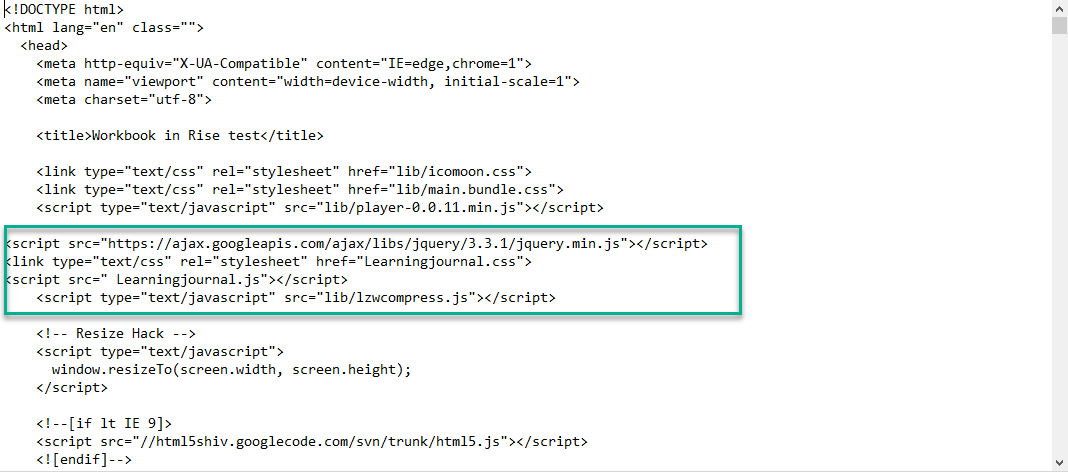
- I edited the index.html and added the 3 lines of codes to the applicable line.
- I double-clicked the index.html file to see if it would show properly. (It didn't.)
- I thought maybe it needs to be zipped back up, so I did that and uploaded it to my LMS.
Before I go any further with my testing, the last comment on here is from a while back. You mentioned that it could break at any time due to Articulate updates. Do we know that it's still working?
Thanks. I see that the css file is only 1 kb, but when I open it, it's the full content.
- LauraFotherg185Community Member
Yes this definitely still works! Our medical students are using it in 9 different Rise courses that were developed.
- TianxuanLiuCommunity Member
Nice!
- JaneAhern-57fa5Community Member
Hi all, thanks again to Mike Amelang for developing and sharing this great tool.
I have used it previously with a few bumps here and there, but am stumped by this one - the journal boxes appear in the course (and you can enter text in them) but not the question prompts.
If I test it by adding text to the boxes, I can get a printout of the journal and all the Section information and journal entry text appears there, but you can't see it online in the course.
I have tried rebuilding each journal entry using a block template that worked OK earlier this year, but get the same issue.
I've attached the SCORM file in case someone wants to take a look. I have no programming knowledge - which is why I use Rise :-)
- DavidAtkinson-dCommunity Member
This is excellent - thank you
- JaneAhern-57fa5Community Member
HI Tracy,
Yes I would be happy to, any time after Tuesday next week. We're on Australian Eastern Standard time here. Can you send me a Zoom meeting invite for a time that works for us both?
Cheers
JaneJane Ahern
Senior Learning & Development Advisor
[cid:image004.jpg@01D86B84.6160D260]Aboriginal and Torres Strait Islander Community Health Service Brisbane
55 Annerley Road, Woolloongabba Qld 4102
P: (07) 3240 8900 ext# 1126 I M: 0413001661
www.atsichsbrisbane.org.au
[cid:image003.jpg@01D86B64.E62E3840]
I acknowledge the Turrbal, Yuggera and Yugambeh people as the Traditional Owners of the country on which I live, work and play. I pay my respects to them and their country, and to Elders past, present and future.
IMPORTANT NOTICE: This email and any attachment to it is intended only to be read or used by the named addressee. It is confidential and may contain legally privileged information. No confidentiality or privilege is waived or lost by any mistaken transmission to you. If you receive this email in error, please notify the sender and delete it from your system. You must not disclose, copy or use any part of this email if you are not the intended recipient. The Aboriginal and Torres Strait Islander Community Health Service Brisbane Ltd is not responsible for any unauthorised alterations to this e-mail or attachment to it.- TrainingSILFranCommunity Member
Jane, thank you so much for your willingness to help me! I am very grateful. A colleague was able to find the problem.
Blessings,
~ Tracy
- JaneAhern-57fa5Community Member
Fantastic Tracy,
Glad you got it resolved.
JaneJane Ahern
Senior Learning & Development Advisor
[cid:image002.jpg@01D86E36.278F4620]Aboriginal and Torres Strait Islander Community Health Service Brisbane
55 Annerley Road, Woolloongabba Qld 4102
P: (07) 3240 8900 ext# 1126 I M: 0413001661
www.atsichsbrisbane.org.au
[cid:image003.jpg@01D86E36.278F4620]
I acknowledge the Turrbal, Yuggera and Yugambeh people as the Traditional Owners of the country on which I live, work and play. I pay my respects to them and their country, and to Elders past, present and future.
IMPORTANT NOTICE: This email and any attachment to it is intended only to be read or used by the named addressee. It is confidential and may contain legally privileged information. No confidentiality or privilege is waived or lost by any mistaken transmission to you. If you receive this email in error, please notify the sender and delete it from your system. You must not disclose, copy or use any part of this email if you are not the intended recipient. The Aboriginal and Torres Strait Islander Community Health Service Brisbane Ltd is not responsible for any unauthorised alterations to this e-mail or attachment to it.
- KenyaMcIntyre-1Community Member
HI! How do I remove the Print Actions button? Thanks!
- AmyGttCommunity Member
Were you able to figure this out? I am trying to delete it as well.
- LindsayIngamellCommunity Member
Hi there
I've just tried to run a test file following the instructions, but when I open the .html file in textedit (i'm working on a mac so can't use notepad++) it is empty. If I open with Chrome I can see the lines but can't edit. Can anyone advise how I can view and edit the file?
- MartinLinneyCommunity Member
Hi guys, this is a great bit of info and it looks really good when I've used it. My only issue seems to be the Print My Actions button. I have multiple sections, some with actions and some without. But it only seems to show my very first section on Print my Actions. Anyone else come across this?
- JaneAhern-57fa5Community Member
Awesome - that works. I also found (later) that I could ignore the message and save the files (for anyone getting the same issue). Thanks, Matthew - really appreciate your help and this community of users!













Related Content
- 10 months ago
- 1 year ago