Forum Discussion

KerryJ
13 years agoCommunity Member
Line-in mic not working in Articulate Storyline
Hi there
I am using a line-in microphone that Windows 7 picks up as the default, that I can use to record in Audacity with no issues and that Articulate screen capture recognises - yet Articulate...

PeterAnderson
12 years agoFormer Staff
Hey Jeff!
See if this helps.
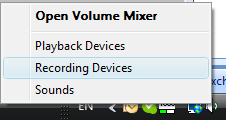
- Right-click the Volume Mixer (the icon that looks like a speaker) in the system tray on your taskbar, and select Recording Devices:
- Right-click your recording device and select Enable:
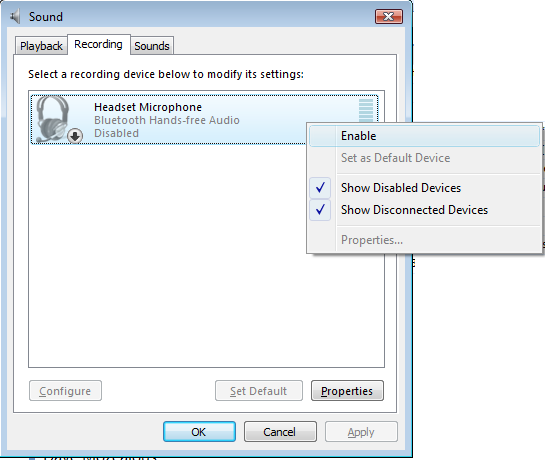
(Note: If you do not see any devices listed on the Recording tab, verify that both the "Show Disabled Devices" and "Show Disconnected Devices" options are check-marked similar to the image above.)
After enabling the device, you should be able to record audio in your Articulate software.
Related Content
- 11 months ago