Forum Discussion

Lost Text Animations by Paragraph After Translation

Hi David_LeFevre! This can happen after importing translations from the Word export.
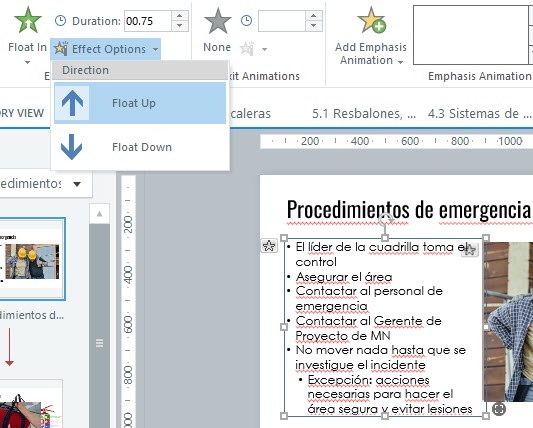
Sometimes Storyline converts bullets into line breaks instead of true paragraphs, so it treats the text as one block and the Effect Options > By Paragraph setting disappears.
I’d recommend trying this:
• Toggle bullets off and back on with Storyline’s bullet tool
• Check for Shift+Enter (soft returns) and replace them with Enter
• Cut and paste the text back into the same text box
• If needed, paste the text into a new text box and reapply the animation
Once Storyline recognizes each line as a separate paragraph again, the By Paragraph option should return.
- David_LeFevre2 months agoCommunity Member
I was hoping for a solution that would not require manual editing in Storyline, especially because I don't speak Spanish so resetting all the bullets to match the audio will be very challenging (I also need to do this for other languages that I do not speak, compounding the challenge). My project has about 45 slides with bulleted text boxes with several items, each of which is timed to the audio narration. Since importing the translation document breaks all the animation timing (resets everything to the start of the slide), that's a lot of Storyline work to fix something that shouldn't have changed. Is there anything that can be done in the Word doc itself that will make it so the import doesn't mess up all the animation?
- LucianaPiazza2 months agoStaff
Hello David_LeFevre,
Thanks for sharing more detail with us! I can see how frustrating it is to lose all that timing across 45 slides, especially working in a language you don’t natively speak.
When importing translated text from Word, Storyline treats it as new content, which resets animation timing. Unfortunately, there isn’t a way to preserve those timings through the Word doc.
If you’re open to it, we’d be happy to take a closer look and see if there’s a way to reduce the manual work. Feel free to share your .story file and translation materials in a support case so we can continue troubleshooting.
Looking forward to hearing from you!
- David_LeFevre2 months agoCommunity Member
FYI: I tried the new Localization service Articulate offers and it at least translates the bulleted text without losing all the animations. It even translated the AI audio, which the Word doc import did not do. So that looks like a good solution that will save a lot of time. I still have to time the animations to the new language, but that is expected (would be wonderful if it would look at the timing in English and auto-adjust it to the same translated phrase--can't AI help with that?). It was the total loss of animation that was a surprise. Now we just have to figure out pricing...


Related Content
- 1 year ago