Forum Discussion

New in Storyline 360: Integrated Review 360 Comments
- 2 years ago
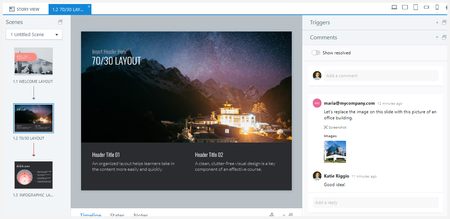
Based on your feedback, we made an improvement that we hope elevates your in-app comments experience. You can now easily address feedback on a specific course from various stakeholders. View comments for multiple Review 360 items right in Storyline 360 or Rise 360.
Let us know your thoughts about this enhancement. We'd love to hear from you!


Comments is a great tool for sure but I see people from 2 years ago asking for a way to see where the Comments are inside of the Storyline File vs having to hunt for them. Has this request been added to the list? I have a courser with about 75 slides at this point. Looking through each slide to see if there are comments is silly.

Hi RussLickteig,
Thanks for sharing your thoughts on this.
I wanted to make sure I understand what you're looking for. With Integrated Review 360 Comments, comments are tied to specific slides and can be viewed directly within Storyline through the Comments panel. As you move between slides, the panel updates to show the comments associated with the currently selected slide.
When you mention wanting to see where comments are inside the Storyline file, are you looking for a way to quickly identify which slides contain comments without having to navigate through the project slide by slide? For example, a comment indicator on slide thumbnails, a filter for commented slides, or a project-wide list of comments?
I'd love to better understand your workflow and what would be most helpful.