Forum Discussion

New in Storyline 360: Integrated Review 360 Comments
- 2 years ago
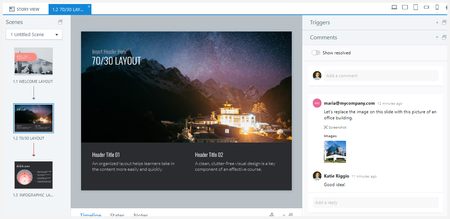
Based on your feedback, we made an improvement that we hope elevates your in-app comments experience. You can now easily address feedback on a specific course from various stakeholders. View comments for multiple Review 360 items right in Storyline 360 or Rise 360.
Let us know your thoughts about this enhancement. We'd love to hear from you!


Yes, this is a great feature and will save time moving between applications. I am using this feature for the first time this week.
I am not comfortable viewing the comments inside of Storyline in the side panel (where you view Triggers, Slide Layers). I have a large screen and when I need to see the triggers and layers it is can be frustrating moving things around.
Is there an option for me to disable the comments (Beta) that shows inside Storyline?
I prefer to view the Feedback link in Review 360 from my second screen. I can see all comments in a full view and can move from slide to slide there, with more ease.
In summary, the side panel inside Storyline is just too busy for me. Thank you.
- StevenBenassi2 years agoStaff
Hi Kim!
Happy to help with this!
You can click on the icon shown in the screenshot to hide the 'Comments' panel. Alternatively, the icon to the right of it undocks the panel so you can move it away from your field of vision if you are working with multiple screens.
However, there isn't a way to permanently disable this section. Undocking the comments panel and minimizing/collapsing are currently the only options to control its visibility.
Please let me know if you have any more questions!
