Forum Discussion

minhduc
6 years agoCommunity Member
Pass result and content of a multiple choice question to a variable in Storyline 360
Hi,
Is there any function or way in Storyline 360 that allows me to pass the result (true or false) and content of students' answer in a multiple choice question to a variable? Normally, with shor...

mattsmeeth
8 months agoCommunity Member
Hello from 2025 - did anyone find a solution to this, by any chance?
- LaurenDuvall8 months agoStaff
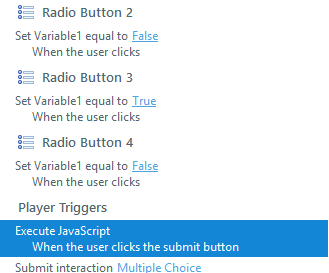
Hi mattsmeeth! Storyline 360 doesn’t automatically create variables for multiple-choice questions like it does for text-entry ones. But you can still track what a learner selects and whether it's correct using custom variables and triggers. Have you tried this type of setup?
To capture the learner's choice:
- Create a text variable (for example, LearnerChoice).
- Add triggers to each option, such as:
- Set LearnerChoice to "Option A" when the learner clicks that option.
- Repeat for each choice.
This stores the selected answer in your variable.
To check if that is correct:
- Create a true/false variable (for example, IsCorrect).
- On the Submit button, add a trigger that says:
- If LearnerChoice equals "Correct Answer," set IsCorrect to true.
- Otherwise, set it to false.
Now you have a record of both what they picked and whether it was correct.
Let me know if this works for your build!
