Forum Discussion

Resizing Boxes in Matching Drag and Drop
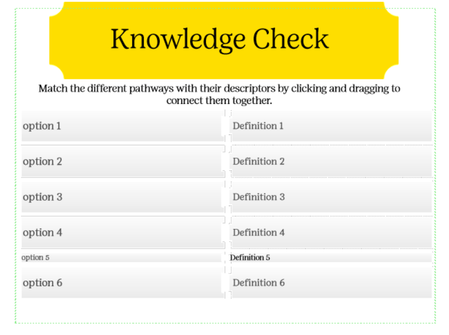
Ange Thanks for your response! I have tried adding a new slide and it appears like this,
Thanks for the suggestion that it may be a corrupted file and to reach out to Articulate. I appreciate the insight!
I see this in Preview mode.
- StevenBenassi1 year agoStaff
Hi Angela0039!
Sorry to hear you're having trouble with Matching Knowledge Checks in Storyline!
Glad to see Ange has been helping you. I tested the behavior on my end, but did not notice any inconsistencies when previewing the slide.
First, can you confirm that you are working with locally-stored .story files? Working off of a network, or shared drive may introduce erratic behavior. If you are already working locally, I suggest performing a repair of your Storyline installation to see if that makes an improvement.
However, if the issue persists, it would be helpful to see a copy of the .story file that's giving you trouble. Feel free to share that here in the discussion, or privately through a support case.
We'll delete it from our system as soon as we've finished troubleshooting!
- Ange1 year agoCommunity Member
Hi Angela0039 To cross one thing of your list of checks, before you start checking everything else, which can be laborious, I have attached a .story file with a matching drag and drop, which you can check and if it looks fine import into your project and check again. It looks and works fine my end, both in preview and review.


Related Content
- 1 year ago
- 3 months ago
- 11 months ago