Forum Discussion

See-through issue
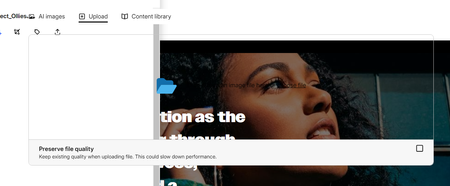

Hi MattBrosseau! I appreciate you sharing a screenshot of what you're noticing on your end! I've not noticed the Upload window look like this, so I'd imagine it might be a browser-related issue. Do you mind testing the following and letting me know the outcome?
- If you open the course in a private, incognito window, is the Upload window still see-through?
- In a new Rise 360 course, is the Upload window see-through?
It would also be helpful to know if this has happened before or if it is a new issue. Thanks for connecting with us to share this snag!
Hi Lauren! I tried an incognito window and it's still see-through. It's see-through in any course, the new ones and the old ones. It is also see-through when I'm trying to save a new block template, after I select the sections and before I provide a template name. Also, when I'm trying to share a review link after publishing a new version.
- LaurenDuvall2 months agoStaff
Thank you for these extra details, MattBrosseau! Which browser are you using? I've tested this using Chrome and it is working as expected. If possible, could you provide a screen recording and share it with our Support Engineers at support@articulate.com. They'll be able to offer additional troubleshooting steps to hopefully eliminate this odd behavior!
Related Content
- 7 months ago
- 7 months ago
- 2 months ago
- 10 months ago