Forum Discussion

SL 360 sometimes does not find an existing item to republish in Review 360
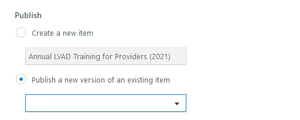
That makes sense, and it's almost certainly when it happens for me. Wish there were a way to fix it, as it has happened that I've inadvertently published a new version of the wrong file.

Sorry for the trouble, David! We don't have this logged as a bug, so I'd like to gather more details from you. It sounds like the course is missing in the drop-down list when you're using another file to start a course. Do you mind sharing that workflow with me? Are you duplicating the course outside Storyline 360 and then opening the copy in Storyline 360?
Once I gather these details, I'll report this to my team, which will hopefully help us find a fix!
- DavidSchwartz-f5 years agoCommunity Member
Hi Lauren,
Generally speaking, I either have duplicated a course outside of SL, or have opened it and then done a Save As to create another course. I can't say with certainty which of these conditions was met in courses where this issue occurs. (Not sure what you are asking when you say a course is missing in the drop-down list when using another file to start a course.)
In any case, with a course where the problem occurs, I have already published it to Review at least once, but when I go back to publish revisions, SL does not recognize that the course is associated with any course already in Review.
I've taken a screencast so you can see what happens: https://360.articulate.com/review/content/d3b1c6fd-ce2c-4465-a591-967d56c25a84/review
I will note that if I publish as a new item in Review, it then seems to maintain the connection going forward. That would be fine if I weren't trying to keep existing comments together with the updated version.
Thanks!
- PhilMayor5 years agoSuper Hero
Hi Lauren, I have reported this as part of the beta and confirm that what David has said is very similar to my experience.
If I create a new course from another course using save as often it gets confused and when I try to publish to review again will either not find a previous link (although is in dropdown) or will try to go to previous course link. This has happened so many times to m.

Related Content
- 2 years ago