Forum Discussion

LaurenAckley-6d
4 years agoCommunity Member
Sliders and Accessibility
Are sliders truly accessible? I was playing around and could toggle through the different layers using the slider and keyboard controls, but I couldn't get the screen reader to read any of the text ...

LeslieMcKerchie
2 years agoStaff
Hi Robbie,
Thanks for popping in to share your concerns. You didn't mention what accessibility issues you were currently experiencing.
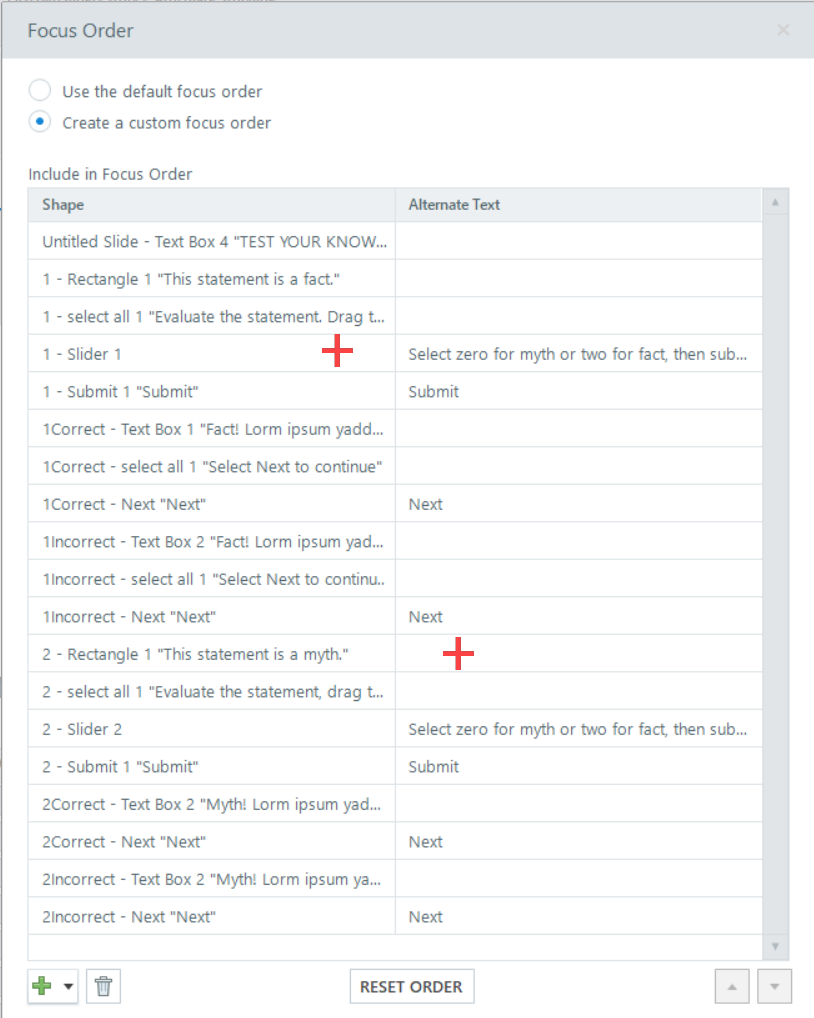
I can navigate your sliders using NVDA in Chrome. Taking a look at the focus order for the first two sliders, here are a few thoughts:
- The text boxes for myth and fact can be removed from the focus order since the Slider can provide direction.
- Adjust the alt text for the Next button on the correct and incorrect layers.
- Provide directions for the Slider. For example, select zero for myth or two for fact, then submit your response.
- Adjust the focus order on a few slides:
- Layer 1 Correct and Incorrect: directions to select next should come before the Next button.
- Slide 2 directions should come before the Slider.
- Add the main statement text back to Slide 2 (rectangle 1 - this statement is a myth) and move above the Slide 2 directions.
This should get you headed in the right direction for the other layers. I've attached before and after images to help visualize the above list.
This was a quick first pass, so please let us know if you were thinking of a specific concern not mentioned here.

Related Content
- 10 months ago
- 1 year ago