Forum Discussion

Text-Entry Fields shine through Hidden Objects
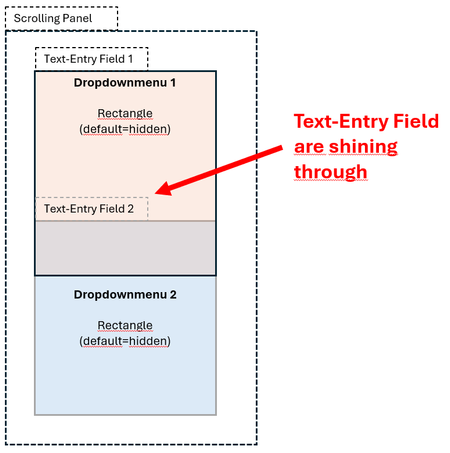

You're fighting a known Storyline quirk: text-entry fields get rendered as HTML inputs sitting above the slide, so they don't obey the normal show/hide stacking the way shapes do. A field in the Hidden state can still grab hover and focus — which is exactly what you're seeing.
Your motion-path workaround is actually the standard fix — park the inactive fields off the slide instead of just hiding them. Two refinements:
1. Park them on timeline start (one trigger each) rather than mid-interaction — no 0.1s shuffle while the learner is hovering.
2. If only one field is visible at a time, reuse a single text-entry field and route its value into a different variable per slot. Then there's only ever one input on the slide to manage.
One revisit check: make sure the parking triggers fire on every visit. If the slide is set to "Resume saved state," a parked field stays parked on revisit (good). If it's "Reset to initial state," the timeline-start triggers re-fire and re-park everything (also fine). The broken case is parking them on some other event that doesn't repeat.
Related Content
- 10 years ago
- 1 year ago
- 2 years ago