Forum Discussion

The encoder-7-64 process causes the CPU usage to spike unnecessarily
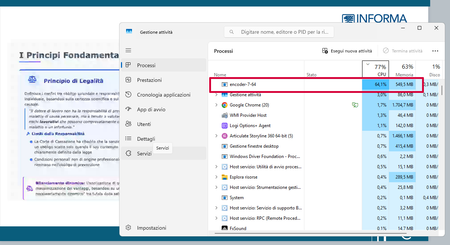
I downgraded to build 3.120.37241.0 and now Encoder-7-64 no longer starts automatically (and unnecessarily).
So the assumption that the process shouldn’t start unless I’m publishing is not wrong.
After all, I’d never noticed this before.
Please fix it.

Glad you have found a fix you're happy with. What this proves is that 3.121 does something on open that 3.120 doesn't, not that background encoding is inherently wrong, insert-time transcoding has always been the design in SL. 3.121 shipped a fix where closed captions were deleted after a video was edited. I'm guessing here, but the fix likely changes how video renditions or their captions are validated, so on open SL decides existing assets need reprocessing, which would explain the issue you're seeing if I'm guessing right...
- marcello_3 months agoCommunity Member
Downgrading isn’t a fix, and I’m not happy about it.
It’s unreasonable that the encoder should start up and re-encode all the media every time I open a Storyline file, even if I don’t make any changes – don’t you think?
So, I hope Articulate fixes it soon.
- DShaw3 months agoCommunity Member
I agree it shouldn't happen, 'runs at insert' is by design; 'runs on every open forever' is wrong. I searched the forums and it seems SL has had history with this type of issue; back in Dec 25 a SL update was reverted because of a MP4 to WebM implementation that caused a similar issue you're seeing. I've tried to replicate the issue but I don't see the same thing happen on my machine. Some things you could do to check it's not something in your environment that's causing the issue, watch the disk column for encoder-7-64 for a couple of minutes. If it's reading/writing data, it's genuinely processing something and should eventually finish. If it sits at basically zero while CPU stays high it's stuck. In Task Manager go to the 'Details' tab, right-click the column headings, choose 'Select columns', and scroll down and tick 'Command line'. Find encoder-7-64 in the list and read that column, it names the exact video file it's processing. If it's the same video every time you open the project, it could be that one file is the trigger. If it's happening across multiple projects this wouldn't be the cause.
- marcello_3 months agoCommunity Member
The problem happens in multiple projects
Related Content
- 1 year ago