Forum Discussion

The encoder-7-64 process causes the CPU usage to spike unnecessarily
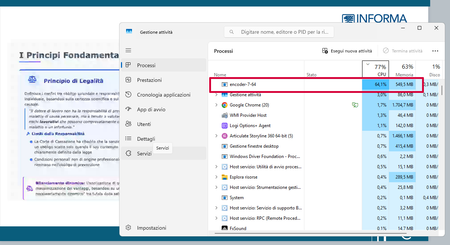
The publish quality I used is Static.
The build in which I encountered the issue is 3.121.37380.0.
I downgraded to build 3.120.37241.0 and the issue disappeared.

I replicated this on my machine and ran a controlled test on 3.122, and I think I've found what's going on.
Current builds precache a publish-quality copy of your video at insert time, but only if the source is out of spec. A compliant MP4 (H.264, 1920x1080 or smaller, AAC audio) is left completely untouched, encoder-7-64 doesn't fire at all. An out-of-spec source (in my test, 1762x1146, taller than 1080) triggers the encoder to produce a rescaled rendition into a PublishPrecache folder, so publish can serve it later without re-rendering. This is why I couldn't replicate it a few days ago as my MP4 was in spec!
That seems to explain what you're seeing exactly. I'd guess your project almost certainly contain videos that don't meet the current spec, most likely oversized in height, or with non-standard framerates or audio. Every time you open the project, SL queues a precache job for each non-compliant asset. If you close SL before it finishes, none of that work persists, so next open re-queues the lot. It looks like it's re-encoding on every open because effectively it is, the same jobs, never allowed to complete.
Two things you can do:
One, let it run to completion once. Open the project, let encoder-7-64 finish naturally however long that takes, then save and close. Next open it shouldn't run.
Two, If this does fix it, for future projects, standardise your source video at 1920x1080 or smaller, H.264, 30fps, AAC stereo. Anything within spec bypasses the precache path entirely in my testing.
Worth raising with Articulate support regardless. The feature itself seems sensible, precaching to speed publish, but doing it silently on open, with no progress indicator, no way to defer or cancel isn't great.
- marcello_3 months agoCommunity Member
I’ve submitted a case.
It's Articulate that should examine this issue and fix it, not you or me.
- LucianaPiazza3 months agoStaff
Hello marcello_,
I see that you're working with my colleague Robert. You're in excellent hands!
We'll continue the conversation in your case, so everything is in one spot!
- AmyH0rnsby1 hour agoCommunity Member
Hi DShaw - I'm having similar issues to marcello_ with the encoder running in the background and maxing my CPU for video heavy story files. I have checked my mp4 files in VLC media player and they are within the required specs you've outlined above. Do you have anymore advice on how to stop the encoder?


Related Content
- 1 year ago