Forum Discussion

The "Player" button doesn't work.
Hello, the "player" button in Articulate Storyline 2 doesn't work and we can not figure out why. I thought it might be because of notice in attachments, which appears every time you turn on the Articulate Storyline 2. The notice recommends us to download new Flash Player, but it doesn't make sence when the Flash Player no longer exists. Do you have any experience with that? Thank you.
11 Replies
- DaveCoxCommunity Member
Hi Vit,
The notice recommends that you download the new flash player because the software recognizes that the flash player is missing on your system. Storyline 2 is outdated software, At the time of its release, this error message indicated the correct course of action. Because Storyline 2 relied on Flash to preview your project, it cannot play the project without the flash player. This is why your player button is not working.
There are sources where you can download and install flash on your system. Once you've installed the flash player, you can preview your project in Storyline 2. You may see several warnings from various security packages about loading flash, but it can be done. I had to do that a while back to view an obsolete project that I was attempting to re-create.
Instead of continuing to use Storyline 2, your best option is to update to Storyline 360.
Hi Vit,
It looks like Dave has you covered here, but I wanted to pop in and share our documentation for you or anyone following along:
- PhilMayorSuper Hero
Storyline 2 needs the flash player for other elements beyond the player, as Dave suggests it is time to move on
- VitSikyrCommunity Member
Thank you so much, Dave and the others too!
Now I am trying to update Storyline 2 to 360, but there isn't automatic update in Articulate and I can not find instruction how to update it manually.
Hi Vit,
It's a new piece of software, so you cannot update it within Storyline 2.
We recommend that you upgrade to Storyline 3 or Articulate 360 (which includes both Storyline 360 and Studio 360) as these apps don’t have any Flash dependencies and their HTML5 output works in all major browsers. Compare versions of Storyline and Studio to see all the new features you’ll get.
- NancyWoinoskiSuper Hero
Can you upgrade from Storline 2 to 3 or do you have to buy a new license? My understanding is that you have to purchase a new license. If this is the case, saying you can upgrade is a little misleading.
Hi Nancy,
You are correct. It's a new product with a new license.
If you upgrade your computer or upgrade your phone, this is synonymous with purchasing.
For versioning, we typically mention updating to the latest version.
- VitSikyrCommunity Member
Hello,
I have one more question. I want to be sure - is this really upgrade to Storyline 3 and after installation will be all functions compatible?
Thank you!
Hi Vit,
We made it super easy to upgrade a Storyline 1 or Storyline 2 course to Storyline 3. Just double-click the project file (i.e., the *.story file) to open it, then click Upgrade when prompted to upgrade the project.
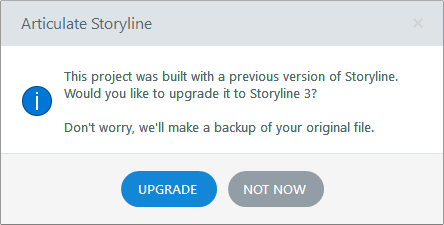 As I mentioned above, Storyline 3 does not have any Flash dependencies and the HTML5 output works in all major browsers.
- VitSikyrCommunity Member
Hi Leslie,
but the problem is that I don't have the option of automatic upgrade in Storyline 2. When I click on "Check for updates", it says that there are no updates.
So probably I have to buy and install Storyline 3 but I'm afraid it won't be compatible and maybe we will lose our documents in Storyline 2.
Thank you for helping me.
Hi Vit,
You are correct. We discussed this above.
To summarize what we've discussed here and integrate it with the next steps:
- Storyline 2 is no longer working due to its dependency on Flash.
- We recommend upgrading to Storyline 3 or Storyline 360. This is not an update within Storyline 2, but it is an upgrade to new software with a new purchase and installation requirement.
- You mentioned wanting to use Storyline 3, so you'd want to get this installed.
- Once installed, you can open your .story file from Storyline 2 to upgrade the project to Storyline 3.
You mentioned that you were afraid Storyline 3 wouldn't be compatible. You can find all of our system requirements here. In addition, when you open your .story file in Storyline 3, a backup file will be saved:






Related Content
- 4 months ago
- 2 months ago
- 6 months ago