Forum Discussion

Use the Enter Key to Advance
Hi,
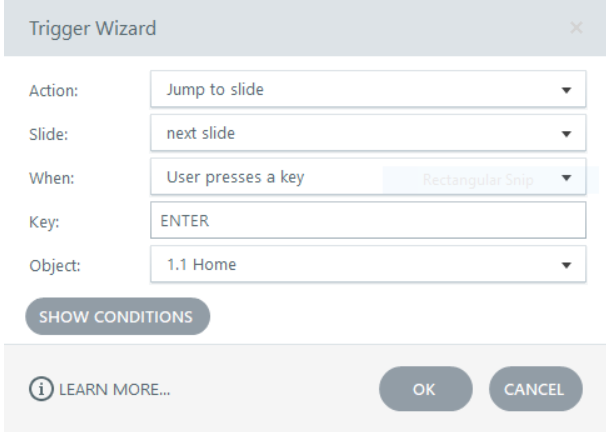
I would like the user to press the Enter on a specific slide, to advance to the next slide. I do not find this as a Trigger option.
I am using Storyline 360 v3.60.26947.0. The attached screenshots show this as an option in previous versions, however, it is not available in my current version. In addition, I do not want the user to click on the slide to advance, using any key / Enter, as shown in the Current Trigger screenshot.
The preferred navigation is to press Enter after a specific text box is displayed on the slide, as directed by the narration.
Am I missing something obvious here?
Thanks
2 Replies
- PhilMayorSuper Hero
Key press triggers have always had an issue with focus from back in the days of Storyline 1.
On changing slides the focus would no longer be on the slide so the enter (or any key trigger) key would work intermittently. The trigger has be rewritten to show that the user needs to click on the screen to maintain focus., I don't believe there is any work around for this apart from adding a text entry field to the bottom of each timeline which will grab the focus onto the slide but will mess up accessibility
- MichaelRobinsonCommunity Member
Hi Phil
Thanks for the response and update.
I'll work on another solution for this slide advancement.
Much appreciated!


Related Content
- 2 months ago
- 9 months ago
- 6 months ago