Forum Discussion

EswarkumarKanth
6 years agoCommunity Member
When I publish the module not given web object folder.
Hi
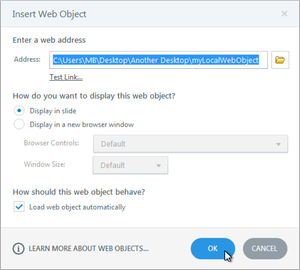
I used WebObject element into my screen by using the local path
then after publishing, we will get a folder called "WebObjects" but recently when I try to publish in LMS HTML5 Output the...

EarlKreuzer-020
5 years agoCommunity Member
Tested: This will create a WebOjects folder (with needed assets for self contained output) under the story_content folder... "You need to create separate folders for source files first"
- Place your Storyline file in it's "OWN" folder!
- Place your html, images, etc. in their "OWN" folder!
- Open storyline -- insert Web Object
- At the enter web address popup -- Click the folder icon and navigate the SEPERATE folder you created for html and images
- Choose the "Select Folder" button.
- Publish for LMS "it should create a WebOjects folder with the assets needed to view anywhere!
- JulieKenney-d283 years agoCommunity Member
This is a critical piece of information - I have looked all over for this as my course would not create the web object folder for the SCORM file, but played fine on the Web. I have spent way too much time trying to figure this out. A tutorial about how to exactly publish these objects for local files on an LMS really should be done. Too many people are saying to have ALL of your files in one folder. That did not work for me. Thank you Earl!

Related Content
- 17 days ago
- 12 months ago