Forum Discussion
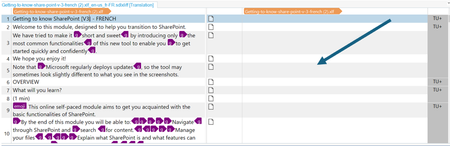
XLIFF output for a Rise course
keeping this thread alive...

Hello MindaCarl,
Happy to help!
The second column being blank is the normal behavior for most translation software. Here's what translation looks like in another tool called Smartcat:
The space to the right is where you can enter the translated text. You can copy the text from the left column over to the right if this is what you need to get started.
- MindaCarl1 year agoCommunity Member
Hi Jose,
Thanks for your feedback. Unfortunately, with Trados, it seems that the text in the right column needs to be there: without it, they can't enter any new text. I double-checked this point cos it made no sense to me but both the translators and the internet 'say' the same thing.
I can't imagine no one's tried to translate Xliff in Trados before (I'm actually fairly certain it's the tool used for translation by another client of mine, who regularly translated Articulate content for my team), so there must be something else going on, either on the Articulate side or the Trados side. Is it possible that a recent update in Articulate would have changed the way the Xliff is downloaded? Or could it be specific to Rise (my previous translation experiences having been with Storyline)?
Minda
- JoseTansengco1 year agoStaff
Hi MindaCarl,
Here's an official video from Trados showing that the right column starts blank. It's an older version of their software, but I assume the translation flow is still the same. It would also be counterproductive to pre-populate the right column with the exact text as the left column because the right column will be replaced with entirely different text.
I'd recommend checking with Trados support to see if your version requires the right column to be pre-populated with the original text. If it does, please open a case with our support team here so we can check the structure of the exported translation file.
- MindaCarl1 year agoCommunity Member
Hi Jose,
Thanks for your feedback. I checked with the team again and it turns out that the issue had been simplified for my non-expert benefit: the problem is not so much with Trados, but the workflow system that they use internally to streamline translations (something called WorldServer).
It seems the team have now found a workaround, which is great, but for some reason, the buttons (e.g. submit) and the instructions that come from the system (e.g. take again, please answer the question to continue) remain in English. Are these not part of the original download, then? If not, is there a French version of Articulate that I could use to upload the translation into? I had a quick look in my account but couldn't immediately find anything that lets me change languages.
Thanks again,
Minda
- SCRothe61 year agoCommunity Member
Hi Minda,
I translate Rise XLIFF in Trados and have been doing so for 1 year now. You need to check the Trados Studio settings: that's where you'll find the option to always have the second column filled out.

Related Content
- 1 year ago