Forum Discussion

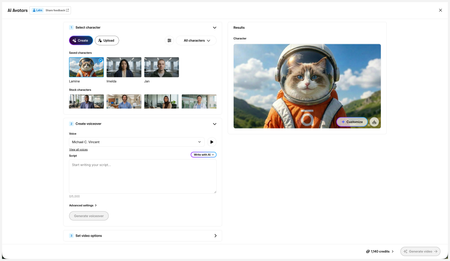
New in Labs: AI Avatars
- 2 months ago
Hi everyone,
We’ve just released a few exciting enhancements to AI Avatars, and we’d love for you to check them out! Here’s what’s new:- AI Avatars in Custom Blocks
- AI Avatars in Storyline 360
- References
- Use References to guide character generation with your own visual assets. This is now available in the Create and Customize Character workflows.
- Quick Prompts
- Choose from prebuilt prompts for style, framing, presentation, pose, environment, clothing, and expression. Available in the Create and Customize Character workflows.
- Tips
- A new Tips icon is now available in the Create and Customize Character workflows to help you get even better results.
- Delete and Rename Saved Characters
- Keep your library organized by renaming or deleting saved characters.
- Upload Character
- Upload your own character to your Saved Character library.
- Download your Avatar Video
- To download your avatar video, click play, then select the Download icon in the lower-right corner.
As always, we welcome any feedback! You can share that here in this discussion, or use this feedback survey link!


I just used the block to generate a video 49 seconds long. It took about 10 minutes to generate. I used the provided Avery avatar with Jessica Bogart's voice. Even though I'm highly perceptive, I think anyone would agree the result was goofy. The lip-syncing was off most of the time, she opened her mouth wide several times, and the mouth, teeth, and eyes changed in size and sharpness frequently--feeling more like Elastigirl. The teeth morphed together a couple times (something AI has had a particularly hard time with).
As my favorite YouTube home inspector likes to say, "If you squint, it's mint."
All that said, it is very close to passably human. There are moments when the avatar is sharp and in sync, and that gives me hope. This is a really cool idea and I hope it succeeds. I agree with all of the feature requests my colleagues have already stated.
With or without avatar video, I also want the ability for AI voice to narrate an entire course, much like Microsoft Edge's "Read Aloud" feature, with a floating set of audio controls which follows you as you scroll.
- KellyAuner3 months agoStaff
Hi Frostworn,
Thanks so much for sharing your feedback and including screenshots! I see what you mean about the teeth and wide mouth. I've passed this along to our team.
Please feel free to share with us here, or use this feedback survey link as you continue testing this feature!
Related Content
- 3 months ago
- 5 months ago