Forum Discussion

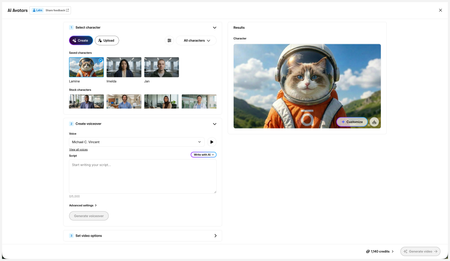
New in Labs: AI Avatars
- 2 months ago
Hi everyone,
We’ve just released a few exciting enhancements to AI Avatars, and we’d love for you to check them out! Here’s what’s new:- AI Avatars in Custom Blocks
- AI Avatars in Storyline 360
- References
- Use References to guide character generation with your own visual assets. This is now available in the Create and Customize Character workflows.
- Quick Prompts
- Choose from prebuilt prompts for style, framing, presentation, pose, environment, clothing, and expression. Available in the Create and Customize Character workflows.
- Tips
- A new Tips icon is now available in the Create and Customize Character workflows to help you get even better results.
- Delete and Rename Saved Characters
- Keep your library organized by renaming or deleting saved characters.
- Upload Character
- Upload your own character to your Saved Character library.
- Download your Avatar Video
- To download your avatar video, click play, then select the Download icon in the lower-right corner.
As always, we welcome any feedback! You can share that here in this discussion, or use this feedback survey link!

First off, holy moley! If this pans out as I hope it will (fingers crossed), this feature would replace at least two other tools I'm paying for!
Here are my thoughts on my first attempt. I wasn't sure what to expect or where to prompt for the video action. This attempt cost 25 credits for 25 seconds of video.
The character and VO worked well, but the action was all wrong. The character is an instructor for an in-person class, but the audience is taking a Rise eLearning course (confusing, I know).
The generated video included a monitor screen with virtual learners, which she pointed at the entire time. She completely ignored the whiteboard and students in front of her while looking directly at me!
The in-person learners were the most interesting part of this as they nodded their heads and spoke in sync with the instructor to the audio script. Since this was my first attempt, the process wasn't obvious where to prompt for the character and in-person learners' movements or actions.
Additionally, I second SarahDmowski's feedback related to VO. The most important new filters would be for accent and language. Once I've identified the demographic, I'd like to filter by rating (the number of people who used the specific voice).

Hi, TammyKnoll-Ande!
Thank you so much for sharing your experience so far, and letting us know that filtering by rating would be helpful to you! Please don't hesitate to reach out with any other feedback as you create!
Related Content
- 3 months ago
- 5 months ago