Forum Discussion

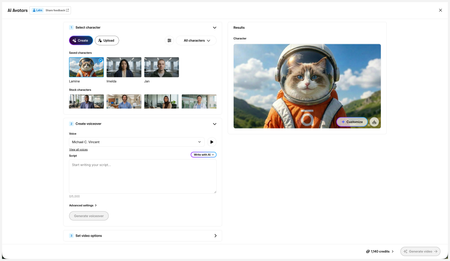
New in Labs: AI Avatars
- 2 months ago
Hi everyone,
We’ve just released a few exciting enhancements to AI Avatars, and we’d love for you to check them out! Here’s what’s new:- AI Avatars in Custom Blocks
- AI Avatars in Storyline 360
- References
- Use References to guide character generation with your own visual assets. This is now available in the Create and Customize Character workflows.
- Quick Prompts
- Choose from prebuilt prompts for style, framing, presentation, pose, environment, clothing, and expression. Available in the Create and Customize Character workflows.
- Tips
- A new Tips icon is now available in the Create and Customize Character workflows to help you get even better results.
- Delete and Rename Saved Characters
- Keep your library organized by renaming or deleting saved characters.
- Upload Character
- Upload your own character to your Saved Character library.
- Download your Avatar Video
- To download your avatar video, click play, then select the Download icon in the lower-right corner.
As always, we welcome any feedback! You can share that here in this discussion, or use this feedback survey link!


During the creation of the new AI avatar video featuring a railway‑construction‑site theme, the overall output was visually strong. However, an issue was observed in the background: the railway equipment repeatedly moves forward and then reverses every few seconds.
This unintended motion is distracting for viewers and does not accurately reflect how real railway equipment behaves on tracks. We should review this element to ensure the background remains realistic, consistent, and aligned with the intended setting. Otherwise loved it... going to experiment with my other scenarios.
- KellyAuner3 months agoStaff
Thank you testing out this feature, MrugeshJani!
I've logged your feedback with our product team.
Related Content
- 3 months ago
- 5 months ago