Forum Discussion

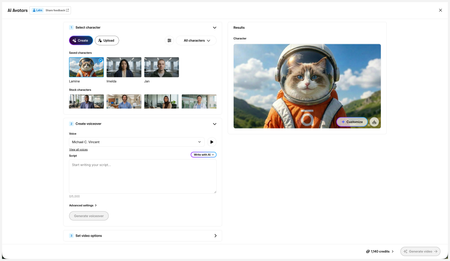
New in Labs: AI Avatars
- 2 months ago
Hi everyone,
We’ve just released a few exciting enhancements to AI Avatars, and we’d love for you to check them out! Here’s what’s new:- AI Avatars in Custom Blocks
- AI Avatars in Storyline 360
- References
- Use References to guide character generation with your own visual assets. This is now available in the Create and Customize Character workflows.
- Quick Prompts
- Choose from prebuilt prompts for style, framing, presentation, pose, environment, clothing, and expression. Available in the Create and Customize Character workflows.
- Tips
- A new Tips icon is now available in the Create and Customize Character workflows to help you get even better results.
- Delete and Rename Saved Characters
- Keep your library organized by renaming or deleting saved characters.
- Upload Character
- Upload your own character to your Saved Character library.
- Download your Avatar Video
- To download your avatar video, click play, then select the Download icon in the lower-right corner.
As always, we welcome any feedback! You can share that here in this discussion, or use this feedback survey link!

Hi everyone,
We’ve just released a few exciting enhancements to AI Avatars, and we’d love for you to check them out! Here’s what’s new:
- AI Avatars in Custom Blocks
- AI Avatars in Storyline 360
- References
- Use References to guide character generation with your own visual assets. This is now available in the Create and Customize Character workflows.
- Quick Prompts
- Choose from prebuilt prompts for style, framing, presentation, pose, environment, clothing, and expression. Available in the Create and Customize Character workflows.
- Tips
- A new Tips icon is now available in the Create and Customize Character workflows to help you get even better results.
- Delete and Rename Saved Characters
- Keep your library organized by renaming or deleting saved characters.
- Upload Character
- Upload your own character to your Saved Character library.
- Download your Avatar Video
- To download your avatar video, click play, then select the Download icon in the lower-right corner.
As always, we welcome any feedback! You can share that here in this discussion, or use this feedback survey link!

If you customize too much, does it null the syncing feature? It's not syncing in the preview, and I don't want to waste credits to find out if it will in the video it creates.
- CarmenWaterman2 months agoCommunity Member
My experience has been that it syncs better in the video it creates. KellyAuner if we have a problem and the video is not syncing with the audio can we ask for a credit refund?
- KellyAuner2 months agoStaff
Hi, CarmenWaterman!
Currently in Labs, we're not offering credit refunds if the results don't meet expectations. Credits will be automatically refunded only if the generation fails.
- CarmenWaterman2 months agoCommunity Member
Thanks Kelly that makes sense, I just thought that if the video and the audio where the character is speaking is not syncing up and it is apparent that what the character is saying is not what the audio is saying might be a consideration. I know for the video to be useable in a course I wouldn't be able to use a video like that. I truly appreciate everything that is open for testing
- KellyAuner2 months agoStaff
Hi ShandaH,
Using complex scenes with multiple characters or busy environments can lead to unnatural lip-syncing and background movement. To achieve the best results, I recommend using these tips!
- CarmenWaterman2 months agoCommunity Member
Thanks, I haven't used any scenes with multiple characters, and appreciate all the tips.

Related Content
- 3 months ago
- 5 months ago