Forum Discussion

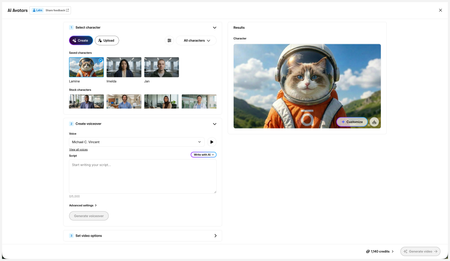
New in Labs: AI Avatars
- 2 months ago
Hi everyone,
We’ve just released a few exciting enhancements to AI Avatars, and we’d love for you to check them out! Here’s what’s new:- AI Avatars in Custom Blocks
- AI Avatars in Storyline 360
- References
- Use References to guide character generation with your own visual assets. This is now available in the Create and Customize Character workflows.
- Quick Prompts
- Choose from prebuilt prompts for style, framing, presentation, pose, environment, clothing, and expression. Available in the Create and Customize Character workflows.
- Tips
- A new Tips icon is now available in the Create and Customize Character workflows to help you get even better results.
- Delete and Rename Saved Characters
- Keep your library organized by renaming or deleting saved characters.
- Upload Character
- Upload your own character to your Saved Character library.
- Download your Avatar Video
- To download your avatar video, click play, then select the Download icon in the lower-right corner.
As always, we welcome any feedback! You can share that here in this discussion, or use this feedback survey link!

Hi JasadaSmith,
I'm happy to help!
If you generated a video using an AI Avatar, the video remains in the video block where it was originally created. As long as the block hasn't been deleted, the video should still be recoverable.
You can also access your saved avatars by opening the Block Library, selecting AI Avatars, clicking the dropdown next to All Characters, and choosing Saved Characters.
If you're still unable to locate the videos, please let us know where you created them and whether the project or block may have been deleted, and we'll be happy to investigate further!

Darn it, I was playing in a custom block and then chose another one thinking the video would remain. Well thats some of my credits gone ..oh well lesson learnt
Related Content
- 3 months ago
- 5 months ago