advice
6 TopicsiFrame video becoming a keyboard trap
We have several Rise tutorials that use YouTube content embedded using iFrames. Doing accessibility testing, we recently discovered that these become keyboard traps. Users can tab into the content and play it, but the standard guidance of using esc to navigate out of the video isn't working and tabbing through also doesn't seem to work. Does anyone have insight into what we need to do to make this content fully keyboard accessible? Has anyone else had this issue? Thanks!920Views3likes9CommentsEndless Loop in Labeled Graphic Block
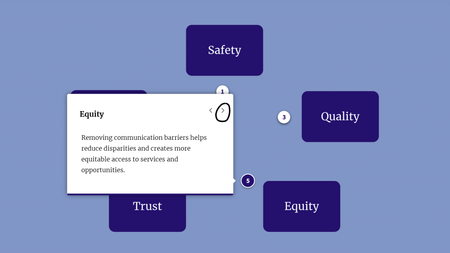
Hi everyone, I'm currently evaluating keyboard navigation for a course using NVDA. I'm having trouble getting stuck in an endless loop around a labeled graphic block, and unsure if: There's something I'm not adjusting in Rise 360 This is a "me problem" with NVDA navigation I didn't have this issue with another labeled graphic block, but I'm not sure what the difference is. When testing with NVDA, I'm using Tab to navigate to the Next button of each Marker's description. But then after Marker 5, instead of exiting to the next Continue button outside of the block, it just keeps me going around and around in an endless loop. (I originally had each marker styled as a plus sign, but had hoped numbering them would fix the issue.) Unfortunately, I didn't find the Accessibility Info section of the Rise 360: Using Labeled Graphic Blocks particularly helpful.96Views2likes1Comment