advice
261 TopicsAI Tool for creating conversations
Hi everyone, I'm exploring the possibility of using text between 2 (or more) people to create an AI-generated audio conversation, in most cases between a CSR and customer. From my web search I see there's a utility called Musely that might work but my company's internet policies block me from seeing the page. So, I figured I'd poll this wonderful group of creators to see what they may know or could recommend. Thanks!3Views0likes0CommentsWhat’s in a name?
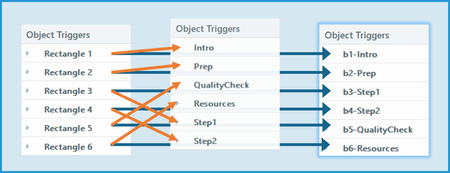
To paraphrase Shakespeare’s Juliet: “What’s in a name? A button by any other name would click as well.” When you insert a new object on a slide, Storyline names it. Duplicate it or insert another new object of the same type, and Storyline adds an incremented number to the default name. Storyline also gives default names to motion paths, layers, and variables. And that’s how your slide might end up with Rectangle 1, Rectangle 2, Rectangle 3, etc., etc., etc. Keeping the default names leads to one of the most common mistakes I’ve seen in the community: selecting the wrong item in a trigger. The simple solution? If something will be involved in an interaction, take the time to give it a meaningful name. It’s not as important to rename non-interactive objects. However, that can make it easier to adjust accessibility settings. So what is in a name? Use whatever naming convention works for you—and your colleagues if you share files. Below are some naming conventions I like. Identify the type. Storyline shows Object Triggers alphanumerically. When you’re creating or editing a trigger, Storyline also sorts selectable objects, motion paths, layers, and variables that way. To keep certain items grouped together, I like to start the custom name with an identifier. Here are some examples of how I start custom names: “b-” for buttons (Note: I use this for any clickable object, not just the official “Buttons” provided in Storyline.) “L-” for layers (Note: I use an uppercase L because a lowercase l can look like the number 1 in some fonts.) “go-” for motion paths After that initial identifier, I add a meaningful descriptor. Include numbers if the sequence is important. Useful descriptors might not be “in order” when sorted alphanumerically. That’s why I add a number after the identifier when the sequence is important. Provide useful info, but keep it short. I want the descriptive part of a name to tell me about the thing being named. But I keep it as short as possible. That makes is easier to read and simply takes up less space in a trigger. Here’s an example. In the list on the left, the objects have default names. (Those will appear in order if you create them in the proper sequence.) In the middle list, the objects have been given short but meaningful names. However, they don’t appear in the desired sequence. Also keep in mind that non-interactive objects could appear in-between these objects when making a selection in a trigger. In the list on the right, the names start with identifiers and sequence numbers. This keeps them in a group that appears in the desired order. And here’s what makes proper naming worth the effort: good names make it much easier to troubleshoot. In fact, I’d say you’re less likely to enter the wrong item in a trigger when everything is well named. What naming conventions work for you?24Views1like0CommentsWorksheet Style Interactivity Within a Course?
I am working on a course and want to try a slightly different approach, but I'm not quite sure how to go about it. Normally, we would have a video in a module, and after the video is complete, we would ask the learner to download a PDF "worksheet" and complete the exercise before moving to the next module. 80% of our user base accesses courses from a mobile device, so the chances of them downloading a PDF and completing it between modules are slim to none. Do any of you have ideas on how I could add boxes for learners to type in answers to reflection questions within the course itself? If so, is there a way they could do that AND have all of their responses at the end of the course emailed to them, so they have a complete notes packet after they complete all the modules? I'm happy to hear any and all ideas of how to make this happen (from personal experience or just "in theory this should work" thoughts)!67Views1like3CommentsHow do you build interactive, step-by-step math practice in Storyline or Rise?
Hi everyone! I'm a math teacher getting started with interactive lesson design, and I love how step-by-step practice helps my students understand concepts instead of just memorising them. I'm curious how others structure interactive math exercises in Storyline or Rise — for example, do you reveal each step of a solution one at a time, use free-text input so students show their work, or rely on question banks with retries? I'd love to hear what has worked well for you, especially for making abstract topics like algebra feel hands-on.42Views0likes1CommentLearning Articulate - how to gain skills
I would love to hear from anyone and everyone-- I am a self-taught user of Articulate- I originally began my E-Learning journey using a competitor and when the organization I was working for decided to go with Articulate- I had to learn it quickly. I feel like I can and do create the content, I need to for my organization, but there is so much functionality with this software that I am sure I am missing out on, due to lack of my knowledge. So, my question is, how did/do you learn about the vast functionality of Articulate? Did you take classes, if so - where/with what company? Are there additional resources outside of this amazing group to learn more? I appreciate all feedback!60Views2likes4CommentsInteractive phishing awareness activities
I recently prepared a cybersecurity awareness session for a small organization and used realistic examples of phishing emails, scam text messages, and fraudulent phone calls. I found that working with concrete examples was much more effective than simply explaining a list of warning signs. For future training, I would like to make this part more interactive. Do you know any tools, activities, or freely available resources that allow learners to safely practice recognizing and responding to phishing attempts? Ideally, I am looking for something suitable for non-technical learners and a bit more interactive than a standard multiple-choice quiz. I would be interested to hear what has worked well in your training or e-learning projects.51Views0likes1CommentHow to Build a Rotating Video Carousel in Articulate Storyline
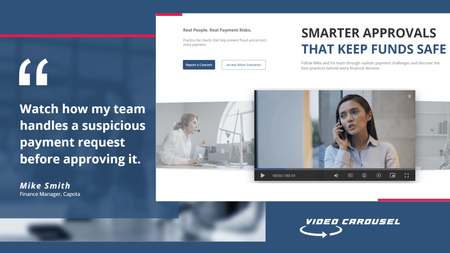
2 min read Three videos. Click a side tile and the whole set glides across, the outer tiles scaling and blurring back into depth. It loops in both directions and never dead-ends. Try the live demo first. Then here is how it goes together. The videos stay in Storyline They sit on three slide layers, Vid01, Vid02 and Vid03, as ordinary Storyline video. That matters. You keep your seekbar, your accessibility settings and your normal publish pipeline. Swapping in your own footage is just right click, Change Media. The carousel is a web object A small folder of HTML, CSS and JavaScript sits on top and draws the three tiles. The front tile lines up exactly behind the real video, so what learners click is Storyline, not a picture of Storyline. The look and motion live in one file Open config.js in Notepad. Tile size, swing distance, tilt, blur, fade, speed, play button colour and background are each one line with a plain-English comment. Change a number, save. There is no code to write. The folder rule nobody expects This is the step that may trip up almost everyone. Storyline copies the web object folder when you insert it, so pointing it back at the same folder shows you the old version no matter how many times you save. Rename the folder, repoint the web object at the new name, then publish. Why it looks blank in Preview Web objects do not render in Storyline Preview. You have to publish to see the carousel run. This is normal Storyline behaviour and nothing is broken. See it running Open the live carousel demo and click the side tiles to feel how the motion reads. Watch the full tutorial on YouTube for the complete build.78Views1like2CommentsLocalization verification - but verifiers will not use the Review360 function.
Looking for some advice, workarounds, and eventually, a solution to a hurdle we have been thrown. We are localizing multiple (over 100) courses using Articulate localization. Each translation must be verified by our in-house localization team; however, they will NOT use the Review360 method for verification. The verification team has requested Excel spreadsheets of each Rise and Storyline element for side-by-side comparison and editing. I can't export Rise or Storyline like that, I can't copy/paste from the Review360 verification sidebar, and the XLIFF file I was able to export does not line up with the source language file. Thoughts? Ideas? Any help or insights would be appreciated.33Views0likes0CommentsNew to Instructional Design - Advice Appreciated!
Hello! I am brand-new to the world of instructional design and so excited to have discovered this amazing career path! I would really appreciate some specific advice on how to get started on building the necessary skills, theories, methodologies, etc. that are needed to be successful in this industry. I am looking to educate myself and would love to hear from those that have built their careers from the ground up. What did you do, or what would you do if you were in my position? I look forward to connecting! :)185Views1like8Comments