ai assistant
4 Topics“Are You Sure?” in E-Learning #555
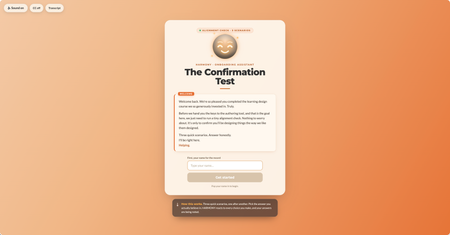
This week I wanted to lean into the spirit of the confirmation prompt, that moment of pause, of reconsideration, and ask: what if that pause wasn't entirely on your side? The scenario: you're an internal team member who's just come back from a learning design course. You have the master learning design authoring tool. Before you're allowed near the authoring tool, the org's AI guide HARMONY needs to run a quick "Confirmation Test." Three scenarios. Shouldn't take long. HARMONY is very helpful. The "Are you sure?" mechanic does something a little different here. I'll leave it at that. 🙂 A few craft notes for anyone interested in the build: The confirmation prompt UX is deliberately asymmetric; the buttons don't behave the same way depending on which answer you're leaning toward HARMONY has two states that shift based on your choices throughout Three different endings based on your answer tally The fake "analysis" stage has a silent jury. You'll see. I have a lot of fun with Claude Design, Code and all things Claude Would love to know which ending you hit, and whether any of the scenarios felt a little too close to home. 👀 Are you a conformist or a rebel? Find out here Confirmation Test Thanks to DavidAnderson and the Articulate 360 Account Management team for the prompt; this one was a lot of fun. #ElearningChallengeSimple Solution = Best Solution for Customer Interaction (ELH Challenge #538)
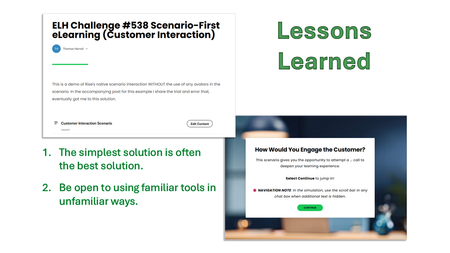
Problem For this portion of my customer service eLearning module, I wanted to create an immersive experience that would help the learner practice the decision-making process and the approved scripting they must adhere to. Solution (my journey) I wanted to try my hand at using Rise360’s AI Assistant for a CSR-to-customer interaction. But my attempt did not produce what I was looking for. So… Why not try to “vibe” it? I switched over to Vibe Coding. I figured something “new” and “fresh” would liven up this customer service training module. I abandoned it after 12 attempts. I got close to a viable solution, but still had a ways to go. I returned to AI Assistant, used the proper format it needed, and tweaked the remainder of my scenario without using the avatar setting. Lessons Learned For a while, I was stuck in my head with the idea of “new and fresh.” But 10 out of 10 times, the simplest solution you build is likely the best possible one. Don’t underestimate simplicity. Finally, sometimes using a tool you touch daily can blind you to its potential in a new way. That’s what my final solution is – Rise360’s native scenario builder without the typical avatars I’ve used in the past. Conclusion Though we have access to “new shiny” tools and “AI on the brain,” tried-and-true tools and techniques will never go out of style. We ought to continually revisit the tried-and-true to be reminded how cool they are. 😉 Click here to experience the demo I built. 👀 It also includes more details of the great learning experience I had. 📝 Disclaimer: my demo doesn't strictly adhere to the challenge's parameters (a scenario instead of learning objectives), but I thought this would be a good place to share this learning experience with the community.Professional Hearts - a microlearning teaser
I tried to build a course within a half hour, with 3 goals in mind: use entirely Articulate content library assets use AI-generated course content include some kind of interactive element, also AI vibe-coded Here are the results! The results show that letting AI completely dictate the content, when it comes to more mundane trainings like this, is quite effective if you're just trying to "get something out there." The game looked almost exactly what I thought it would, it required a very precise prompt, which I'll share here so that you can try this out for yourself: "Now, a course showstopper: Using the articulate Rise coded block, I want to include a small coded block that provides an interactive game: a "shoot the moving target," meant to get the learner mildly amused and continuing to follow the training. The game is a side-facing view with a bow and arrow (or just an arrow) on the left side of the screen and two objects on the right: a heart (representing workplace relationships) and a chart/graph (representing work). They are moving up and down on the right side of the screen, offset so that the heart is in front and the chart is behind. they are not intersecting with each other, and moving in alternating times and speeds such that there is not always a clear line that could be drawn from the bow and arrow to the chart in the rear. the objective is for the learner to press the "fire" button and launch the moderately-fast moving arrow across the screen to hit the "work" chart icon and not the "romance" heart icon. If they hit the chart it's a "great job" outcome, if they hit the heart it's a "Love over work, eh?", and if they hit nothing then it's a "try again". in any outcome, a "start over" button appears in the middle of the screen and resets the interactive element. Can you provide the code for this?" I was hoping it would use the "code" block to keep it entirely within Articulate Rise, but I think it recognized right away for what I was wanting to do that an html code embed was more effective and flexible (hosting the code on my GitHub).129Views0likes0CommentsCreating and Managing Strong Passwords
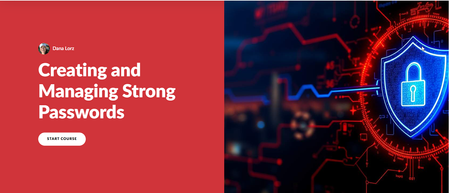
Ok, this is AI all the way in Rise. First I used Chat GPT to answer the questions: The difference between Passwords and Passphrases The difference between Browser and 3rd party password keepers Pros and cons of both browser and 3rd party applications Chat GPT's choice. I put those answers into a word document and through Rise, I imported that text as the resource to base my AI course off of. It generated an outline that I tweaked a little bit then created the course. For each module, I used AI to generate the content. It is so easy because it refers to the bullet points for that module you set up earlier. Setting aside all the interruptions of my regular duties, this took me about 3 hours start to finish, but I did not really proof it too much. All in all, the AI course generation is the bees knees and I will be using it more with my previously created resources to build the content library for my firm. Creating and Managing Strong Passwords | Review 360