ai
18 TopicsPrompting My Way to Better Visuals
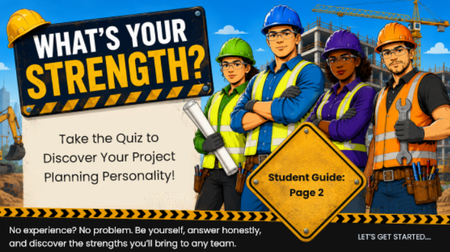
For a project we're currently developing, I wanted to create a project management "planning style" personality quiz as an engagement activity at the beginning of a module. One of the things I've enjoyed most about using AI for visuals is how quickly I can iterate on an idea by refining the prompts rather than starting from scratch each time. The Final Result Rather than using any one generated image exactly as produced, I treated each version as a design exploration. I combined elements from several iterations to create the final introductory slide for the activity. To get to the final result. I used a series of prompts: Step 1. Starting with a General Concept I usually begin with a broad prompt and then refine it based on the results. For this project, I started with: "Create a 16:9 illustration with a construction theme to introduce a project planner personality quiz." This prompt relied on an earlier prompt that generated the quiz concept itself: "Create a project planner personality quiz with different personas. The quiz should involve 5 to 10 questions and make scoring simple, such as based on score ranges or whichever answer letter appears most often." The first image captured the overall concept well, but it wasn't quite right. Step 2. Revising and Refining The initial illustration felt a little too youthful for my audience. It reminded me more of an animated children's style than something designed for adult learners entering the telecom workforce. So my next prompt was: "Make this more photorealistic. Ensure all people are wearing appropriate eye protection." While I liked the direction, I realized the rest of the module used illustrated graphics rather than realistic artwork. Instead of starting over, I continued refining the same image with another prompt: "Modify the characters so they are styled like a graphic novel for an adult audience." The style now fit the audience much better, but the colors were darker than the rest of the course branding. My final refinement was: "Modify to a brighter pop art style. Ensure all workers are wearing proper PPE, with no jewelry and hair properly restrained."146Views2likes2CommentsFrom Blurry to Beautiful: Using Articulate Storyline AI to Improve Image Quality
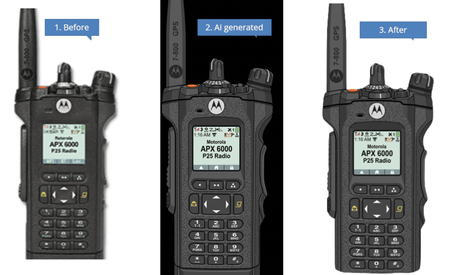
As we all know, the Articulate Storyline AI feature can generate fantastic images. Today, I also discovered that it can transform a blurry, regular image into a clear, vector-like image. I had some pictures that were not in very good condition, especially when they were enlarged and placed in Storyline. I thought the AI Assistant might be able to improve their quality or convert them into a more vector-like style, so I gave it a try. Surprisingly, the results were very impressive. Since the generated images have a solid background. I asked the AI to remove the background and make it transparent, but it responded that it cannot create transparent images or remove backgrounds to make them transparent. However, this is not a major issue—I simply used Photoshop to remove the background afterward.45Views0likes0Comments
Watercolor style / vintage illustrations
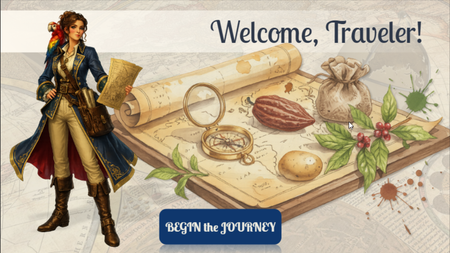
Hi, ELH community! I'd like to share a preview of my newest Storyline project, currently still a work in progress. The Secret Life of Food is an interactive learning experience that explores how everyday foods such as chocolate, potatoes, tea, coffee, and spices have influenced trade, exploration, culture, and world history. For this project, I wanted to move away from a traditional corporate look and experiment with a more immersive visual approach. I chose an old explorer's atlas aesthetic, combining watercolor botanical illustrations, vintage maps, and historically inspired characters to create the feeling of traveling through a living journal of discoveries. Learners are guided by Catarina de Silva, a fictional naturalist and explorer, as they uncover the surprising journeys behind some of the world's most familiar foods. The project is still under development, but I'd love to hear your thoughts on the visual style and overall direction. Thanks for taking a look! PROMPTS: (used for creating images in Chat GPT, Storyline AI) General style: "Vintage explorer journal aesthetic, watercolor and gouache illustration, warm parchment textures, hand-painted botanical details, historical cartography elements, museum exhibit quality, Age of Exploration atmosphere, elegant educational artwork, rich earthy palette, antique paper, subtle ink sketches, highly detailed, soft painterly rendering, casual realistic character design, storybook realism, professional educational illustration, Articulate Storyline course artwork, clean composition, high quality digital painting, National Geographic educational style, transparent background when applicable" Characters: "Full-body character illustration, casual realistic style, hand-painted digital artwork, realistic proportions, expressive face, educational museum-quality illustration, inspired by historical exploration journals, detailed clothing and accessories, subtle watercolor textures, soft brushwork, warm natural lighting, elegant pose, believable anatomy, high level of detail, not cartoon, not anime, not photorealistic, transparent background PNG." Backgrounds: "Vintage illustrated background, explorer journal aesthetic, watercolor map textures, antique parchment, botanical details, warm earthy colors, educational exhibit design, historical atmosphere, hand-painted digital artwork, highly detailed environment, immersive storytelling scene, suitable for eLearning course background, subtle depth, readable composition."311Views3likes6CommentsThe Construct
Hello! It's surprising - and a little bit troubling - how AI seems to 'get' certain pop culture references in your prompts. Hopefully, this homage is pretty obvious! The imagery was created using Google Flow and Rise's AI Avatar tool, with the interaction controlled in Storyline. If you view this demo on a desktop, you will need to press the Y and N keys. But if you view it on a mobile device, you will need to swipe left or swipe right. TRY IT OUT HERE: https://bit.ly/elhc557 144Views0likes1Comment
I Asked AI to Help Me Build Team Games. I Didn't Stop at One.
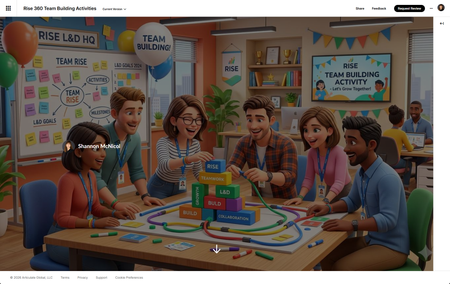
Let me set the scene. I've got a team building meeting coming up. I wanted something engaging — not another "share two truths and a lie" moment that makes everyone stare at the ceiling. I wanted something that actually gets people talking, laughing, maybe even a little competitive. You want a game. 🎮 But I also had approximately zero hours to build one from scratch. Sound familiar? Here's what I did instead: I opened a conversation with AI, described what I was going for, and started building. And somewhere between "let's make it facilitator-led" and "can you add confetti when someone scores a point" I didn't end up with one game. I ended up with five. The Process Was the Whole Point I didn't sit down with a grand master plan to build a game library. I started with a simple goal: create something fun for a L&D team building session that didn't require everyone to download an app, log into a platform, or remember a join code. The constraint? It needed to live in Rise 360 as a Code Block self-contained, no dependencies, ready to run on one shared screen. What I didn't expect was how fast 🏎️ the ideation loop would move. Describe a concept, see it rendered, react to it, refine it. Across a few sessions, that loop produced five fully playable games: L&D Jeopardy: Five categories of industry-specific clues that hit a little too close to home (SME Confessions, anyone?) AI Confessional: A L&D edition where the real answers might surprise you Prompt Lab: A game that actually reinforces AI prompting skills while everyone thinks they're just playing L&D Quest: Virtual Trivia Pursuit: Because our field deserves its own trivia championship The Case of the Vanishing Keynote: A mystery game so relatable it hurts Five games. Multiple sessions. No dev team. No budget line item. What Made It Work A few things I learned along the way that made the process actually fun instead of frustrating: Start with the vibe, not the mechanics. Before I said a word about HTML or JavaScript, I described the energy I wanted: laugh-out-loud, low stakes, facilitator-led, one screen for 20 people. That framing shaped every design decision that followed. React out loud. The fastest iterations happened when I said exactly what I saw — "the modal is off to the left," "the text isn't readable," "this needs more wow factor." Specific feedback beats vague dissatisfaction every time. Let it surprise you. I came in asking for Would You Rather. I left with Jeopardy complete with a starfield background, confetti cannons, animated score bumps, and a facilitator answer key. The AI brought ideas I wouldn't have thought to ask for — and some of them were the best parts. The Real Takeaway for L&D We talk a lot about engagement in learning design. We spend weeks building branching scenarios and interactive modules trying to manufacture the thing that games create naturally: people want to play. What this experiment reminded me is that the barrier to building game-based learning experiences is lower than it's ever been — not because the craft got easier, but because the tools got smarter. You still need to know your audience. You still need to write questions that land. You still need to make judgment calls about what's too complex and what's just right. But the part where you stare at a blank HTML file at 11pm wondering how to center a div? That part you can skip now. Try It Yourself If you've got a team meeting coming up, a training session that needs a warm-up, or just a burning desire to ask your colleagues whether they'd rather deal with a hands-off SME or a micromanaging one — build the game. Describe the vibe. Pick a format. React to what you see. Iterate. You might sit down to build one game and walk away with five. Built in Rise 360 using Code Block. AI-assisted development across multiple sessions. No divs were harmed in the making of these games. 🐵 Rise 360: Team Building Activities231Views5likes2CommentsBack In My Day
Hello! Icebreaker games get a bad rap in corporate training. But I think Articulate's AI Avatar feature can breathe new life into this format. For this Futurama-inspired demo, I created a series of videos using the 'Upload Character' option in the Rise AI Avatar tool. Then I downloaded these videos and placed them in a 'Pick One' freeform question slide in Storyline. Your answer determines how my avatar responds. Try it out here: https://bit.ly/elhc553 188Views1like2Comments
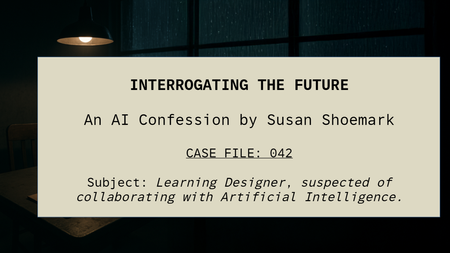
Interrogating the Future: An AI Confession
“The suspect knew too much about AI. Or maybe… she just knew how to answer the right questions.” Check out the recorded Pod Cast Here: Interrogating the future How It All Began It started as a simple reflection, ten questions about how AI is shaping my design work. But instead of writing a straight blog, I found myself drawn to something more atmospheric. Something that felt like the process itself, shadowy, uncertain, full of creative tension. So, I turned the reflection into a crime-show-style interrogation, complete with tape recorder hums, flickering lights, and a narrator whose voice demanded answers. The irony? Every part of the production was built with AI. The words, the sound, the visuals, even the interrogation room itself, were all digitally generated and then manually composed by me. Built by AI, Crafted by Hand I started by feeding the ten questions into ChatGPT, but instead of plain responses, I asked for a script. Together, we created a dialogue between a suspicious interrogator and me — a learning designer “accused” of collaborating with Artificial Intelligence. Then came the layers: Voice: generated using AI text-to-speech, giving each character a distinct tone and rhythm. Sound Effects: sourced and blended through AI-assisted sound libraries; tape clicks, fluorescent hums. Images: created with AI image generation and enhanced in Photoshop’s Generative Expand to build the noir interrogation room. Editing: every frame and cue assembled manually — timed to each pause, each flicker, each breath. It wasn’t just automation, it was orchestration. Why Noir? Noir has always been about truth hiding in plain sight. It’s smoky, suspicious, human. And that’s exactly how AI feels right now, part mystery, part revelation. The interrogation format gave me a way to ask the big questions: Is AI saving us time or stealing our craft? Can it really understand empathy, context, and culture? Or is it just pretending well enough to fool us — and our learners? The Real Interrogation Behind the theatrics, the project became a metaphor for the design process itself. Every day, learning designers interrogate ideas: “What’s the story here?” “What does the learner need?” “Is this real, or just noise?” AI doesn’t replace that questioning, it amplifies it. It’s like having an endless brainstorm partner who never sleeps, never stops suggesting, and occasionally hands you brilliance on a platter. The Craft of Collaboration What fascinated me most was the balance. AI built the assets — but I gave them shape. It’s a partnership that works best when humans stay in control of tone, meaning, and emotional truth. “AI gave me the pieces. But I had to make them make sense.” That’s the new creative muscle, knowing when to hand over, when to edit, and when to override. Lessons from the Interrogation Room By the end, I realised the project wasn’t about AI at all, it was about agency. The ability to stay curious, playful, and skeptical, even when technology feels all-knowing. If AI has a role in the future of learning design, it’s not to automate creativity, it’s to augment it. To make space for designers to ask better questions, faster. To amplify storytelling, not silence it. Final Word So yes, I built my own interrogation. I wrote the script with AI. I voiced it with AI. I scored, illustrated, and expanded it with AI. And then I did what no algorithm could: I stitched it all together with intuition, timing, and story sense. Because creativity isn’t about the tools you use. It’s about what you do with them.429Views4likes5CommentsThe Cost of Ignoring Safety Signs
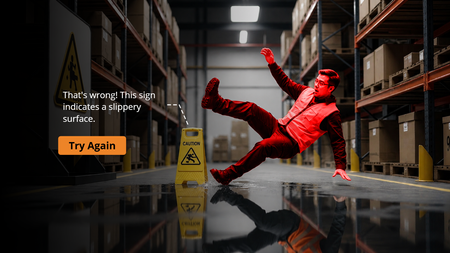
Created an interactive scenario-based quiz: “The Cost of Ignoring Safety Signs” ⚠️ The course uses AI-generated visuals to build realistic workplace scenarios that help learners understand the real consequences of ignoring safety warnings. A quick, engaging, and impactful learning experience focused on improving workplace safety awareness. Demo: https://www.sarkgcreation.com/elc552/story.htmlCyber Shield
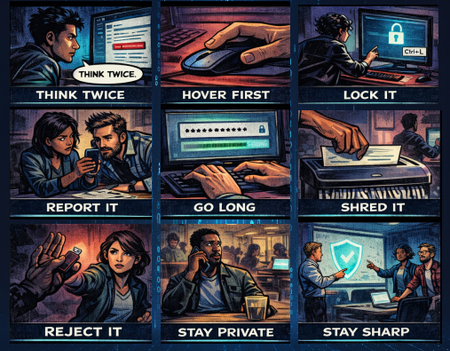
I had so much fun with this week's challenge! I created "Cyber Shield" - a cybersecurity awareness course designed as a noir comic book. The concept is simple but impactful: 9 essential cyber safety habits, each told through a single comic panel with a short, punchy caption. Audio narration expands on each tip as the panels are revealed one by one. What I focused on: Dark noir comic book aesthetic with consistent visual style across all panels AI-generated images using ChatGPT for the comic panels Audio narration for each tip, keeping the on-screen text minimal (1-2 words per panel) while the voiceover carries the detail Tools used: Articulate Storyline 360 ChatGPT (image generation) ElevenLabs (voiceover) Pixabay (sound effects) View the demo here. ABOUT ME: I'm an Instructional Designer who loves creating interactive e-learning experiences that are engaging, visual, and fun to build. Connect with me on LinkedIn!Case: Operation Dopamine - A Noir Comic Mystery
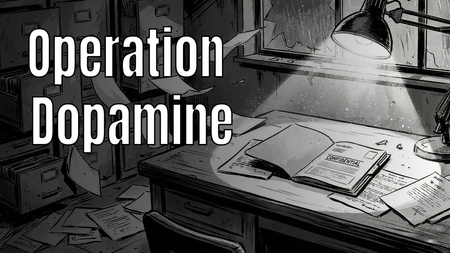
Hi E-Learning Heroes! 👋 For this week's Comic Book-Inspired Challenge, I decided to go full "Noir Detective" graphic novel style. 🕵️♂️✨ In my project, "Case: Operation Dopamine", the learner steps into the shoes of a private investigator exploring a ransacked laboratory. The mission? To find the 6 stolen components of Gamification (such as Engagement, Customer Lifetime Value, and Emotional Connection) and restore color to a black-and-white corporate world. 🔍 Play the interactive demo here: > Play Operation Dopamine I had so much fun blending storytelling, visual design, and instructional concepts into this one. I would love to hear your thoughts and feedback!566Views2likes4Comments