articulate 360 training
317 TopicsHow to Master Articulate Storyline for Interactive E-Learning Projects?
Hi everyone, I’ve been working with articulate storyline recently while developing interactive e-learning modules, and I’ve noticed that many beginners struggle to move beyond basic slide creation. While articulate storyline is incredibly powerful, especially with triggers, states, layers, and variables, understanding how to combine these elements effectively is where most learning designers face challenges. For example: When should you use layers vs. new slides? How do you structure variables in articulate storyline for complex branching? What’s your approach to keeping large storyline projects organized? From my experience, mastering articulate storyline becomes much easier when you focus first on logic building rather than visual design. Once you understand triggers and conditions deeply, creating advanced interactions feels more intuitive. I’m curious to know: What helped you become confident in articulate storyline?211Views0likes3CommentsTrouble with 360* images in Storyline
Hi everyone! Did anyone else have issues with uploading 360* images in Storyline recently? I finished my free trial a couple of days ago, and I never got it to work properly. Every time I added an image, I would get stuck in the preview screen. Did anyone else experience this and find a work around? There were a couple of other glitchy features, but this is by-far the most important for me to try before I commit. Thank you!45Views0likes1Comment(Kind of urgent) How do I make an icon animate across a map in multiple slides?
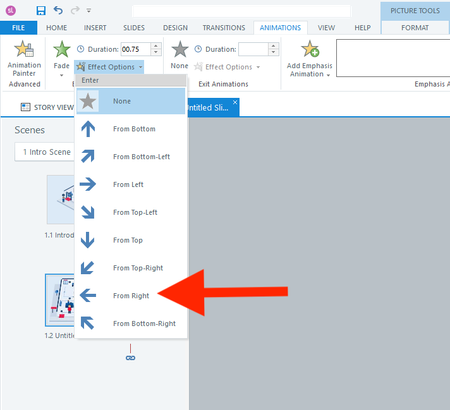
Hi everyone, I actually have two questions. I will start with the easier one first. Question 1 In a fade-in from the right animation, is there a way to adjust how far to the right the object starts? I don't want it to animate from off the right side of the slide. I only want it to start a few pixels to the right. Question 2 How do I animate the red shirt character below across 13 slides? I want it to follow each button from 1 to 13. I realize I should use the Motion Path. But what's the smartest way to use the motion path across slides? I have always found the motion path to be challenging. Thank you all for your help! :)73Views0likes3CommentsBlack Bars on the Left and Right Sides of Published Storyline 360 Course
Hi team, I’m using Articulate Storyline 360. When I preview or publish my course, I get black vertical bars on both the left and right sides of the slide, as shown in the attached screenshot. I have already turned off the Player menu/sidebar, but the black spaces are still there. I want the course content to fill the available browser/player area without these black sidebars. What is causing these black areas, and how can I remove them? Is this related to the Storyline slide size/aspect ratio, Player settings, or responsive scaling? Thanks in advance.61Views0likes2CommentsStoryline 360 drag-and-drop issue: object moves away from cursor after state change
Hi everyone, I am having an issue with a drag-and-drop interaction in Articulate Storyline 360. I have a draggable object with two states: Normal: approximately 6 × 48 px Drop Correct: approximately 1 × 328 px When the object is dropped correctly, its state changes from Normal to Drop Correct, so it appears as a full-height installed membrane. Later, I want the user to drag the material back to its original position. When the user starts dragging the object and I change its state from Drop Correct back to Normal, the visible object is no longer under the mouse cursor. There is a noticeable distance between the cursor and the object. What I would like is: When the user starts dragging the dropped object, it changes back to the Normal state. The centre of the Normal-state object should immediately appear under the mouse cursor. The user should then be able to drag it normally back to its original drop target. Is there a native Storyline method to reset the drag anchor or make the object's centre align with the cursor after changing states? If not, is there a reliable workaround using separate objects, triggers, or the Storyline JavaScript API? I have attached screenshots/video showing the behaviour. Thanks.170Views1like10CommentsStoryline 360 - Feedback Master Error After Updating
Since recently updating Articulate Storyline I have gone back into a file I made a few months ago. I have found that since the update: For quiz questions using the default feedback master slides, whilst the layout selected shows on the preview, when looking at the slide in create/review/publish it is incorrectly formatted Text has been moved so it no longer aligns with the page Has anyone come across this issue before?80Views1like3CommentsText to Speech - Sound help Phonetic spelling (make this sound like...)
Hi, what am I doing wrong? I need this to say "con-duct" - not conduct. like, conduct a training. Do I have this programmed correctly? I have the <speak> and </speak> in the beginning/end of the text. below is what I am using.... <phoneme alphabet="ipa" ph="ˈkuhn‑DUKT">conduct</phoneme>Solved98Views0likes4CommentsStoryline SCORM export suddenly much larger than the Storyline project
Hi everyone, I’m having a strange issue with a Storyline 360 project and I’m hoping someone can help me understand what’s happening. I have a Storyline project that was originally 206 MB. When I published that version as SCORM, the exported SCORM package was 246 MB. I needed to get the SCORM package below 230 MB for our LMS, so I started compressing the images within the project. After compressing and replacing the images, I managed to reduce the Storyline project file from 206 MB to 196 MB. However, when I published this new version as SCORM, the package unexpectedly increased to around 270 MB. So the sequence is: Storyline project: 206 MB → SCORM: 246 MB Compressed/replaced images Storyline project: 196 MB → SCORM: ~270 MB What is particularly strange is that when I checked the published SCORM files, I found that the images were actually being increased in size during the publishing process. For example, I had an image that was 104 KB in the Storyline project. The Media Library also showed it as 104 KB. However, when I located that same image in the exported SCORM package, it was around 3 MB. I found this happening with a lot of the images — the file sizes in the published SCORM were significantly larger than the corresponding images in the Storyline project. I've also checked the Media Library and the largest images currently in the project are around 2.1 MB, so there doesn't appear to be one particularly large asset causing the increase. I extracted the SCORM package to investigate further. The extracted package is around 300 MB, while the story_content folder is only 6.9 MB, so the majority of the size appears to be coming from elsewhere in the published output. The really strange thing is that the SCORM export was working fine earlier today. The original 206 MB project exported to 246 MB. It was only after I started compressing and replacing images that the SCORM output started increasing to around 270 MB. I'm running Storyline 360 on Windows through Parallels on a Mac. Has anyone experienced anything similar, where images are becoming significantly larger when Storyline publishes them to SCORM, even though the source images in the Storyline project/Media Library are much smaller? I'm trying to understand why Storyline is increasing the image sizes during publishing and what could be causing the SCORM package to jump from 196 MB to 270 MB. Any advice would be massively appreciated! Thanks!91Views0likes2Comments