articulate 360
2272 TopicsOne Question Quiz/Survey
I would like to conclude my module not with a knowledge check, but with one question on how the audience perceive the topic. A simple question, with 5 answers. I tried to make this into a quiz with 1 MC question, but I am stuck in workarounds how communicate the chosen option to in Cornerstone via SCORM 1.2. Any ideas are highly appreciated!Articulate Rise AI Tutor Defaults to ON - Concerns
Hi everyone, we are very concerned that the AI Tutor publishing feature is defaulted to ON. For our enterprise license, this is very concerning as we have no way to manage the use other than to advise our seats to not use it unless approved by their legal team. We have no way to track if groups are using it when they are not permitted, we have no way to turn it off administratively or to control who is using it. We were able to go through a process of approval for the internal AI features that are visible and available to our developers, but this is actually an end-user-facing AI function - which is outside of the scope of our original approval. This opens us to liability issues and frankly puts into question if we have to drop the use of AI entirely just to manage this vulnerability. How are you managing your developers utilizing the AI Tutor?25Views0likes0CommentsHow do you manage external video resources in Storyline or Rise 360?
I'm working on an e-learning project where I need to manage several external video resources before adding them to a Storyline/Rise 360 course. I'm particularly interested in how other course creators handle the workflow from sourcing a video to preparing the final media file. Things I'm considering include video quality, file size, captions, accessibility, permissions, and keeping the original source documented. In my own workflow, I also tested fdown.media for saving a publicly available video for offline preparation/reference. I'm interested in how others approach this part of the workflow and whether there are better ways to organize externally sourced media. For those working with Storyline or Rise 360, do you normally keep local copies of external videos, host them separately, or use another approach? How do you balance quality, accessibility, and course size?Show Object on second visit/revisit
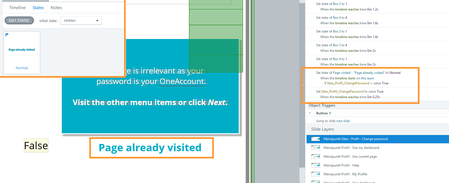
I simple want a text "page already visited" to appear at the second visit of a layer. But the text does not show up. 2 triggers: First Trigger: I set the status to "Normal" of the "page already visited"-textbox from status "invisible" on timelinestart of the layer IF variable Sites_Profil_ChangePassword is true. Second Trigger: I let the variable Sites_Profil_ChangePassword to switch to "Right" from initial "False" state when the timeline reaches 0,25 seconds of the layer. The textbox is on top of all elements in the layer and always visible. Layer Property is "Reset to initial state". This setup is working in a new file and also within the same file with a new test layer. Any ideas? As I can't create a new SL-file as there are weeks of work in it.Trigger not launching email in LMS player
I developed a course that includes a hotspot. The learner is supposed to click on the hotspot which triggers a "send email to" action. The items work in review 360 but do not in the lms player (vi LMS). Any suggestions on how to get the trigger/hotspot to work?62Views1like4CommentsUnable to edit attachment in Interactive Video
Has anyone else run into this issue with Interactive Video in Articulate 360 AI? When I add an Attachment block, the content edit (pencil) icon that used to appear in the top-left corner seems to be missing. As a result, I'm unable to edit the attachment within the block. Just wondering if this is a known issue, a recent update, or if I've overlooked something. Thanks!32Views0likes1CommentBlack Bars on the Left and Right Sides of Published Storyline 360 Course
Hi team, I’m using Articulate Storyline 360. When I preview or publish my course, I get black vertical bars on both the left and right sides of the slide, as shown in the attached screenshot. I have already turned off the Player menu/sidebar, but the black spaces are still there. I want the course content to fill the available browser/player area without these black sidebars. What is causing these black areas, and how can I remove them? Is this related to the Storyline slide size/aspect ratio, Player settings, or responsive scaling? Thanks in advance.49Views0likes2CommentsJAWS is announcing the disabled state of the button twice
JAWS now announces the disabled state of a button twice—first when focusing on the overall button control, and again when focusing/reading the button text. In previous versions, it only announced the accessible text once followed by unavailable.81Views1like7Comments