e-learning development
2120 TopicsNova Expedition Extended to November 6
If you missed it, there were recent updates to AI Avatars. We’ve extended the Nova Expedition through November 6, so you have time to try it out and earn your Nova Expedition badge and 30 bonus ELH Rewards points. Not sure where to start? A few ideas: A friendly welcome message for the start of a course A quick policy or process reminder A knock-knock joke, just to see how the avatar handles timing and delivery Share what happened in a new post on the Nova Expedition board. Then, share your feedback in the pinned Shape What’s Next thread. We’re gathering all of your notes to help make Nova better, so tell us what’s working, what’s not, and what you’d like to see next. Check out what members have already shared: Thomas_Shayon used Nova’s translation to turn around a quick course update, and says he was “wholly unprepared” for how well it worked. BryanPechtl used two AI Avatars to stage a conversation between a frustrated patron and a court clerk, giving a feel for a real interaction. AndrewBlemings- tested a Training Deck prompt with brand requirements. SMcNicol gave Articulate’s AI Avatar an annual performance review Explore the experiments and share your own →4Views0likes0CommentsSCORM/xAPI Test LMS
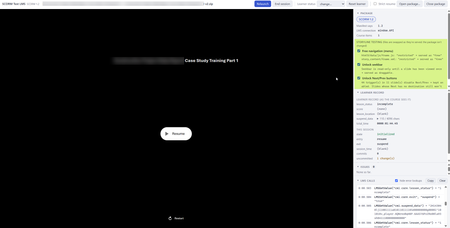
Claude Code made me a local test LMS for checking SCORM 1.2 and 2004, and xAPI packages before uploading them to a real LMS. If you use it with Storyline packages, it will allow you to disable locked navigation. It shows every call the course makes to the LMS, what gets saved, and anything that a real LMS might reject or handle differently: Code is here if you would like to try it out (no warranties, at your own risk, but it is free): https://github.com/willswords/scorm-test-lms26Views0likes1CommentProblems with a quiz!
I have downloaded a quiz/game that I’m having some trouble with. There is a help function, but unfortunately, I can’t get it to work. I want to change the number of levels from 5 to 2—I believe I’ve sorted that out—but I also want to adjust the time allowed to complete the task, and I haven’t been able to figure that part out. So, is there a clever person out there who can solve this for me, or explain exactly how I should go about it?Solved51Views0likes5CommentsAre We Designing for Learning or Just Adding More Clicks? 🤔
I've been thinking a lot lately about how we approach interactivity in e-learning, especially with all the amazing tools and features available to us in Rise and Storyline. As instructional designers, we have so many creative ways to engage learners, but I sometimes wonder if we're making things interactive because they genuinely support learning or simply because we can. For me, the goal has always been to move beyond presenting information and create experiences that help learners actually apply what they've learned. Sometimes that means a scenario, a decision-making activity, or an opportunity to practice (I would love to hear ideas about how you do this one). I'd love to hear how others approach this. What's your personal rule of thumb for deciding whether an interaction truly adds value to a learning experience? And even better, have you ever removed or simplified an interaction and found that the learning experience actually improved? I'd love to hear your experiences, examples, and lessons learned. One of my favorite things about this community is how much we can learn from each other's approaches!35Views0likes4CommentsVery Weird Table Issue
This is a weird one. I've created a course with a simple layer and a table on that layer. Nothing special here. It's a 2 column 12 row table showing food temperature limits for a food safety course. The table looks fine in the build and when I run it locally, but when I compile the course and run the course from an LMS the table is missing some (not all) row text. The cells are just blank. I've tried the usual suspects of changing font's, clearing cache's but it still displays wrong. UPDATE*** - I replaced the table with a new one which seems to have resolved this issue but the issue below remains. Further more, (and if someone else can confirm this for me that would be great), if I create a table, lets say 2 columns by 8 rows, enter basic text into each cell and then lets say I want to change all of the text to bold. Select the text in the table from the top down and press the bold button, only the first 2 rows will bolden. It appears to be a bug but I need someone to confirm this for me. Any help would be really appreciated. Graham.27Views0likes2CommentsHow can I start a motion path where it ended in a previous slide?
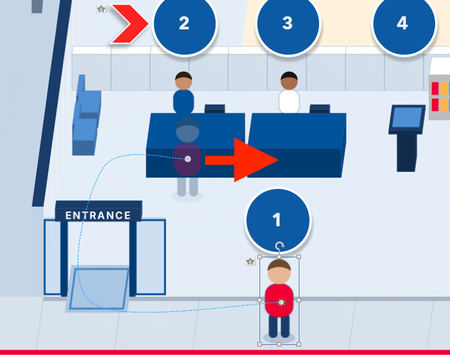
I created a curved motion path for an icon in slide one. In slide two, I want that curved motion path to be a straight-line motion path, starting where the curved motion path ended in the previous slide. How do I accomplish this?Solved105Views0likes12CommentsGiving My Characters a Makeover
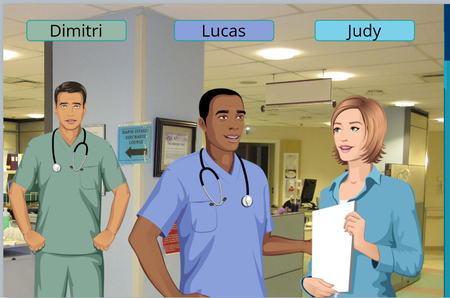
I'm working on a course about recognizing if a staff member might be unfit to work. I showed the scenario I built to my SME. They asked if I could make Dimitri look more disheveled. Well, no, I can only change him to look kind of worried. Then I thought let me see what I can do with some AI. I took the character and asked/prompted him to stay the same but make his hair messy. When it was just a picture of him from his waist up I got a great result. When I tried his full body it changed is face multiple times and he never looked like the same character. So, to fix this...... I took the one I did like (above), used PowerPoint and it's background removal tool to isolate his messy hair. Then I just copied and pasted that onto my full body character in Storyline.23Views2likes0CommentsSeeking Experienced Storyline Developer – Better Business Cases Project (NZ / Remote)
We're developing a Better Business Cases learning programme through Capability Collective in New Zealand, using Articulate Rise, Storyline and Moodle. We're looking to connect with an experienced Storyline developer who can help us create engaging, scenario-based learning, including branching decisions, investment committee simulations, conditional feedback and assessment. We have existing learning content, videos, exemplars and an established LMS. The opportunity is to enhance these with interactive, applied learning experiences. Interested in hearing from developers with relevant examples of their work, availability and indicative rates. Happy to discuss scope directly. Cheers Craig [email protected]28Views0likes0CommentsSeeking Feedback on My First Storyline 360 Module
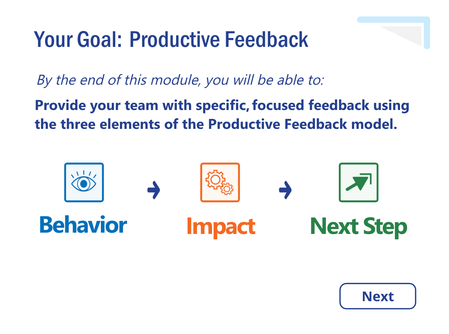
Greetings, everyone! After twenty years as a classroom educator, I'm transitioning into instructional design and learning experience design. I've spent the last four months teaching myself Articulate Storyline 360 while developing my first complete eLearning module, Productive Feedback. The module is designed for charge nurses and introduces a simple, three-element model for providing specific, focused feedback to their staff. I've recently completed the first version and am beginning Alpha testing. I'd greatly appreciate feedback from fellow designers, particularly regarding the clarity of the content, learner experience, navigation, and overall instructional design. I'm especially interested in constructive criticism and suggestions for improvement as I continue refining the module for my portfolio. Review 360 link: https://360.articulate.com/review/content/9a37fa9c-6c32-4352-b0ba-884450b7ff5d/review Thank you so much for taking the time to look at my work. I truly appreciate any insights you're willing to share. Take good care! -KyleSolved92Views1like7CommentsAI Tool for creating conversations
Hi everyone, I'm exploring the possibility of using text between 2 (or more) people to create an AI-generated audio conversation, in most cases between a CSR and customer. From my web search I see there's a utility called Musely that might work but my company's internet policies block me from seeing the page. So, I figured I'd poll this wonderful group of creators to see what they may know or could recommend. Thanks!12Views0likes0Comments