e-learning essentials
93 TopicsReview360 User Guide
Hello, Does anyone have a simple template or guide they use with SMEs when asking them to review content in Review 360? Would love to be able to attach something simple my review requests so SMEs know what they are looking for, and how to provide feedback. What I have found online tends to be more aimed at a developer audience. Thanks!305Views1like11CommentsLearning Articulate - how to gain skills
I would love to hear from anyone and everyone-- I am a self-taught user of Articulate- I originally began my E-Learning journey using a competitor and when the organization I was working for decided to go with Articulate- I had to learn it quickly. I feel like I can and do create the content, I need to for my organization, but there is so much functionality with this software that I am sure I am missing out on, due to lack of my knowledge. So, my question is, how did/do you learn about the vast functionality of Articulate? Did you take classes, if so - where/with what company? Are there additional resources outside of this amazing group to learn more? I appreciate all feedback!35Views2likes3CommentsHow to Build a Rotating Video Carousel in Articulate Storyline
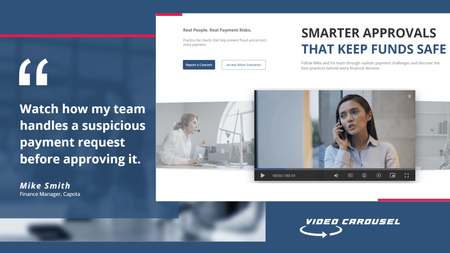
2 min read Three videos. Click a side tile and the whole set glides across, the outer tiles scaling and blurring back into depth. It loops in both directions and never dead-ends. Try the live demo first. Then here is how it goes together. The videos stay in Storyline They sit on three slide layers, Vid01, Vid02 and Vid03, as ordinary Storyline video. That matters. You keep your seekbar, your accessibility settings and your normal publish pipeline. Swapping in your own footage is just right click, Change Media. The carousel is a web object A small folder of HTML, CSS and JavaScript sits on top and draws the three tiles. The front tile lines up exactly behind the real video, so what learners click is Storyline, not a picture of Storyline. The look and motion live in one file Open config.js in Notepad. Tile size, swing distance, tilt, blur, fade, speed, play button colour and background are each one line with a plain-English comment. Change a number, save. There is no code to write. The folder rule nobody expects This is the step that may trip up almost everyone. Storyline copies the web object folder when you insert it, so pointing it back at the same folder shows you the old version no matter how many times you save. Rename the folder, repoint the web object at the new name, then publish. Why it looks blank in Preview Web objects do not render in Storyline Preview. You have to publish to see the carousel run. This is normal Storyline behaviour and nothing is broken. See it running Open the live carousel demo and click the side tiles to feel how the motion reads. Watch the full tutorial on YouTube for the complete build.66Views1like2CommentsID Toolbox
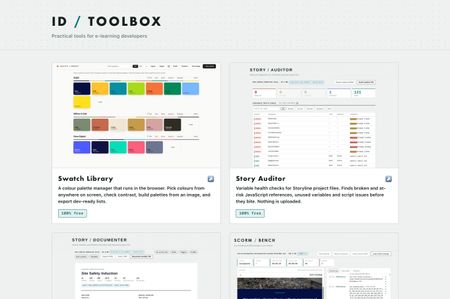
Practical tools for e-learning developers… Over the past several months I've built a set of browser tools for the bits of Storyline and Rise that used to cost me hours. Eleven of them, all completely free, no signup, no accounts, nothing to install. They run entirely in your browser. Nothing is uploaded anywhere, which for me was the whole point, I wasn't keen on posting client content to a website just to check something… ID Toolbox238Views10likes3CommentsLess Is More Is Not Just About Content, but About Learning Experience
After working in instructional design for many years, I've come to realize that "less is more" is often misunderstood. It is usually associated with simplifying content, such as making courses shorter, reducing information, or avoiding overload. But in my experience, it goes beyond that. Even when we have correctly identified what learners need to know, do, or change in order to meet business goals, there is still another important question: How should we design the learning experience itself? The goal should be to help learners learn with the least unnecessary effort. Not by removing depth or rigor, but by removing friction that does not contribute to learning. Over the years, I've seen many different approaches to learning design. Some learning experiences feel under-designed, where the lack of structure or intention makes it difficult for learners to stay engaged or understand the purpose of the content. I've also seen cases where, in an effort to avoid being "too simple" or "boring," additional layers of interaction, visual elements, or gamification are introduced. Many of us have probably spent hours building advanced interactions in Storyline or carefully structuring a Rise course because we wanted the learning experience to feel more engaging. There is nothing wrong with using these features. The question is whether they genuinely support learning. Sometimes these additions are driven more by what the tool allows us to build than by what learners actually need. As a result, learners may end up spending more time completing interactions than understanding, retaining, or applying the knowledge that really matters. This is especially important in corporate learning. Learners are often balancing training with their daily responsibilities. Time is limited, and attention is limited. That is why I believe we should be intentional about where we add complexity. Interaction is not the problem. In fact, meaningful interaction is essential for learning. The key word is meaningful. The most valuable learning experiences are those that help learners understand concepts more deeply, retain what they have learned, and apply that knowledge in real work situations. This is where I choose to focus my design effort. Not on adding interaction for its own sake, but on identifying the moments in learning that truly matter. Instead of asking, "What cool Storyline feature can I use here?", I think we should be asking, "How does this interaction help learners understand, retain, or apply what they need to learn?" When we design with that intention, learning can often become simpler while also becoming more effective. That's the kind of learning experience I continue to strive for. I'd love to hear how you decide when an interaction is truly worth adding.414Views11likes12CommentsAn eLearning Course May Be Teaching More Than You Intended
After many years in instructional design and eLearning, I’ve come to question something we often take for granted about learning. We tend to think of it in simple terms: The learner learned it. The learner didn’t. The course worked. The course failed. But I don’t think learning works that way. People always learn something. The more important question is: What are they learning? Consider a poorly designed eLearning course. An employee attends a course because they genuinely want to learn. But the content is difficult to follow, the activities feel disconnected, and the experience becomes frustrating. The course doesn’t help with the problems they actually face at work. We might conclude that the learner simply didn’t get much out of it. But they may have learned something very different from what we intended: “I could have spent this time getting my work done.” Or “eLearning is a waste of time.” That is still learning. It’s just not the learning outcome we intended. And if that happens repeatedly, something else happens. We spend a great deal of effort trying to motivate learners, get them interested, and hook them into the learning experience. But several poor learning experiences can work in the opposite direction. Learners may become more guarded and less receptive, even when they are later required to learn. There is an interesting example in Taiwan. The government has invested heavily in eLearning for public servants, offering a large number of courses across different topics and allowing employees to choose based on their needs and interests. There are many good courses among them, but the quality is mixed. In 2018, a proposal was submitted on Taiwan’s Public Policy Participation Platform calling for the abolition of the eLearning program for public servants. One of the complaints was that requiring 20 to 40 hours of eLearning each year was a waste of time with little effect. The proposal received nearly 8,000 endorsements in just three days. What interests me is not whether the program was good or bad. It’s this: If people repeatedly experience learning that feels ineffective, what are they learning about learning itself? Maybe: “This isn’t worth my time.” And that may be a bigger problem than one ineffective course. A poor course doesn’t simply fail to teach what we intended. It may teach learners to distrust the learning experience itself. So perhaps we need to ask a different question when we talk about learning effectiveness: Not just, “Did they learn what we wanted them to learn?” But: “What else did they learn from the experience?”50Views2likes0CommentsWhat tools do you use?
What are your go to tools you use everyday and wouldn't be without in your authoring process? Here's mine. There's one thing they all have in common, and for me it's the important bit, nothing gets uploaded. They're plain HTML and JavaScript running in your browser. When you drop a .story file, an image or a SCORM zip on one of these, it gets read in memory on your own machine and that's the end of it. No server, no account, no sign up. Most of what I work on is client material and I'd rather not be posting it to a third party site. I suspect I'm not alone in that. They're all completely free, no trial, no limits, no nonsense! Story Auditor Variable health checks Storyline project files. Finds broken and at risk JavaScript references, unused variables and script issues before you ship. Story Documenter A complete written specification from a .story file. Every slide, every trigger in plain English, every quiz answer etc, ready to print or share with clients. Great for creating storyboards. Image Press Resize, compress and convert images in the browser. E-learning size presets, a target file size, batch zip download, and image metadata stripped on output. Great free tool for managing images for projects. SCORM Bench Run a SCORM package against a logging LMS runtime, without uploading it. Every API call visible, live data model, the manifest checked. Works with SCORM 1.2 and 2004. And a quick question; what's the thing in your workflow that still doesn't have a tool? These only existed because I moaned about something enough and then got annoyed enough to fix it!149Views2likes1Commentelearning as an evidence package for legal team
I'm looking for some advice from others using Articulate Storyline and Rise. Our organization is responsible for providing copies of completed training to our legal team when courses are involved in litigation or other legal matters. Historically, this was straightforward because our courses were primarily click-and-read, and we could provide a Word document containing the course script. As our courses have become much more interactive, with scenarios, branching, knowledge checks, drag-and-drops, simulations, and other learner interactions, we're finding that a traditional script no longer accurately represents what the learner actually experienced. For those of you using Storyline or Rise, what do you provide to your legal, compliance, or records management teams when they need a legally defensible copy of a course? Do you still create a script? If so, what does it include? Do you archive videos, screenshots, source files, SCORM packages, or something else? Have you developed a standard "evidence package" for each published course? If your legal team prefers a searchable document, how are you balancing that need with accurately documenting interactive content? I'm especially interested in hearing from government, healthcare, financial services, or other highly regulated organizations, but I'd appreciate insights from anyone who's established a sustainable process. Thanks in advance for sharing what's worked or what you've learned the hard way!223Views1like9CommentsThe Red Pen
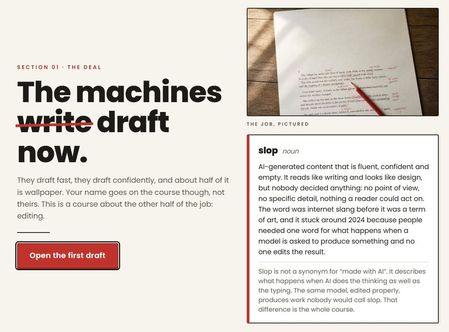
AI drafts fast, confidently, and about half of it is wallpaper. This course teaches you to edit it, spot the six tells, fix them without swapping one kind of slop for another, and check the numbers a model will invent with a straight face. The Red Pen | Rise Tools used: Canva, Gemini and Rise Canvas33Views1like0CommentsHow Rise Canvas was created
I’ve had several requests to detail how I created Rise Canvas Rather than trying to respond to everyone via DM, LinkedIn etc, I thought I’d detail everything here in one post. I’m a web/app designer in addition to being an ID (and some other side hustles that pay the bills!) so this has been a bit of a background passion project initially started for my own work… This will be a long read, so I’ll write it in several parts… This will be fairly non-technical as this isn’t really the place to discuss technical detail.. Part 1 coming next…418Views7likes11Comments