e-learning essentials
121 Topics- 401Views2likes3Comments
Community Insights: Peer Guide Spotlight
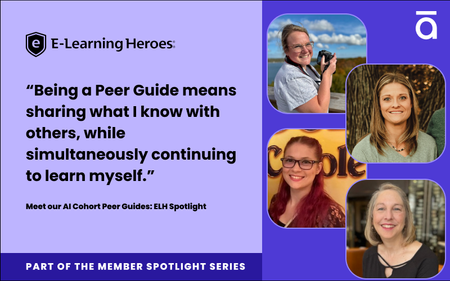
Many of you have seen buzz about our AI Assistant Certification Cohort , regardless if you have participated. Our second run of the program just wrapped up, and it’s safe to say that the biggest difference between these two sessions lies in the hands of four community members. Our peer guides: MelAngiulo SusanWhalen0822 lane_jacole & TaylorSakinsky- What is a peer guide? These are community leaders who help with community programs. Right now those programs are our AI Assistant Certification Cohort and Peer Pods. These initiatives are leveling up the way we learn in ELH by creating bite sized communities of practice. This increases peer to peer connection: they’re opportunities to learn not just with each other, but from each other. As these programs continue to grow we realized they needed one major improvement: peer leadership. That’s where these four community members come in! Their journey to LD varies: from a recent M.S in Instructional Design (congrats Melissa!) to having left teaching middle school after 16 years (an incredible tenure, Jacole!). The path specifically to becoming a peer guide was more straightforward, as they all participated in the first AI cohort. All four guides shared that filling this role was anything but a re-hash of their first experience. Rather, being a peer guide meant a front row seat to the variety, creativity, and possibilities that each participant brought to the assignment. “We all had the same prompt, but it was fascinating to see how many different directions everyone took it in. There were some genuinely creative ideas and modifications that inspired me to try something new in my own work.” - Melissa “It's so fun to see everyone's take on the same task, and it shows just how truly unique we all are! The creativity was inspiring.” - Taylor “I love the different color schemes, the images generated, and the creativity applied to the activity. It truly inspired me!” - Susan “I saw some new ideas that I haven't seen before, and those submissions helped me grow as well!” - Jacole The willingness to experiment with the assignment is just the surface of successful community based learning. Being open to resources, learning from others, sharing pain points (and of course bonding over pet pictures) are all central elements to maximizing the opportunity for personal growth in a learning community. Taylor and Melissa emphasized the diversity of expertise in ELH, reminding us “lean on those around you” and that “we can all leverage and learn from one another.” Jacole pointed out that “sometimes the best learning comes from the workarounds others have found and shared for their similar frustrations.” Susuan corroborated, sharing the reward of this is discovering “shared experiences, from our love of pets to the all-too-familiar challenge of getting AI to generate exactly the image we envision.” Being intentional about openness to growth, to sharing, to learning with and from one another is a huge part of their success as peer guides. Another part is simply the joy of building up others. When asked what being a peer guide meant to them there was a resounding consensus: they wanted to help and connect with the community. “Stepping into the peer guide role gave me the opportunity to build meaningful connections with individuals across the global Articulate community.” -Susan “I wanted to be a witness to the growth and trials of my peers, celebrate the wins no matter how big or small, and commiserate over any pain points.” - Jacole “I thought it would be a great opportunity to help the next group of members navigate their experience.” - Taylor “Being a Peer Guide means sharing what I know with others, while simultaneously continuing to learn myself.” - Melissa And in the spirit of helping others by sharing what they know, each of our peer guides offered some advice: About using AI tools, make sure you check the final product. “As trained professionals, we have the expertise and responsibility to design effective courses—LLMs should be viewed as just another tool in our toolbox, not a replacement for our judgment.” -Susan What this looks like: integrating AI into your workflow means integrating a system of checks you might not have thought about before. The usual read-through for clarity, typos, and other common human errors should be joined by reviewing images, making sure quiz questions match the type of answers available, and keeping a library of prompts that are more effective than others. About ELH, explore the full extent of resources available “There are so many cool features and how-to videos that I wouldn't have known about if I didn't get an email about an "updated features walkthrough" or if I wasn't scrolling through the ELH resources.” -Melissa What this looks like: take advantage of our download library, ask for feedback on builds, and attend webinars whenever possible. Don’t hesitate to search for a keyword or interaction type- the well of knowledge here is deep. “Lean on those around you (and in the ELH community)! All of us come from varying backgrounds with different levels of experience, and none of us knows it all!” - Taylor What this looks like: reach out to your peers, pose questions about best practices, and specify if you think a certain lens will help you that you’re missing. Chances are high someone here has that perspective. About life outlook, stay in a growth mindset “There are always so many ways to grow when you are intentionally open to it.” - Jacole What this looks like: stay alert for opportunities to learn, to revisit things you once knew, and to share what you know now. 🌟Our peer guides are wonderful resources for advice, and we know there are many more in the community who just need the right chance to shine. If this is you, sound off in the comments with what you’d like to bring to the community! It can be an article, a build, or a community leadership position. 💬If you’re not ready for the spotlight, chime in below with what you believe is essential to learning in a community.362Views2likes5Comments8 Business Use Cases for Microlearning
Are you excited to try out microlearning, but unsure when to use it? Below, we outline eight common workplace situations that benefit from a short-form course. Each situation includes a sample microlearning. At the end, learn how you can customize these templates for your own company and training needs. 1. Create Organizational Alignment To hit a business target, everyone needs to be moving in the same direction. Creating that alignment starts with clear, frequent communication of the shared mission, vision, and values. Microlearning can help. The following editable template shows how you can align employees through regular executive “micro” updates: Executive Update 2. Highlight HR Information, Notices, or Reminders Educating employees about annual events like open enrollment, tax season, and compliance training is a critical function of HR teams. The problem? Important announcements often get missed when they’re embedded in long paragraphs or endless emails. Grab the following templates to see how microlearning makes HR communications more digestible and engaging: A Quick Guide To Open Enrollment Internal Company Newsletter 3. Strengthen Company Culture and DEI Initiatives Fostering an inclusive company culture is a continuous process—not a one-time effort. A series of microlearnings can support your larger culture-building and DEI efforts. Check out the following examples for ideas on how to get started: Are You an Ally? Try Taking on These 5 Roles How To Identify and Stop Using Ableist Language Gossip-Proof Your Workplace 4. Streamline Business Processes You can also use microlearning to document and streamline business processes or workflows—such as employee onboarding or performance management. Notice how the following examples make it easy for employees to work through the steps of a process independently: New Hire Pre-Hire Checklist Performance Review and Feedback 5. Increase Security Awareness Most successful data breaches, phishing attacks, and other cybersecurity incidents are caused by human error. Adding refresher microlearnings throughout the year can fortify your defenses. See an example for safeguarding against phishing attacks below: Spot the Phish 6. Enhance Employee Wellness A successful business needs thriving employees. But employee wellness training often ends up buried under competing priorities. Microlearning makes it easy for employees to fit in short breaks for self-care throughout the workday. Check out these two wellness-related microlearning examples: 3 Desk Stretches to Instantly Improve Your Day 5 Tips for Better Naps 7. Provide Quick-Reference Guides Microlearning is the perfect resource for one-off training questions: Employees can quickly find the answers they need—when they need them. Below, we’ve created templates for product and software training. But you could easily create quick-reference guides for sales, customer service, and other teams. Get To Know [Name of Product] Software Training 8. Reinforce and Assess Key Takeaways Finally, who says you have to choose between a more sizable course and microlearning? Repetition aids retention. Consider following up longer training sessions with a microlearning quiz, scenario, or summary. The examples listed below demonstrate how you might do this: Can You Recover From a Workplace Mistake? Training Refresher Wrap-Up There’s no shortage of creative ways you can use microlearning to achieve your business training objectives. The examples above are just a starter list. You might also check out submissions to one of our weekly community challenges, 40+ Microlearning Examples Created in Rise 360 #407. Interested in customizing one of these examples for your team? If you’re an Articulate 360 subscriber or trialer, you can edit all of the examples linked throughout this post by choosing the course from our Rise 360 microlearning content templates. Here’s a short video showing how to do that: What’s the latest microlearning course you’ve created? Tell us about it in the comments—and feel free to ask any questions you might have! Like this article? Subscribe to our newsletter to get the latest e-learning inspiration and insights directly in your inbox. You can also find us on LinkedIn and Twitter.4.4KViews0likes11CommentsHow I Built This: I Developed an Award-Winning Ethics Course
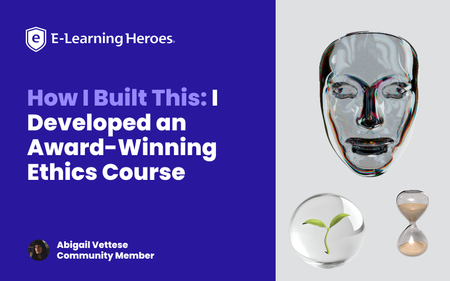
Why I Built This: When I first learned about branching scenarios, something clicked for me that I hadn’t seen other eLearning developers execute: visually compelling, philosophically rich thought experiments. I studied Moral Philosophy in my undergrad and became obsessed with ethical dilemmas. Naturally, I decided to build an ethics course about technology. Think The Trolley Problem, only I wanted to pose questions about the growing reliance on AI and its implications by employing Instructional Design strategies. An opportunity came up through my Master’s program to attend DevLearn and compete in DemoFest, so it was time to start building my concept. I designed and developed a course in Storyline called The Agency Algorithm that confronts learners with issues regarding three main topics: algorithmic warfare (The Armory), AI assisted resource allocation (The Triage Garden), and surveillance (The Mask Archive). The Experience & Design Intent: A quick walkthrough of the multi-room experience. The Agency Algorithm is a multi-room interactive learning experience that blends instructional design, game-like mechanics, and philosophical inquiry. It immerses learners in ethically complex scenarios by leveraging branching logic, and integrating experiential aesthetics with conceptual depth. My primary goal with this project was to encourage critical reflection on the role of technology on human agency and autonomous choice. The concept itself was pretty clear to me, but I wanted to push the limits of Storyline visually, so I acquired a number of 3D assets from Adobe Stock, some of which I further modified in Adobe Dimension. I wanted the visuals to anchor the learner in a unique environment that did not feel reminiscent of traditional eLearning, and rather create space to explore and feel like a participant in something unfolding. There aren’t often black and white answers to ethical questions, and branching scenarios are an excellent way to illustrate this while offering learners a safe place to experiment and think through various outcomes based on their decision making. Visual Worldbuilding/Making It Not Feel Like eLearning: Initially, I intended to hand draw assets myself to really hone in on the human vs AI dynamic, but quickly realized the time I’d have to accomplish this was dwindling. While I drafted a few loose concepts in my journal, I ultimately decided to stick with digital assets. While I landed on 3D assets largely due to time constraints, the outcome is reminiscent of an old experimental video game or some sort of immersive idea gallery. As an artist, I often approach my work from a minimalist lens so this project was a fun way to really add some artistry that corporate training often doesn’t have room for. Variables, Multi-state objects, Cue points, and other mechanics: I relied heavily on multi-state objects to create hover states, “tip” cards, text labels, and more, for example in the circuits with definition reveals. I enjoyed building the “loading” effect in the Mask Archive, although it was a bit clunky and took a lot of trial and error! I learned a lot along the way and used a cue point on an orb with a glow effect beneath the mask and used triggers to cause the effect to work. The course overall has a few hundred triggers (slide, object, and variable triggers) and somewhere around 40 variables (mostly T/F variables). What I learned: I think it is important that we don’t hand-hold learners through every learning experience. I want users to think through complex challenges and autonomously choose and feel like a true agent in the process of acquiring knowledge. A lot of eLearning makes it too easy for the learner and we lose engagement when we undermine the intelligence of our audience. I learned SO much about how to leverage Storyline in new ways. I am still a relatively new user to the tool, so this project allowed me to freely explore and be guided by curiosity. Link to my portfolio: https://www.abigailvettese.com/1.4KViews12likes7CommentsComfortable with Studio 360 but Curious About Storyline 360? This Article Is for You
Note: We're ending support for Studio 360, Replay 360, and Peek 360 on December 31, 2026. Learn more. When I talk to Studio 360 users, they often tell me that they’ve been wanting to give Storyline 360 a try, but feel too intimidated. Sound familiar? I get it. Change can be scary. But thanks to the PowerPoint-like interface and the easy-import feature, the transition from Studio 360 to Storyline 360 is super-smooth. And since Storyline 360 is included in your Articulate 360 subscription, you can start using it right away—at no additional cost. Still on the fence? Take a peek at some of the things Studio 360 users appreciate most when they start using Storyline 360. 1. Creating Interactions That Reduce Cognitive Load When you’re building a course in PowerPoint, it can be hard to find ways to cut down on the amount of on-screen text—and reduce the cognitive load—so learners can focus. In Storyline 360, slide layers make it easy to create click-and-reveal interactions that let learners view content in smaller, more digestible, chunks. For example, instead of a slide like this: You can create an interaction like this: Click here to compare the two versions Not only does this second version feel less overwhelming, but presenting each point one at a time invites learners to interact, increasing the likelihood that they’ll remember the content. 2. Converting Static Slides into Engaging Interactions With PowerPoint, it can be hard to find ways to get learners to interact with your course beyond clicking the Next button. With Storyline 360, you can put learners in the driver’s seat by converting static slides into engaging interactions in just a few clicks, thanks to the Convert to Freeform feature. For example, let’s say you’re creating a course on sun safety. You might have a slide that looks something like this: It’s informative, but not interactive. Now let’s see how you could use that same content to create a lean-forward interaction that’s sure to captivate your audience: Click here to compare the two versions Put yourself in your learner’s shoes. Which version would you find more interesting and engaging? My money’s on the drag-and-drop interaction. 3. Designing Nonlinear Courses Building a single course for a target audience with varying knowledge and skill levels can be a real challenge. One way to ensure you meet everyone’s needs is by building a nonlinear, or branched, course. You can do this by creating a menu that allows learners to navigate the course content freely or by designing a choose-your-own-adventure-style course where the learner’s path through the course changes depending on their actions. Building nonlinear courses in PowerPoint can be extremely challenging. But with Storyline 360, it’s a snap. You can easily see and make changes to the flow of your courses by simply dragging your slides in Story View, as shown in the GIF below. The ability to create nonlinear courses is just one example of how building your courses in Storyline 360 allows you to quickly and easily deliver a more personalized experience to your learners. And the more personalized the experience, the more relevant the course will feel to your learners—making them more likely to remember and apply the concepts to their jobs. Want more tips on personalizing your courses? Check out this article: 3 Ways to Personalize Your E-Learning Courses. 4. Building Custom Navigation That’s Intuitive With Storyline 360, you have total control over the learner experience. You can turn virtually any object into a custom button that behaves the way learners expect it to—making navigation intuitive. Let me explain. When you’re navigating the web, how do you know that an object is clickable? If you pay close attention, you’ll notice a couple of visual cues. For example, when you hover your mouse over a clickable object, the cursor changes from an arrow to a hand. There’s also usually a slight change to the formatting of the object itself—the fill color might change to a slightly lighter or darker hue. These visual cues help you navigate the website and find what you’re looking for. You can do the same thing in your e-learning courses to ensure your learners never feel lost. Check out the GIF below to get a better idea of what that experience can feel like: Click here to explore the interactive version With easy-to-use features like states and triggers in Storyline 360, you can make any object clickable in just a few seconds. And because these objects will behave just like learners expect them to, they’ll be able to focus on the course content—instead of trying to figure out where to click. The Bottom Line Importing your Studio 360 courses into Storyline 360 is fast and easy. And with Storyline 360’s PowerPoint-like interface, the learning curve is almost nonexistent. What do you have to lose? Give it a try today! Here are some resources to help get you up and running: Tips for Importing Microsoft PowerPoint and Articulate Presenter Content into Storyline 360 Storyline 360 tutorial videos Storyline 360 training webinars Storyline 360 user guide Want to try Storyline 360, but don’t have Articulate 360? Start a free 30-day trial, and come back to E-Learning Heroes regularly for more helpful advice on everything related to e-learning. If you have any questions, please share them in the comments.277Views0likes0CommentsHow to Share an E-Learning Course on Your Intranet or Internet Website
Considering sharing your e-learning course on a website or your company intranet? It’s a great option for times you don’t need to track learner progress or quiz scores, and it’s supereasy to set up. In this article, we’ll walk you through the process, step by step. 1. Find a Web Server To share your course on your intranet or internet website, you have to upload it to a web server. But before you can do that, you need to find one you can use. Start by contacting your IT department to see if your organization already has a web server. If they do, great! Ask them if you can get access to it. If they don’t, here are two free options many e-learning pros use: Amazon S3. See this tutorial to learn how to get set up. Google Cloud. See this video tutorial to learn how to get set up. Note that there’s a usage limit for the free versions of the above web servers. If you go over the limit, you’ll be charged a small fee. 2. Publish the Course for Web Delivery Once you’ve identified a web server you can use and your course is finalized, you’ll want to publish or export it for web delivery. In most authoring apps—including those we offer at Articulate—this is as easy as selecting the Web option and hitting Publish. For more details, check out the links below: Rise 360: Publishing Content for Web Distribution Storyline 360: Publishing a Course for Web Distribution 3. Upload the Course to Your Web Server Next, you’ll want to upload the course files to your web server. If you’re using Amazon S3 or Google Cloud, you can do that directly in your browser by clicking the Upload button and selecting your files. Upload screen in Amazon S3 Some web servers require you to use an external app, called a File Transfer Protocol (FTP), to upload your course. If that sounds complicated—don’t worry! We made a short video to walk you through that process. 4. Share the Course Link with Learners Now that your course is uploaded, all that’s left is to send the course link to your learners. But how do you find the course link? It’s easy! Simply open the course folder on your web server and look for the HTML file. Depending on the authoring app you used to create your course, the name of this file—and therefore your course link—will be slightly different. Here are the file names for Articulate apps: Rise 360: index.html Storyline 360: story.html Storyline 360 course folder on Amazon S3 Once you find the HTML file, click on it to view the full URL. It’ll look something like this: Rise 360: http://www.myserver.com/coursename/index.html Storyline 360: http://www.myserver.com/coursename/story.html That’s the link you’ll want to share with learners so they can view your course. Wrap-Up Sharing your course on your intranet or internet website can be a good option if you don’t need to track learner data. And by following the steps outlined in this article, you’ll have your course in your learners’ hands in no time. Want to learn about other ways to share your course? Check out this article: How to Share E-Learning Courses with Learners. And remember to follow us on Twitter and come back to E-Learning Heroes regularly for more helpful advice on everything related to e-learning. If you have any comments, please share them below. This article is part of our E-Learning 101 email course, a series of expertly curated articles that’ll help you get started with e-learning—delivered right to your inbox. You’re only a click away from becoming an e-learning pro! Sign up here to enroll.4.4KViews0likes7CommentsWhat’s the Difference Between Training, Education, and Learning?
Ever sat across from a client or Subject Matter Expert (SME) as they asked you to help create “training,” “education,” and “learning”—all in the same breath? While these terms might sound academic and share some DNA, they’re not interchangeable. They all have slightly different meanings. Failing to clarify and build a shared understanding of these terms with your clients can contribute to misunderstandings and rework later. So let’s unpack the meaning of each of these terms—training, education, and learning—and place them into a workplace context. Understanding them will help ensure that you and your clients are on the same page right from the start! What is training? The Merriam-Webster Dictionary gives many different definitions for the word “training,” but the most applicable is “to undergo instruction, discipline, or drilling.” And when you look up the synonyms for training, it shows “drill,” “exercise,” and “practice.” Hmm. I don’t know about you, but I’m getting a pretty clear mental picture of a runner being trained by a coach. Training a runner is the act or process of instructing them to improve their performance. It’s a form of education that’s focused on a defined goal or task—in this case, making it through a marathon and shaving a few minutes off the time. Taking an example from a workplace setting: let’s say your sales team needs to learn to use new software to process returns. This is a task-specific goal that can be easily addressed with training. What is education? If training is a form of education, what’s the difference between being trained and being educated? Turning to my trusty ol’ dictionary once again, we see that “education” is defined by Merriam-Webster as “knowledge and development resulting from the process of being educated.” Development implies a change that happens over time as you absorb knowledge. That means that, unlike training, education isn’t a task-oriented one-off experience. Another key difference between training and education is that education is more conceptual in nature. The skills and knowledge we acquire through education are often more theoretical and less practical. Again, using our new software example, most of us would agree that it’s probably not the best use of company time and resources to send learners who only need to know how to process returned merchandise on a new system to a multi-week, intensive sales education program. So, if the goal is discrete and skills-based, like learning new software to perform a task, training is a more appropriate solution than education. What is learning? If training is the act or process of formally instructing someone on how to perform a task or perform it more efficiently, and education is the long-term process of developing knowledge, what is learning? Learning is the desired outcome of training—and the path to being educated. And the best part of learning is that it happens naturally through life experience. Of course, the likelihood of learning something new can be increased by our environment, upbringing, work, and mindset, among many other factors. In a workplace setting, learning occurs when people internalize information or skills, retain it, apply it, and then make additional connections to something else they’ve learned. It’s that connection of knowledge to ideas and experiences all woven together that forms the fabric of learning. Not only do we learn all the time, people learn in different ways—through formal training or, more often, informally, through their own experiences, or through the shared experiences of others. Regardless of how people learn, the process of learning equips them to take on more complex challenges. For instance, if we use our new software training example once again, a team member who’s been successfully trained to use the new software to process returns is a training win. But even better is the employee who’s learned how to marry their knowledge of the new software with their understanding of the latest changes to your company’s 30-day return policy and uses their customer service skills to do what’s right. That kind of layered, dynamic thinking and problem-solving is where training, education, and learning all intersect. Wrap-up If it feels like the devil is in the details, you’re not wrong! These terms are similar and related but with slightly different meanings that might escape all but the nerdiest of instructional design pros. Understanding these nuances can be helpful for navigating tricky client conversations with ease and confidence. What other common threads do you see with these terms? Would you define them differently? Let me know with a comment below, or strike up a new conversation in the Building Better Courses forum and hear from all our resident e-learning pros! Like what you read here? Be sure to follow us on Twitter and come back to E-Learning Heroes regularly for more helpful advice on everything related to e-learning.2.2KViews1like5CommentsIn Case You Missed It: November 2025 in ELH
Here’s a brief highlight reel of the conversations, builds, and resources that shaped the community’s discussions in November. 🧳 Join the E-Learning Heroes Passport Challenge! From now through January 5, you can earn passport “stamps” (aka badges!) just for participating in the community—posting discussions, sharing examples, cheering on peers, and more. Every badge marks progress in your own learning journey and gets you closer to fun rewards like swag, shout-outs, and even a chance to win a Fujifilm Instax camera. 💬 What Everyone’s Talking About Looking for a spark of inspiration? Here are some conversations fueling creativity across the community. Instant Publishing with Quick Share Members are excited about Quick Share’s one-click publishing for everyday Rise content. See how others are using it for job aids, previews, and vendor training, and share your own quick-use ideas. Share Your AI Assistant Makeover Creators are posting fun before-and-after examples of how they used AI Assistant to level up drafts, build scenarios, or refine lessons. Check out their transformations and add your own. A Handy Storyline Notepad JoeDey's persistent notepad for Storyline is getting lots of love. If you’ve been looking for a simple way for learners to save notes, explore the demo and join the discussion. 🌟 Standout Challenge Entries November’s challenges surfaced lots of gems! A few standouts: Using Interactive Video for Scenarios & Quizzes in E-Learning Push vs Pull E-Learning By Jayashree_Ravi A side-by-side look at how the same topic can feel totally different: passive slide vs. active video journey. The branching version turns a basic onboarding moment into an experience you are excited to explore. Train Smart: Technique Quiz By ElenaZhuravleva This first-time challenge entry uses short workout clips as quiz questions to test whether you can spot proper form. Simple, practical, and a great example of how video can make quick checks feel interactive. Designing Office Exploration Interactions for E-Learning Welcome to the Office By Kate_Golomshtok This creative virtual tour guides you through an office space, offering a way to explore rooms, teammates, and key info. A fun, game-like approach with lots of potential for expansion. You're Hired! By ded2 This demo brings an interactive approach to onboarding with AI-powered characters who respond in real time. Airport Security for Travelers The Zero-Drama Security Shuffle By GabrielleBradle See how AI Assistant took an outline and shaped the result into a clean Air Travel Security module. A great example of AI speeding up real course development. TSA Dishes on Thanksgiving Food By GolfPrincess This demo experiments with AI-generated visuals, narration, and custom interactions to build a playful learner experience. 🎤 Members Took the Mic (Guest Webinars) From beginner tips to polished animations, these guest-led sessions offer hands-on tips you can put to work in your next Storyline build. Top 10 Tips for New Storyline Users with Judy Nollet New to Storyline? Learn ten essential tips to help you skip the rookie mistakes and start building with confidence. Creating Animations and Interactions in Storyline with Simple CSS and JavaScript (No Coding Required) with Natalia Vostretsova Learn how to give your Storyline projects a modern, animated feel using a simple framework and copy-ready code. 🎓 Trending Training Webinar November’s training focused on improving visuals with tools you already have. Edit AI Images Using Free Windows Tools Discover simple, free ways to edit AI images on your Windows PC, from removing backgrounds to polishing photos and refining illustrations. 📚 Member-Powered Articles Looking for inspiration? These member-powered reads offer hands-on techniques, career insights, and behind-the-scenes workflows you can adapt to your own projects. Made By Members: Rise Code Blocks See how community members are transforming Rise 360’s Code Block into full-on games, tools, and simulations. Community Insights: What You Can Learn from Career Pivot Discover practical career lessons from David Tait’s journey—from leveraging your existing strengths to turning setbacks into opportunities you can use in your own development. How I Built This: How I Vibe-Coded a People Manager Simulation by Daniel-Benton. A practical walkthrough showing how a story-driven simulation was created in Rise, and how you can adapt the same codebase to build your own interactive experiences. 💎 Hidden Gems Sometimes the best tips are hidden in plain sight. Here are a couple worth exploring: Articuland 2026 is Coming! Join the Articuland 2026 VIP list for early updates and pricing, then share the topics and ideas you want featured as we design next year’s experience together. Come Say Hello in the Welcome Center New members are introducing themselves every day, and a quick hello goes a long way. Jump in, say hi, and help someone feel at home. (Bonus: replying earns you a Passport Challenge badge through January 5!) ✨ That’s a wrap for November! What’s one thing you discovered—or created—recently that we should feature in the next roundup? Share it below!499Views1like0Comments5 Ways to Use Animated GIFs in Your E-Learning
Animated GIFs—or image files that act like a short video that loops endlessly—are everywhere these days, on social media, in blogs, and even in e-learning courses! That’s right, instructional designers are using these eye-catching multimedia assets to grab their learners’ attention—and you can too. Check out these ideas to get inspiration on how to incorporate animated GIFs in your courses. 1. As Course Header Images If your learners have a ton of courses in their dashboard and you want yours to stand out, try using an animated GIF in the course header, like in this example: Mars Curiosity Rover. It’s a surefire way to get your course noticed. 2. As Attention Getters GIFs are eye-catching. Have you noticed how hard it is to look away even when you’ve already seen the same animation loop 10 times over? That’s what’s so great about them. Their movement naturally draws your learners in and incites them to pay attention. Not convinced? Take a look at this Rise 360 course: Space Travel–Themed Interactive Infographic See how the GIFs draw you in and make you want to click on the interactive parts? I thought so. 3. To Illustrate Key Messages But GIFs can do more than just catch your learners’ eye. They can actually help learners better understand the concepts you’re teaching them. Check out the GIFs in this course, for example: An American’s Guide to Driving in France. See how the GIFs support the key messages? 4. To Lay Out the Steps in a Process If you’re creating a how-to course, you might be tempted to make a video. And that’s definitely one way of doing it! But if people need to replicate the steps one by one, they might need to rewind each step and watch it over and over again. What a pain! Instead of creating a lengthy video or screencast, why not create a GIF of each step, making it easy for people to rewatch the steps as needed, like in this article on how to make coffee? 5. For Comic Relief If the topic of your course is particularly dry, it might be a good idea to work in some humor to make sure your learners don’t fall asleep. GIFs are a great way to do that! However, be careful to not overdo it. A humorous GIF here and there is one thing; peppering every section of your course with them is another. Here's an example that uses humorous GIFs effectively. Another thing to keep in mind with humor is that it’s subjective. Test your course out on a trusted coworker or two and make sure they find the GIFs to be both work-appropriate and funny. The Bottom Line As with anything, it’s important to keep in mind that too much of a good thing is bad. When using animated GIFs, make sure they’re helping and not hindering the learning process. After all, the goal is to get your learners to focus on the content and retain the key messages. If you’re sold on using animated GIFs in your courses but aren’t sure how to go about creating your own, check out this tutorial. Like this article? Subscribe to our newsletter to get the latest e-learning inspiration and insights directly in your inbox. You can also find us on LinkedIn and X (Formerly Twitter).3KViews2likes13Comments