graphics
41 TopicsHow to Build a Rotating Video Carousel in Articulate Storyline
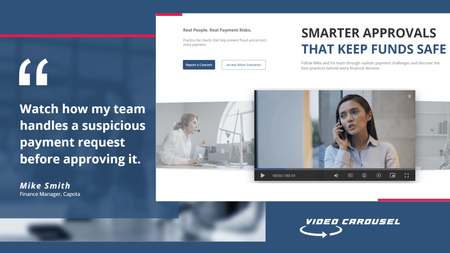
2 min read Three videos. Click a side tile and the whole set glides across, the outer tiles scaling and blurring back into depth. It loops in both directions and never dead-ends. Try the live demo first. Then here is how it goes together. The videos stay in Storyline They sit on three slide layers, Vid01, Vid02 and Vid03, as ordinary Storyline video. That matters. You keep your seekbar, your accessibility settings and your normal publish pipeline. Swapping in your own footage is just right click, Change Media. The carousel is a web object A small folder of HTML, CSS and JavaScript sits on top and draws the three tiles. The front tile lines up exactly behind the real video, so what learners click is Storyline, not a picture of Storyline. The look and motion live in one file Open config.js in Notepad. Tile size, swing distance, tilt, blur, fade, speed, play button colour and background are each one line with a plain-English comment. Change a number, save. There is no code to write. The folder rule nobody expects This is the step that may trip up almost everyone. Storyline copies the web object folder when you insert it, so pointing it back at the same folder shows you the old version no matter how many times you save. Rename the folder, repoint the web object at the new name, then publish. Why it looks blank in Preview Web objects do not render in Storyline Preview. You have to publish to see the carousel run. This is normal Storyline behaviour and nothing is broken. See it running Open the live carousel demo and click the side tiles to feel how the motion reads. Watch the full tutorial on YouTube for the complete build.66Views1like2CommentsBest Video Dimensions and Export Settings for Articulate Storyline (Premiere Pro)
Hi everyone, I'm creating videos in Adobe Premiere Pro for use in Articulate Storyline and would appreciate some advice on best practices. Currently, I'm exporting videos at 960 × 540 px, which seems to match the size of the video area in my course. However, I'd like to ensure I'm getting the best possible quality while keeping file sizes reasonable. My questions are: Is 960 × 540 px still the recommended export resolution for Storyline? What export settings in Premiere Pro have you found work best for Storyline projects? Are there any best practices for maximizing video quality and avoiding blurry text, graphics, or screen recordings after publishing? Have you noticed any limitations or compression issues in Storyline that I should account for when exporting videos? Thanks in advance for your recommendations!107Views0likes3CommentsID Toolbox
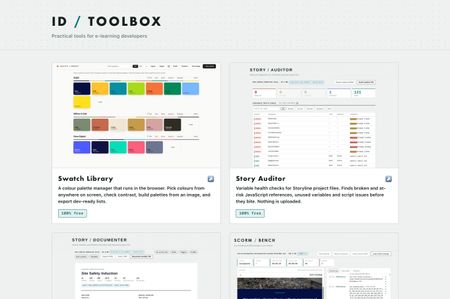
Practical tools for e-learning developers… Over the past several months I've built a set of browser tools for the bits of Storyline and Rise that used to cost me hours. Eleven of them, all completely free, no signup, no accounts, nothing to install. They run entirely in your browser. Nothing is uploaded anywhere, which for me was the whole point, I wasn't keen on posting client content to a website just to check something… ID Toolbox238Views10likes3CommentsEasier way to do Transparent PNG animations in Storyline using AI Assistant.
Hello! For anyone who has been wanting to find an easier way to use animated PNG image sequences in Storyline, here's what I recently came up with (I did a search for this topic here on Best Practices but found nothing to match - may already be old news - if so, disregard all after hello). This JS takes care of the show/hide layer task that was so time consuming for the creator using triggers and states. Here is the AI Assistant prompt followed by the resultant JavaScript: Me: 'Create a JS that shows and hides the images [Picture 1 - 30] on the timeline. The speed should be [30] frames per second, resulting in one complete simulated rotation of the coin. Response: To create a simulated rotation effect at 30 frames per second, where Pictures 1 through 30 are displayed sequentially and loop to simulate a spinning coin, I will develop a JavaScript animation using the appropriate timings to approximate 30 frames per second (33.33ms per frame). Would you like me to proceed with creating the JavaScript trigger for your slide? Me: Yes. Response: I have created the JavaScript trigger named "Simulate Coin Rotation." This trigger will: 1. Sequentially show and hide images from "Picture 1" to "Picture 30." 2. Simulate a rotation effect at 30 frames per second (33.33ms per frame). Let me know if there are additional adjustments or further enhancements you need! See attached for results. Obviously this is for proof of concept and will require further refinement - speed/pausing, etc., but refinement is as easy as prompting 'pause the animation after 3 rotations', etc.) Setting up this two-minute long process beats spending several minutes/hours creating triggers and setting up states by hand, so thought I should share it. Hope it helps. -alan PS, here's the JavaScript: // Find and reference each image by Object IDs const images = [ '5qmgHzeewKx', '6VntD4WftmZ', '68qpF1r6HPu', '6iKY1TZhCUC', '5dvzDd0iirL', '5shjC2rUjgc', '6RY4BuHuzbB', '5sCE78GZyz9', '69eZTSWRsRF', '6kb0gHMMoks', '5kIbYD5RUff', '5ky6F9fxZaH', '62UnQqLgzkj', '6gbjZjrNAiF', '66S2FRgX8al', '6VMdqURcmx7', '6WzEJUWCnKN', '5y34gJ5aiPb', '6rDpPQV5c0i', '5VTPNi9Ha3w', '5dcAeTqKxhj', '6RXO9pKotPV', '69jJxhF86Yk', '6oiTtYItgmo', '6HUOqsiJGRX', '69yAum3TwUS', '64HNtI9aayc', '5rFNGYaOXUd', '69jBWIgp8H7', '6lJfba5n8lp' ]; let currentIndex = 0; function showFrame() { images.forEach((id, index) => { const image = object(id); image.style.opacity = (index === currentIndex) ? 1 : 0; }); currentIndex = (currentIndex + 1) % images.length; } // Set all images to hidden initially images.forEach(id => { const image = object(id); image.style.opacity = 0; }); // Start cycling through frames at 30fps (33.33 ms per frame) setInterval(showFrame, 33.33);213Views1like8CommentsDON’T CLICK APPROVE YET.
Before spending credits on an AI video render, lock the story, references, camera direction, timing, and scene details. I used Higgsfield Supercomputer to plan and refine this 15-second HUD promo and documented the complete workflow. Read the step-by-step blog: https://www.craftuxd.com/post/higgsfield-supercomputer-tutorial-ai-product-promo Watch the YouTube tutorial: https://youtu.be/YsXCoUH5vIQ #HiggsfieldAI #AIVideo #VideoDesign #GenerativeAI34Views0likes0CommentsBadges for Competencies
We have some badges set up in our LMS for competencies but I'm wondering if anyone has any cool design templates to share for badges they've created. We are diving pretty heavily into a competency project and will be aligning courses in our LMS to that project in the coming months.183Views1like6CommentsA Way to Organize Color Swatches
I'm a big fan of organization and efficiency when it comes to production eLearning development. One of the biggest challenges is keeping track of hexadecimal colors that I use on a daily basis. I used to use Adobe Kuler, which was a fantastic way to explore color combinations and a swatch panel that I used to organize all the colors I used for various projects. Well, they've recently changed to Adobe Color and have basically ruined what wasn't broken and now its requires Adobe Express in order to edit and save color palettes, so I started researching other options. Frustratingly, nearly all the options I found required a subscription. What I ended up doing is create an html document that I keep on my desktop and it's been absolutely wonderful and I wanted to share with this community as I have received so much help and assistance from this amazing, creative community of professionals. Open and edit the html document with Text Edit, or Notepad and you'll see the section where you can add your own color swatches, or update what's there. You can name them whatever you want and add in the hexadecimal color code. When you open the document in a web browser, you simply click on the color you want to use and it copies the hexadecimal code to your clipboard. My next push will be to create another one that is all pastel color combinations. This has ended up being one of my favorite new resources and best of all it's free and super easy to customize. Enjoy and continued success!Solved148Views2likes5CommentsHow are you handling certificate delivery?
Certificate delivery keeps coming up, so I wanted to share the approach I settled on after trying a few and hear how others are doing it. The recurring problem: a learner finishes a course, and you want them to get a certificate that (a) looks exactly like the slide you designed, (b) lands in their inbox automatically, and (c) is recorded somewhere you can look up later. Native print-to-PDF and LMS certificates got me part of the way, but not all three. What I ended up building: On the certificate slide, the Send button runs an Execute JavaScript trigger that posts the slide to a small backend endpoint. The backend renders that actual slide, so the PDF is pixel-perfect; no rebuilding the layout server-side and hoping the fonts match. It emails the PDF to the learner over SMTP, and logs every issue to a database with a simple admin dashboard (search, re-send, download). It runs on ordinary cPanel hosting - no monthly third-party service and no per-certificate fees - and one backend serves multiple courses. How's everyone else handling this native download, LMS-issued certs, Google Sheets/Zapier, a paid service? Curious what's working for you. I do this kind of Storyline-to-backend integration, so happy to go deeper on any of it if it's useful.85Views0likes1CommentReimagining Navigation Intros with 3D Motion
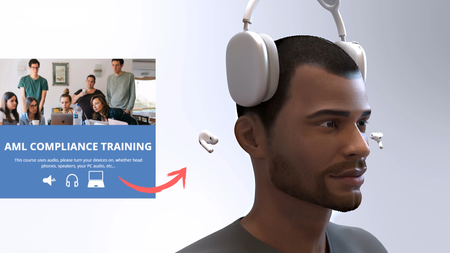
There’s more than one way to begin an eLearning course; and sometimes, sometimes the best way isn’t with text content, but with atmosphere. I’ve always been inspired by how airline safety videos set the tone before a flight begins. They take a routine moment and turn it into something memorable through motion, storytelling, and design. In this short navigation intro, I demo how to bring that same prelaunch energy into your course. With 3D motion and audio cues, you can instantly draw your learners in, before a single concept is even introduced. Navigation Intro: https://craftuxd.tech/Audio/story.html I designed this to spark engagement, proof that learning experience design gets fun when you experiment with 3D, soundscapes, animation, and visual storytelling. Here’s a quick tutorial: https://www.youtube.com/watch?v=62MRlM1iz0M202Views2likes2Comments