instructional design
1346 TopicsHello, E-Learning Heroes!
Crystal from South Dakota here! I have professional expertise in publishing, communications, design, and education. I've worked as a writer, editor, publication designer, and educator, and I'm now transitioning into instructional design and learning experience design. I love taking complex information, finding meaningful connections, and organizing it into something clear, engaging, and useful. I enjoy working with both the big picture and all the little pieces that make it work. Also, TYPOGRAPHY! Wanna talk fonts? Page design hierarchy? Yes, please. I've designed entire publications, developed curriculum and instructional materials, written assessments, and created interactive learning activities. I'm here to explore new tools and discover new ways to design learning experiences. Crystal2Views0likes0CommentsIssue with a slide in SL - click to reveal interaction
Hello - I am looking for some help for slide 1.8 in my project and the recurring slides on it. the text on the layers keeps disappearing and when i click the refresh button it plays the audies of the base layer and the layer it is on. can i add the SL file here? i know there used to be an option.27Views0likes2CommentsBest practices for maintaining a large library of Storyline system simulations
We’re exploring Storyline for building a library of software simulations, including processes that move between multiple systems that share data. For teams doing this at scale: How do you structure simulations for easier maintenance when applications change? Do you use screen recordings, screenshots, custom-built interactions, or a hybrid? What reusable templates/components have worked well? Are you using AI to identify UI changes, update simulations, or reduce maintenance effort? We’re particularly interested in approaches that remain manageable as the simulation library grows.11Views0likes0CommentsSocial interactions for a remote, digital audience?
I'm curious how others have used Storyline or have thought about using Storyline to promote social learning and social situations between remote learners? At least with the audiences I've largely helped in my time as an instructional designer, remote workers have been an outstanding majority. I was part of a team that developed a "two-player" eLearning, each person played the role of either a caller or a customer service representative, and the course was structured to guide them through the call in discrete steps. It was one eLearning with two pathways--cooperative Battleship in some ways. Learners would call each other over the phone and navigate the scenarios together. The Storyline course was essential to the entire thing working so well and really enabled the social interaction in the first place. I currently have in development a three-player resource management game, each player shipwrecked on a distinct island in an archipelago. All three need to work together to build a new ship and continue their voyage. Winning requires the players exchange resources between their games/eLearnings/islands. So how to exchange resources without paying for and configuring a server? A "courier" system--a popup form in the game into which the player says what they want to send, how much, and to which island to send it. That generates an encrypted short-code for the sender to give to the recipient. When the intended recipient enters that code into their receive-courier popup, the "sent" resources are added to the inventory. Some additional JavaScript maintenance adds the code to a list blocking any duplicates, and additional encryption when codes are generated ensures they can only be used by their intended recipients. It's shaping up to be a very effective team-building exercise (the principal design goal) made possible through the text input objects and a little JavaScript, and so (to restate) I'm curious how others have used Storyline or have thought about using Storyline to promote social learning and social situations between remote learners?22Views1like0CommentsAre We Designing for Learning or Just Adding More Clicks? 🤔
I've been thinking a lot lately about how we approach interactivity in e-learning, especially with all the amazing tools and features available to us in Rise and Storyline. As instructional designers, we have so many creative ways to engage learners, but I sometimes wonder if we're making things interactive because they genuinely support learning or simply because we can. For me, the goal has always been to move beyond presenting information and create experiences that help learners actually apply what they've learned. Sometimes that means a scenario, a decision-making activity, or an opportunity to practice (I would love to hear ideas about how you do this one). I'd love to hear how others approach this. What's your personal rule of thumb for deciding whether an interaction truly adds value to a learning experience? And even better, have you ever removed or simplified an interaction and found that the learning experience actually improved? I'd love to hear your experiences, examples, and lessons learned. One of my favorite things about this community is how much we can learn from each other's approaches!81Views0likes4CommentsI turned my course QA checklist into a free Claude skill. What would you add?
I started this checklist in my master's program, and most of it was accessibility. Over the years I kept adding the things I actually catch when I review a course: activities that don't match the stated outcomes, quiz feedback that only says "incorrect, try again," screenshots of a UI that changed two releases ago. The checklist worked great, but was manual. Recently I turned it into a Claude skill that checks 53 UX & LX criteria. You give it an exported course or a PowerPoint deck and it gives you back a checklist to validate, not a verdict. It answers what it can from the files and drafts an answer when it isn't sure. Anything it can't check, like keyboard navigation or how a screen reader sounds, it leaves open for you. Each finding gets a severity level based on how it affects the learner (blocked, inaccurate, adds effort, and so on), so you know what has to be fixed before launch and what can wait for the next revision. It runs in the Claude desktop app or claude.ai with code execution turned on, so you don't need to install anything technical. It's been tested on a Mindsmith.ai course export on a Windows machine. If it doesn't recognize your export, it'll tell you and ask before trying, and I'd ✨love ✨ to hear how it handles Rise, Storyline or anything else. It's free, and there's a sample report you can click through before trying it: https://chickadee368.github.io/learner-first-qa/ I'd really like to hear from people who QA courses for a living. What do you check that isn't on the list? And if you run it on one of your own exports, I'd love to know where it got things wrong! 🔗 to the overview: https://chickadee368.github.io/learner-first-qa/ 🔗 to the repo: https://github.com/chickadee368/learner-first-qa68Views0likes2CommentsI Built an AI Role Play With No AI (and Claude Was a Very Good Sport About It) 🤖🚫
Last week at an ATD conference, I watched a demo where learners talked to an AI avatar client, asked questions, and got real feedback at the end. My first thought: I need this. My second thought: my budget cannot afford this. 💸 So I did what any reasonable designer would do. I opened Claude and asked it to help me build an AI simulation... without any AI. Asking an AI to fake being an AI is a little like asking a chef to make you a microwave dinner. I half expected some pushback. Instead it said “totally doable” and then flagged everything wrong with my mockup and outline. Haha. Rude. Also correct. 😅 Meet Jordan Blake Jordan is an Operations Manager whose routing errors have tripled, and she wants a 45 minute mandatory course for 300 people. By Friday. You know her. We’ve all met Jordan. 🙃 The learner’s job is to run a discovery conversation and figure out if training is really the answer. (Spoiler: an IT update in September might be involved. Shhh.) So how do you fake a smart conversation? A big table. Like, a really big table. Every topic Jordan knows about (the errors, what changed, who’s affected, the data) has a long list of trigger words. When the learner types, the code scores their message against every topic and picks the best match. It’s the same basic idea as Copilot pulling from resources, minus the part where it actually understands you. 😂 Then we layered on the stuff that makes it feel real: Follow ups. Say “tell me more” or “why?” and Jordan goes deeper on whatever you just asked. Two questions at once. “Who’s affected and when did it start?” gets both answers. Typos. “Has anythign chnaged?” still works. Bless. Personality. Small talk, thank yous, and yes, if you ask “Are you a bot?” she tells you she’s a very real manager with a very real deadline. The right panel does the coaching Jordan’s Mood shifts live, from Open to Defensive. Meeting Clock counts down every turn, so rambling costs you. Case Notes fill in as you uncover clues, so learners can see their discovery building. At the end, a scorecard rates Discovery, Root Cause, Relationship, and Recommendation, with specific coaching for each one. The honest part It’s not AI, and I tell learners that on the Tips page. Jordan responds to key words, and if she misses, the suggested questions keep things moving. I’d rather be upfront than have someone think the “AI” is broken. Trust matters, even with a fake client. 😄 Want to build your own? Start with the real performance problem, then work backward to the clues. Write triggers the way people actually talk, then test with someone who didn’t build it. Let the twists react to learner choices, not turn numbers. Built in a Rise 360 Code Block, uploaded as a zip, zero API keys required. 🎉 Give Jordan a try and tell me what you’d ask her first! Is Training Really the Answer?205Views0likes8CommentsSpin the Plate: An Oktoberfest Beer Pairing Adventure
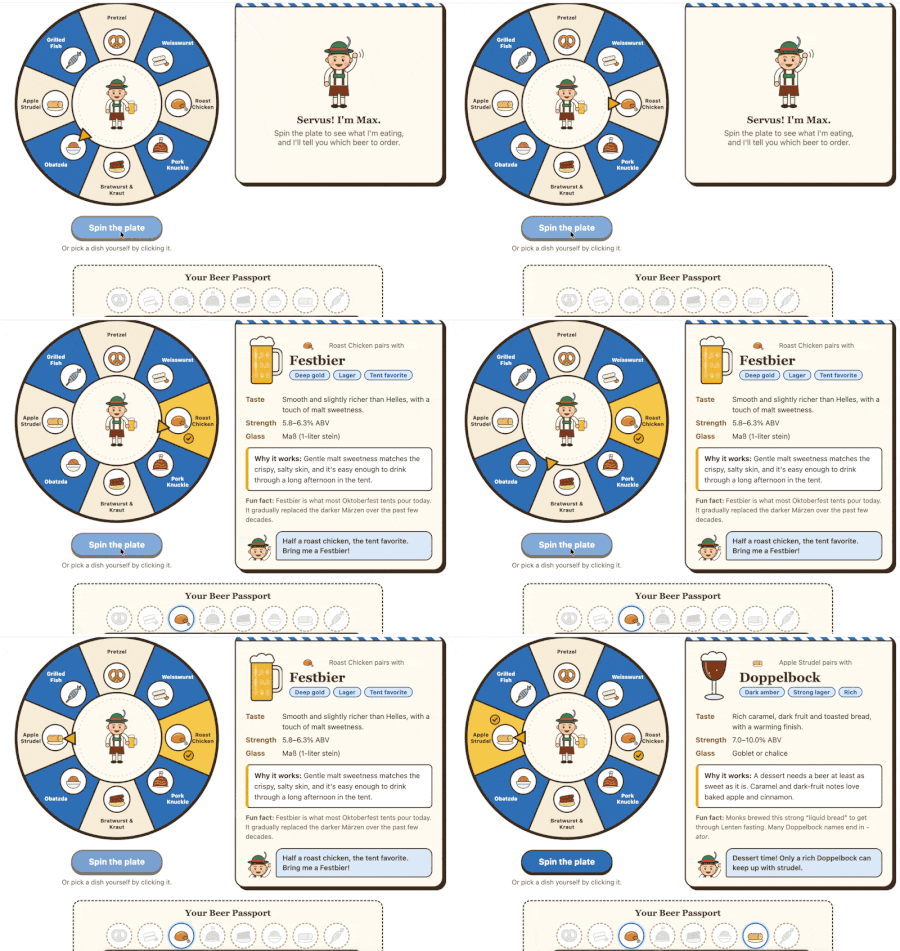
For this week’s challenge, I built a short Rise course that teaches first-time Oktoberfest visitors which beer to order with classic Bavarian dishes. Learners meet Max, a local guide who walks them through the tent, explains the difference between lagers and ales, and then hands them the plate. They spin to see what Max is eating, discover the beer that pairs with it and why, and collect stamps in a Beer Passport. A short quiz at the end checks whether they can make the pairings on their own. Tools: Rise 360 (Timeline, Tabs, Flashcards, Knowledge Checks, Quiz), plus a custom HTML/JavaScript spinner embedded in the course. I designed the interaction and content and used Claude to help with the code and illustrations. This is my first Rise project, so I’d love any feedback, especially on the flow and the spinner interaction! 🍺 view the course92Views1like3CommentsAI Tool for creating conversations
Hi everyone, I'm exploring the possibility of using text between 2 (or more) people to create an AI-generated audio conversation, in most cases between a CSR and customer. From my web search I see there's a utility called Musely that might work but my company's internet policies block me from seeing the page. So, I figured I'd poll this wonderful group of creators to see what they may know or could recommend. Thanks!45Views0likes1Comment