interactive
17 TopicsMeet Your Learner Persona
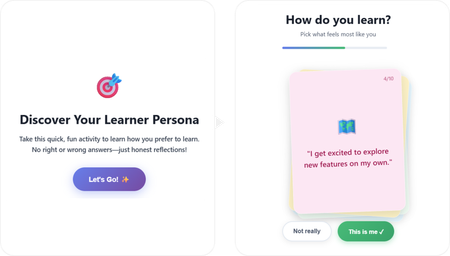
Hello there! 👋 Here's my project: A short, playful interaction that learners could experience at the beginning of a course, but not limited to that. I used both Lovable and ChatGPT as my buddies throughout this learning journey. The interactive code is embedded directly inside the course project. Check out the project here: Meet Your Learner Persona ✨The story behind As a newcomer to vibe coding, the experience was rewarding in the best possible way. I genuinely enjoyed every part of the process and learned a lot, especially about writing effective prompts, navigating code, and making small changes. I found a lot of inspiration by exploring visual and interaction design references on platforms like Dribbble, Figma, and Godly, which helped shape the experience's look and feel. Throughout the project, I experimented with both simple and more complex interactions. In the end, I found myself drawn to the simpler ones, those that quietly support the learning journey without adding unnecessary friction or contributing to cognitive overload. Try taking it to discover your type. 💻Here's also the prompt I used: Create a self-contained, embeddable HTML/CSS/JavaScript interactive learning game designed to be placed inside a Rise course code block. Concept: “Discover Your Learner Persona” – a playful, low-pressure personality-style interaction that helps learners reflect on how they prefer to learn. Experience goals: Fun, fast, and intuitive (2 minutes max) No right or wrong answers Feels like a game, not a test Encourages self-awareness and engagement at the beginning of a course Interaction design: Display one card at a time in the center of the screen Each card contains a short first-person statement describing a learning behavior Two buttons below each card: “This is me” “Not really” When the learner clicks “This is me”, assign 1 hidden point to a specific learner persona When “Not really” is clicked, move on without scoring After all cards are answered, calculate the dominant learner persona and display the result Learner personas (4 total): The Explorer – learns by experimenting, trying things out, discovering through action The Builder – learns best with structure, steps, and logical progression The Observer – prefers watching, reading, and understanding before acting The Connector – learns through discussion, stories, and social interaction Cards (8–10 total): Write short, relatable, first-person statements such as: “I like to jump in and try things out, even if I don’t fully understand yet.” “I feel more confident when learning follows clear steps.” “I prefer seeing examples before I start.” “Talking things through with others helps me learn.” Each card should clearly map to one persona behind the scenes, but never reveal scoring or categories to the learner. Result screen: Display the learner’s persona as a friendly title (e.g. “You are: The Explorer”) Include a short, encouraging description of what this persona means Add 2–3 practical tips on how this learner can approach the course effectively Include reassuring language that most people are a mix and there is no best persona Visual & UX style: Clean, modern, friendly Card-based layout with soft rounded corners Smooth transitions between cards Large, readable text Accessible contrast Neutral, welcoming color palette (colorful, but in light colors) Card layout and behavior: Display the cards as a stacked, slightly fanned card pile, inspired by a physical deck of cards. Cards should overlap each other diagonally, forming a small pile rather than a grid Only the top card is fully readable and interactive at any time The cards underneath should be partially visible, offset slightly in position and rotation Use subtle differences in rotation (e.g. -3°, +2°, -1°) to create a natural, tactile feel Each card should have rounded corners, a soft shadow, and a solid background color Interaction behavior: When a learner answers a card, animate it smoothly off the pile (slide or fade) The next card should move into the top position of the stack The pile should visually shrink as cards are completed Technical constraints: No external libraries or frameworks All HTML, CSS, and JavaScript in a single file Fully responsive (works well on desktop and mobile) Safe for embedding in Rise as a code block or zip package5KViews49likes14CommentsPaint by Num-Birds: Songbird Identification Tool
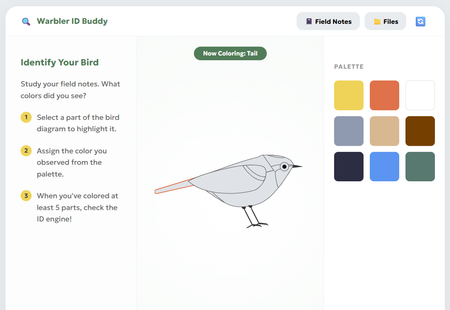
This interaction pushes learners to get curious and creative while identifying some of the most notoriously difficult bird species to spot - warblers! The paint-by-numbers interface paired learning materials (like snapshots, anatomy diagrams, and their own field notes) introduces learners to the fundamentals of bird identification, and allows them to explore this process of visually ID'ing a bird for themselves. Review Here: https://360.articulate.com/review/content/54d099bd-477a As a team with avid birdwatchers, trying to "onboard" people to the hobby always poses a classic blocker: "How do you tell the birds apart?" Though sound, habitat, and other factors play a role, visuals are the first pillar of identification that beginners start to familiarize themselves with. Using Rise's code block, we wanted to create a tool that went beyond flip cards, checklists, and other default interactions. Leveraging HTML/CSS, we created a workshop space that: Breaks down key features to note for ID'ing through an interactive diagram Offers as much or as little support they may need in the form of the snapshots, diagrams, and facts in the "Files" Provides a challenge to apply what they've learned by identifying the "Field Notes" recordings To build this block, we used a mix of vibe-coding and human code expertise! Once we had refined our idea on our own, Gemini was enlisted to help create the basic UI and functions. The functionality was refined and adjusted many times for user ease and clarity. Finally, we looped human experts back in to polish the code, refine the diagram, and squash any stubborn bugs. It was a whirlwind learning experience! Some takeaways: Having the AI refine snippets of the code ensured overall block integrity. We made the mistake at the start of having Gemini spit out a whole new HTML file to adjust minor pieces; we found it changed things that we hadn't asked it to, and actually got "lazy", condensing body text and dressing down UI elements increasingly with each iteration Knowing when to use AI, and when to call in a human expert was our superpower. Gemini deeply, SERIOUSLY struggled trying to create an SVG of a bird. So, we took the monstrosity it outputted and edited the code ourselves to create an image we were happy with! We also enlisted our senior developer to jump in and fix some serious coding errors that had made the block totally un-playable. Not all AI's are made equal: Canva's AI was very promising for vibe-coding at first, but Gemini ultimately became our tool of choice as it provided the most accurate and useful responses. We chose this activity because as bird lovers, we know that warblers in particular have such subtle differences - a black eye ring on one bird might make it a totally different species from the next! The ability to paint and visually describe these tiny differences seemed like the perfect learning opportunity for this challenge (and get our other coworkers on board with birding)! Let us know what you think! Were you able to paint a perfect match? Created by Aamir Aman, Tal Castillo, and Ryan Young.4.2KViews37likes15Comments3D Cube Interaction
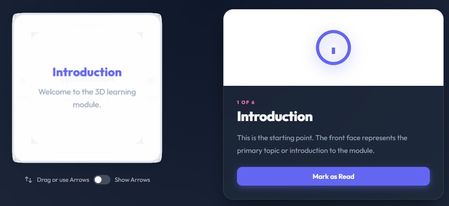
For this build-a-thon, one of the interactions I built was a Cube Rotation Interaction—a custom HTML/CSS/JS block meant to feel a little unexpected. Learners can rotate a 3D cube (by dragging or using arrow controls) to move between faces. Each face represents a topic, and selecting one updates an info panel with supporting content and a Complete button. Once completed, a checkmark appears directly on the cube so learners can easily track what they’ve already explored. The idea came from wanting to build something that doesn’t feel possible in Rise or Storyline. I was brainstorming interactions that really require HTML/CSS, and landed on the idea of rolling a die—something tactile, playful, and naturally three-dimensional. I liked the idea of learners discovering content in any order, rather than clicking through a fixed path. I used ChatGPT early on to brainstorm and create a build spec before jumping into development. From there, I built and refined the interaction in Antigravity using its code builder (powered by Gemini). It took a fair amount of back-and-forth to get the rotation, visuals, and overall feel right. I also added optional arrow controls for accessibility and used GitHub to track different versions along the way. A few things I learned: Rotating the content instead of the entire cube was important—this helped maintain a sense of orientation. Starting with a clear build spec made working with an LLM much more effective. Snapping to the nearest face was a needed touch to make things clear and readable. Small visual details matter more than expected (like darkening the cube during rotation so the cursor doesn’t get lost). Course Link: https://360.articulate.com/review/content/52d258fe-2de4-427a-b04c-747a8970182b/review I’m sharing the code so others can explore or remix it, and because this was a fun way to push beyond familiar interaction patterns and experiment with something a bit more playful. <!DOCTYPE html> <html lang="en"> <head> <meta charset="UTF-8"> <meta name="viewport" content="width=device-width, initial-scale=1.0"> <title>Flip Cube Interaction</title> <link rel="preconnect" href="https://fonts.googleapis.com"> <link rel="preconnect" href="https://fonts.gstatic.com" crossorigin> <link href="https://fonts.googleapis.com/css2?family=Outfit:wght@300;400;600;800&display=swap" rel="stylesheet"> <style> /* Scoped variables for easy tuning */ :root { --cube-size: 300px; /* Super Slick & Vibrant Palette (Dark Theme Base) */ --bg-grad-start: #0f172a; --bg-grad-end: #1e293b; --text-main: #f8fafc; --text-muted: #94a3b8; --primary: #6366f1; /* Indigo */ --primary-glow: rgba(99, 102, 241, 0.5); --accent: #f472b6; /* Pink */ --success: #10b981; /* Emerald */ --success-glow: rgba(16, 185, 129, 0.5); --panel-bg: rgba(30, 41, 59, 0.7); --panel-border: 1px solid rgba(255, 255, 255, 0.1); --panel-shadow: 0 25px 50px -12px rgba(0, 0, 0, 0.5); --face-bg: rgba(255, 255, 255, 0.95); --face-border: 4px solid #e2e8f0; --face-border-active: 4px solid var(--primary); --face-shadow: 0 0 30px rgba(0,0,0,0.1); --font-main: 'Outfit', sans-serif; } body { font-family: var(--font-main); background: radial-gradient(circle at top center, var(--bg-grad-start), var(--bg-grad-end)); margin: 0; padding: 2rem; display: flex; justify-content: center; align-items: center; min-height: 120px; color: var(--text-main); overflow: hidden; } /* --- Progress Tracker --- */ .progress-tracker { position: fixed; top: 20px; right: 20px; background: white; padding: 12px 24px; border-radius: 50px; box-shadow: 0 4px 20px rgba(0,0,0,0.08); font-weight: 800; font-size: 1.2rem; color: var(--primary); display: flex; align-items: center; gap: 10px; z-index: 100; transition: all 0.3s cubic-bezier(0.175, 0.885, 0.32, 1.275); } .progress-tracker.complete { background: var(--accent); color: white; transform: scale(1.1); box-shadow: 0 10px 30px rgba(247, 37, 133, 0.4); } .progress-icon { width: 24px; height: 24px; fill: currentColor; } /* --- Container Layout --- */ .cube-experience { display: grid; grid-template-columns: 1fr 1fr; gap: 60px; max-width: 1100px; width: 100%; /* Glassmorphism Panel Wrapper (optional, currently using grid) */ align-items: center; } /* Mobile Layout */ MeDia (max-width: 860px) { .cube-experience { grid-template-columns: 1fr; gap: 60px; padding: 20px; } :root { --cube-size: 260px; } body { padding: 1rem; } } MeDia (max-width: 400px) { :root { --cube-size: 220px; } } /* --- Cube Module --- */ .cube-module { display: flex; flex-direction: column; align-items: center; position: relative; } .cube-stage { width: var(--cube-size); height: var(--cube-size); perspective: 1000px; cursor: grab; position: relative; /* Prevent scrolling on touch drag */ touch-action: none; -webkit-user-select: none; user-select: none; } .cube-stage:active { cursor: grabbing; } .cube { width: 100%; height: 100%; position: absolute; transform-style: preserve-3d; /* transform is set by JS */ transition: transform 0ms; /* Initial state, JS handles duration */ will-change: transform; } /* --- Animations --- */ @keyframes slideUpFade { from { opacity: 0; transform: translateY(20px); } to { opacity: 1; transform: translateY(0); } } @keyframes pulseGlow { 0% { box-shadow: 0 0 0 0 var(--success-glow); } 70% { box-shadow: 0 0 0 10px rgba(16, 185, 129, 0); } 100% { box-shadow: 0 0 0 0 rgba(16, 185, 129, 0); } } /* --- Cube Faces --- */ .face { position: absolute; width: var(--cube-size); height: var(--cube-size); background: var(--face-bg); border: var(--face-border); display: flex; flex-direction: column; justify-content: center; align-items: center; text-align: center; padding: 24px; box-sizing: border-box; border-radius: 24px; backface-visibility: hidden; backface-visibility: visible; box-shadow: var(--face-shadow); transition: border-color 0.3s, opacity 0.3s; /* Added opacity transition */ } /* Dynamic Opacity during Interaction */ .cube-stage.interacting .face { opacity: 0.9; background: #cbd5e1; /* Light grey for contrast with white cursor */ } .face.visited { border: var(--face-border-active); } /* Checkmark moved to face-content to rotate with text */ .face.visited .face-content::after { content: ''; position: absolute; top: 0px; /* Adjusted for face-content padding/relative pos */ right: 0px; width: 28px; height: 28px; background: var(--success); border-radius: 50%; background-image: url("data:image/svg+xml,%3Csvg xmlns='http://www.w3.org/2000/svg' viewBox='0 0 24 24' fill='none' stroke='white' stroke-width='3' stroke-linecap='round' stroke-linejoin='round'%3E%3Cpolyline points='20 6 9 17 4 12'/%3E%3C/svg%3E"); background-size: 18px; background-repeat: no-repeat; background-position: center; animation: popIn 0.4s cubic-bezier(0.175, 0.885, 0.32, 1.275); box-shadow: 0 4px 10px rgba(76, 201, 240, 0.3); /* Ensure it sits on top */ z-index: 10; transform: translate(15px, -15px); /* Offset to corner */ } @keyframes popIn { 0% { transform: translate(15px, -15px) scale(0); } 100% { transform: translate(15px, -15px) scale(1); } } .face h3 { margin: 0 0 12px 0; font-size: 1.5rem; color: var(--primary); font-weight: 800; } .face p { margin: 0; font-size: 1rem; line-height: 1.6; color: var(--text-muted); font-weight: 400; } .face ul { text-align: left; padding-left: 20px; margin: 0; font-size: 0.95rem; color: var(--text-muted); } /* Face Specific Transforms will be injected or handled by common class + specific class */ .face--front { transform: rotateY(0deg) translateZ(calc(var(--cube-size)/2)); } .face--right { transform: rotateY(90deg) translateZ(calc(var(--cube-size)/2)); } .face--back { transform: rotateY(180deg) translateZ(calc(var(--cube-size)/2)); } .face--left { transform: rotateY(-90deg) translateZ(calc(var(--cube-size)/2)); } .face--top { transform: rotateX(90deg) translateZ(calc(var(--cube-size)/2)); } .face--bottom { transform: rotateX(-90deg) translateZ(calc(var(--cube-size)/2)); } /* --- Instructions --- */ .instructions { margin-top: 25px; font-size: 0.95rem; color: rgba(255, 255, 255, 0.8); /* Lighter for accessibility */ display: flex; align-items: center; gap: 8px; font-weight: 500; } .key-hint { background: rgba(255,255,255,0.15); padding: 2px 6px; border-radius: 4px; font-size: 0.8em; font-family: monospace; border: 1px solid rgba(255,255,255,0.3); color: white; } /* --- Info Panel --- */ .panel { background: var(--panel-bg); border-radius: 24px; padding: 0; overflow: hidden; display: flex; flex-direction: column; border: var(--panel-border); height: auto; min-height: 400px; opacity: 1; transition: opacity 0.2s ease-out, transform 0.2s ease-out; box-shadow: var(--panel-shadow); backdrop-filter: blur(20px); -webkit-backdrop-filter: blur(20px); } .panel.fade-out { opacity: 0; transform: translateY(10px); } .panel-graphic { background: linear-gradient(135deg, rgb(255, 255, 255) 0%, rgb(255, 255, 255) 100%); /* Subtle glass gradient */ height: 180px; display: flex; justify-content: center; align-items: center; color: var(--primary); position: relative; } .panel-graphic::after { content: ''; position: absolute; bottom: 0; left: 0; right: 0; height: 1px; background: linear-gradient(90deg, transparent, rgba(255,255,255,0.1), transparent); } .panel-graphic svg { width: 90px; height: 90px; filter: drop-shadow(0 10px 15px var(--primary-glow)); transition: transform 0.4s cubic-bezier(0.175, 0.885, 0.32, 1.275); } /* Animate icon on entrance */ .panel:not(.fade-out) .panel-graphic svg { transform: scale(1) translateY(0); } .panel.fade-out .panel-graphic svg { transform: scale(0.8) translateY(10px); } .panel-content { padding: 32px; } .panel-label { text-transform: uppercase; letter-spacing: 2px; font-size: 0.7rem; color: var(--accent); margin-bottom: 5px; font-weight: 800; } .panel-title { margin: 0 0 16px 0; font-size: 2rem; color: var(--text-main); font-weight: 800; letter-spacing: -0.02em; } .panel-body { line-height: 1.8; color: var(--text-muted); font-size: 1.05rem; } /* Panel Text Animations */ .panel-title, .panel-body, .btn-complete { transition: transform 0.4s ease-out, opacity 0.4s ease-out; } .panel.fade-out .panel-title { transform: translateX(20px); opacity: 0; } .panel.fade-out .panel-body { transform: translateX(20px); opacity: 0; transition-delay: 0.05s; } .panel.fade-out .btn-complete { transform: translateY(20px); opacity: 0; transition-delay: 0.1s; } /* Complete Button */ .btn-complete { background: var(--primary); color: white; border: none; padding: 12px 24px; font-size: 1rem; font-weight: 600; border-radius: 12px; cursor: pointer; margin-top: 24px; width: 100%; transition: all 0.3s cubic-bezier(0.175, 0.885, 0.32, 1.275); display: flex; align-items: center; justify-content: center; gap: 8px; font-family: var(--font-main); box-shadow: 0 4px 15px var(--primary-glow); } .btn-complete:hover { transform: translateY(-2px) scale(1.02); box-shadow: 0 8px 25px var(--primary-glow); } .btn-complete:active { transform: translateY(1px); } .btn-complete.completed { background: var(--success); cursor: default; box-shadow: none; pointer-events: none; } .btn-complete.completed:hover { transform: none; } .nav-arrow { position: absolute; width: 44px; /* Slightly Larger */ height: 44px; border-radius: 50%; /* Glassmorphism */ background: rgba(255, 255, 255, 0.05); backdrop-filter: blur(8px); border: 1px solid rgba(255, 255, 255, 0.1); display: flex; align-items: center; justify-content: center; color: white; cursor: pointer; box-shadow: 0 4px 15px rgba(0,0,0,0.1); transition: all 0.2s cubic-bezier(0.25, 1, 0.5, 1); z-index: 10; } .nav-arrow:hover { background: white; color: black; transform: scale(1.15); border-color: white; box-shadow: 0 8px 25px rgba(255,255,255,0.3); } /* Positioning around the cube stage */ /* Since buttons are in cube-module (relative), and stage is centered */ /* We can position absolute relative to the module center, or use margins */ /* Better approach: Wrapper or exact placement relative to stage */ /* Let's place them inside the stage container for easy relative positioning */ .cube-stage .nav-arrow { position: absolute; } .nav-arrow--top { top: -60px; /* More padding */ left: 50%; transform: translateX(-50%); } .nav-arrow--bottom { bottom: -60px; left: 50%; transform: translateX(-50%); } .nav-arrow--left { top: 50%; left: -60px; transform: translateY(-50%); } .nav-arrow--right { top: 50%; right: -60px; transform: translateY(-50%); } .nav-arrow--top:hover { transform: translateX(-50%) scale(1.15); } .nav-arrow--bottom:hover { transform: translateX(-50%) scale(1.15); } .nav-arrow--left:hover { transform: translateY(-50%) scale(1.15); } .nav-arrow--right:hover { transform: translateY(-50%) scale(1.15); } /* Toggle Switch */ .toggle-container { display: flex; align-items: center; gap: 10px; font-size: 0.9rem; color: rgba(255,255,255,0.6); /* Lighter */ margin-left: auto; /* Push to right if in flex container */ padding-top: 30px; } .switch { position: relative; display: inline-block; width: 40px; height: 22px; } .switch input { opacity: 0; width: 0; height: 0; } .slider { position: absolute; cursor: pointer; top: 0; left: 0; right: 0; bottom: 0; background-color: rgba(255,255,255,0.2); transition: .4s; border-radius: 34px; } .slider:before { position: absolute; content: ""; height: 16px; width: 16px; left: 3px; bottom: 3px; background-color: white; transition: .4s; border-radius: 50%; } input:checked + .slider { background-color: var(--primary); } input:checked + .slider:before { transform: translateX(18px); } /* Arrow Visibility */ .nav-arrow { /* ... existing styles ... */ opacity: 0; pointer-events: none; /*transform: scale(0.8);*/ /* Conflict with pos transforms, handled below */ } .cube-stage.show-arrows .nav-arrow { opacity: 1; pointer-events: auto; /*transform: scale(1);*/ } /* Specific positions for show state (combining with hover scale) */ .cube-stage.show-arrows .nav-arrow--top { transform: translateX(-50%) scale(1); } .cube-stage.show-arrows .nav-arrow--bottom { transform: translateX(-50%) scale(1); } .cube-stage.show-arrows .nav-arrow--left { transform: translateY(-50%) scale(1); } .cube-stage.show-arrows .nav-arrow--right { transform: translateY(-50%) scale(1); } .cube-stage.show-arrows .nav-arrow--top:hover { transform: translateX(-50%) scale(1.15); } .cube-stage.show-arrows .nav-arrow--bottom:hover { transform: translateX(-50%) scale(1.15); } .cube-stage.show-arrows .nav-arrow--left:hover { transform: translateY(-50%) scale(1.15); } .cube-stage.show-arrows .nav-arrow--right:hover { transform: translateY(-50%) scale(1.15); } /* Face Content Wrapper */ .face-content { width: 100%; height: 100%; display: flex; flex-direction: column; justify-content: center; align-items: center; text-align: center; transition: transform 0.4s ease-out; transform-origin: center center; backface-visibility: hidden; /* sharpening */ position: relative; /* For checkmark positioning */ } /* Progress Tracker text fix */ .progress-tracker { /* ... */ color: var(--primary); } #trackerText { color: var(--primary); } </style> </style> </head> <body> <div class="cube-experience" aria-label="3D Cube Interaction"> <!-- Left: Cube Module --> <div class="cube-module"> <div class="cube-stage" id="cubeStage" aria-label="Interactive 3D Cube." tabindex="0"> <div class="cube" id="cube"> <!-- Faces injected via JS or static below --> <div class="face face--front" data-face="front"> <h3>Front Face</h3> <p>Start here.</p> </div> <div class="face face--right" data-face="right"> <h3>Right Face</h3> </div> <div class="face face--back" data-face="back"> <h3>Back Face</h3> </div> <div class="face face--left" data-face="left"> <h3>Left Face</h3> </div> <div class="face face--top" data-face="top"> <h3>Top Face</h3> </div> <div class="face face--bottom" data-face="bottom"> <h3>Bottom Face</h3> </div> </div> <!-- Navigation Arrows --> <button class="nav-arrow nav-arrow--top" aria-label="Rotate Up"> <svg width="24" height="24" fill="none" viewBox="0 0 24 24" stroke="currentColor"><path stroke-linecap="round" stroke-linejoin="round" stroke-width="2" d="M5 15l7-7 7 7"/></svg> </button> <button class="nav-arrow nav-arrow--right" aria-label="Rotate Right"> <svg width="24" height="24" fill="none" viewBox="0 0 24 24" stroke="currentColor"><path stroke-linecap="round" stroke-linejoin="round" stroke-width="2" d="M9 5l7 7-7 7"/></svg> </button> <button class="nav-arrow nav-arrow--bottom" aria-label="Rotate Down"> <svg width="24" height="24" fill="none" viewBox="0 0 24 24" stroke="currentColor"><path stroke-linecap="round" stroke-linejoin="round" stroke-width="2" d="M19 9l-7 7-7-7"/></svg> </button> <button class="nav-arrow nav-arrow--left" aria-label="Rotate Left"> <svg width="24" height="24" fill="none" viewBox="0 0 24 24" stroke="currentColor"><path stroke-linecap="round" stroke-linejoin="round" stroke-width="2" d="M15 19l-7-7 7-7"/></svg> </button> </div> <div class="instructions"> <div class="toggle-container"> <svg width="20" height="20" fill="none" viewBox="0 0 24 24" stroke="currentColor"> <path stroke-linecap="round" stroke-linejoin="round" stroke-width="2" d="M7 16V4m0 0L3 8m4-4l4 4m6 0v12m0 0l4-4m-4 4l-4-4" /> </svg> <span>Drag or use Arrows</span> <label class="switch"> <input type="checkbox" id="arrowToggle"> <span class="slider"></span> </label> <span>Show Arrows</span> </div> </div> </div> <!-- Right: Graphic Panel --> <div class="panel" id="infoPanel" aria-live="polite"> <div class="panel-graphic" id="panelGraphic"> <!-- SVG injected here --> </div> <div class="panel-content"> <div class="panel-label" id="panelLabel">Face 1 of 6</div> <h2 class="panel-title" id="panelTitle">Introduction</h2> <div class="panel-body" id="panelBody"> Explore the cube to reveal different topics. </div> <button id="btnComplete" class="btn-complete"> <span>Mark as Read</span> </button> </div> </div> </div> <!-- Progress Tracker --> <div class="progress-tracker" id="progressTracker"> <svg class="progress-icon" viewBox="0 0 24 24" fill="currentColor"> <path d="M12 2C6.48 2 2 6.48 2 12s4.48 10 10 10 10-4.48 10-10S17.52 2 12 2zm-2 15l-5-5 1.41-1.41L10 14.17l7.59-7.59L19 8l-9 9z"/> </svg> <span id="trackerText">0 / 6</span> </div> <!-- Celebration Canvas --> <canvas id="confettiCanvas" style="position: fixed; top: 0; left: 0; width: 100%; height: 100%; pointer-events: none; z-index: 999;"></canvas> </div> <script> /** * Minimal Math Lib */ class Quaternion { constructor(x = 0, y = 0, z = 0, w = 1) { this.x = x; this.y = y; this.z = z; this.w = w; } static identity() { return new Quaternion(0, 0, 0, 1); } copy() { return new Quaternion(this.x, this.y, this.z, this.w); } setFromAxisAngle(axis, angleRad) { const halfAngle = angleRad / 2; const s = Math.sin(halfAngle); this.x = axis.x * s; this.y = axis.y * s; this.z = axis.z * s; this.w = Math.cos(halfAngle); return this; } multiply(q) { const qax = this.x, qay = this.y, qaz = this.z, qaw = this.w; const qbx = q.x, qby = q.y, qbz = q.z, qbw = q.w; this.x = qax * qbw + qaw * qbx + qay * qbz - qaz * qby; this.y = qay * qbw + qaw * qby + qaz * qbx - qax * qbz; this.z = qaz * qbw + qaw * qbz + qax * qby - qay * qbx; this.w = qaw * qbw - qax * qbx - qay * qby - qaz * qbz; return this; } premultiply(q) { const qax = q.x, qay = q.y, qaz = q.z, qaw = q.w; const qbx = this.x, qby = this.y, qbz = this.z, qbw = this.w; this.x = qax * qbw + qaw * qbx + qay * qbz - qaz * qby; this.y = qay * qbw + qaw * qby + qaz * qbx - qax * qbz; this.z = qaz * qbw + qaw * qbz + qax * qby - qay * qbx; this.w = qaw * qbw - qax * qbx - qay * qby - qaz * qbz; return this; } normalize() { let l = Math.sqrt(this.x*this.x + this.y*this.y + this.z*this.z + this.w*this.w); if (l === 0) { this.x=0; this.y=0; this.z=0; this.w=1; } else { l = 1/l; this.x*=l; this.y*=l; this.z*=l; this.w*=l; } return this; } dot(q) { return this.x*q.x + this.y*q.y + this.z*q.z + this.w*q.w; } slerp(qb, t) { if (t === 0) return this; if (t === 1) return this.copy().set(qb.x, qb.y, qb.z, qb.w); let x = this.x, y = this.y, z = this.z, w = this.w; // Calculate cosine let cosHalfTheta = w * qb.w + x * qb.x + y * qb.y + z * qb.z; // If negative, invert one to take shortest path if (cosHalfTheta < 0) { this.w = -qb.w; this.x = -qb.x; this.y = -qb.y; this.z = -qb.z; cosHalfTheta = -cosHalfTheta; } else { this.copyFrom(qb); } // If parallel, linear interp if (cosHalfTheta >= 1.0) { this.w = w; this.x = x; this.y = y; this.z = z; return this; } const sinHalfTheta = Math.sqrt(1.0 - cosHalfTheta * cosHalfTheta); // Avoid division by zero if (Math.abs(sinHalfTheta) < 0.001) { this.w = 0.5 * (w + this.w); this.x = 0.5 * (x + this.x); this.y = 0.5 * (y + this.y); this.z = 0.5 * (z + this.z); return this.normalize(); } const halfTheta = Math.atan2(sinHalfTheta, cosHalfTheta); const ratioA = Math.sin((1 - t) * halfTheta) / sinHalfTheta; const ratioB = Math.sin(t * halfTheta) / sinHalfTheta; this.w = (w * ratioA + this.w * ratioB); this.x = (x * ratioA + this.x * ratioB); this.y = (y * ratioA + this.y * ratioB); this.z = (z * ratioA + this.z * ratioB); return this; } copyFrom(q) { this.x=q.x; this.y=q.y; this.z=q.z; this.w=q.w; return this; } set(x,y,z,w) { this.x=x; this.y=y; this.z=z; this.w=w; return this; } static slerpFlat(qa, qb, t) { return qa.copy().slerp(qb, t); } toMatrix3D() { const x = this.x, y = this.y, z = this.z, w = this.w; const x2 = x + x, y2 = y + y, z2 = z + z; const xx = x * x2, xy = x * y2, xz = x * z2; const yy = y * y2, yz = y * z2, zz = z * z2; const wx = w * x2, wy = w * y2, wz = w * z2; return `matrix3d( ${1 - (yy + zz)}, ${xy + wz}, ${xz - wy}, 0, ${xy - wz}, ${1 - (xx + zz)}, ${yz + wx}, 0, ${xz + wy}, ${yz - wx}, ${1 - (xx + yy)}, 0, 0, 0, 0, 1 )`; } } /** * Configuration & Data */ const CONFIG = { sensitivity: 0.005, // Radians per pixel friction: 0.92, // Inertia decay snapThreshold: 0.001 // Velocity threshold }; // Calculate Base Quaternions for each face (UPRIGHT) // Front: Id // Right: Ry(-90) // Back: Ry(180) // Left: Ry(90) // Top: Rx(90) // Bottom: Rx(-90) function createQ(axis, angleDeg) { return new Quaternion().setFromAxisAngle(axis, angleDeg * Math.PI / 180); } const FACES = { front: { id: 'front', label: '1 of 6', cubeContent: `<h3>Introduction</h3><p>Welcome to the 3D learning module.</p>`, panel: { title: "Introduction", body: "This is the starting point. The front face represents the primary topic or introduction to the module.", icon: `<svg viewBox="0 0 24 24" fill="none" stroke="currentColor" stroke-width="2"><circle cx="12" cy="12" r="10"/><path d="M12 16v-4"/><path d="M12 8h.01"/></svg>` }, baseQ: Quaternion.identity() }, right: { id: 'right', label: '2 of 6', cubeContent: `<h3>Analysis</h3><p>Key metrics and data points.</p>`, panel: { title: "Analysis", body: "Here we dive into the numbers. Understanding the metrics is crucial for evaluating performance.", icon: `<svg viewBox="0 0 24 24" fill="none" stroke="currentColor" stroke-width="2"><path d="M18 20V10"/><path d="M12 20V4"/><path d="M6 20v-6"/></svg>` }, baseQ: createQ({x:0, y:1, z:0}, -90) }, back: { id: 'back', label: '3 of 6', cubeContent: `<h3>Methodology</h3><ul><li>Step 1: Plan</li><li>Step 2: Execute</li></ul>`, panel: { title: "Methodology", body: "A systematic approach ensures consistent results. We follow a strict two-phase methodology.", icon: `<svg viewBox="0 0 24 24" fill="none" stroke="currentColor" stroke-width="2"><path d="M12 2L2 7l10 5 10-5-10-5zM2 17l10 5 10-5M2 12l10 5 10-5"/></svg>` }, baseQ: createQ({x:0, y:1, z:0}, 180) }, left: { id: 'left', label: '4 of 6', cubeContent: `<h3>History</h3><p>Looking back at origins.</p>`, panel: { title: "History", body: "Knowing where we came from helps us understand where we are going.", icon: `<svg viewBox="0 0 24 24" fill="none" stroke="currentColor" stroke-width="2"><circle cx="12" cy="12" r="10"/><polyline points="12 6 12 12 16 14"/></svg>` }, baseQ: createQ({x:0, y:1, z:0}, 90) }, top: { id: 'top', label: '5 of 6', cubeContent: `<h3>Vision</h3><p>High-level goals.</p>`, panel: { title: "Vision", body: "The top-down view allows us to see the bigger picture and long-term strategic goals.", icon: `<svg viewBox="0 0 24 24" fill="none" stroke="currentColor" stroke-width="2"><path d="M1 12s4-8 11-8 11 8 11 8-4 8-11 8-11-8-11-8z"/><circle cx="12" cy="12" r="3"/></svg>` }, baseQ: createQ({x:1, y:0, z:0}, -90) }, bottom: { id: 'bottom', label: '6 of 6', cubeContent: `<h3>Foundation</h3><p>Underlying support.</p>`, panel: { title: "Foundation", body: "Every great structure needs a solid base. These are the fundamental principles.", icon: `<svg viewBox="0 0 24 24" fill="none" stroke="currentColor" stroke-width="2"><path d="M3 21h18"/><path d="M5 21v-7"/><path d="M19 21v-7"/><path d="M9 9l3-6 3 6"/><path d="M9 9h6v12H9z"/></svg>` }, baseQ: createQ({x:1, y:0, z:0}, 90) } }; /** * State */ let state = { qCurrent: Quaternion.identity(), isDragging: false, startX: 0, startY: 0, currentFace: 'front', vy: 0, lastMoveTime: 0, isSnapping: false, visitedFaces: new Set() }; /** * Elements */ const cube = document.getElementById('cube'); const stage = document.getElementById('cubeStage'); const panel = document.getElementById('infoPanel'); const panelGraphic = document.getElementById('panelGraphic'); const panelLabel = document.getElementById('panelLabel'); const panelTitle = document.getElementById('panelTitle'); const panelBody = document.getElementById('panelBody'); const btnComplete = document.getElementById('btnComplete'); const trackerText = document.getElementById('trackerText'); const progressTracker = document.getElementById('progressTracker'); /** * Initialization */ function init() { // Hydrate cube faces document.querySelectorAll('.face').forEach(faceEl => { const id = faceEl.getAttribute('data-face'); if (FACES[id]) { faceEl.innerHTML = `<div class="face-content">${FACES[id].cubeContent}</div>`; } }); updatePanel('front', true); // Initial Transform updateCubeTransform(); // Events stage.addEventListener('mousedown', onPointerDown); stage.addEventListener('touchstart', onPointerDown, { passive: false }); // Window Listeners window.addEventListener('mousemove', onPointerMove); window.addEventListener('mouseup', onPointerUp); window.addEventListener('touchmove', onPointerMove, { passive: false }); window.addEventListener('touchend', onPointerUp); stage.addEventListener('keydown', onKeyDown); // Nav Buttons document.querySelector('.nav-arrow--top').addEventListener('click', (e) => { e.stopPropagation(); triggerRelativeRotate(0, -1); }); // Up (Simulate Drag Up) document.querySelector('.nav-arrow--bottom').addEventListener('click', (e) => { e.stopPropagation(); triggerRelativeRotate(0, 1); }); // Down (Simulate Drag Down) document.querySelector('.nav-arrow--left').addEventListener('click', (e) => { e.stopPropagation(); triggerRelativeRotate(-1, 0); }); // Left (Simulate Drag Left) document.querySelector('.nav-arrow--right').addEventListener('click', (e) => { e.stopPropagation(); triggerRelativeRotate(1, 0); }); // Right (Simulate Drag Right) // Toggle Arrows const toggle = document.getElementById('arrowToggle'); toggle.addEventListener('change', (e) => { stage.classList.toggle('show-arrows', e.target.checked); }); document.querySelectorAll('.nav-arrow').forEach(btn => { btn.addEventListener('mousedown', (e) => e.stopPropagation()); btn.addEventListener('touchstart', (e) => e.stopPropagation()); }); // Complete Button const btnComplete = document.getElementById('btnComplete'); btnComplete.addEventListener('click', onCompleteClick); requestAnimationFrame(animate); } /** * Interaction Logic */ function onPointerDown(e) { state.isSnapping = false; state.isDragging = true; state.vx = 0; state.vy = 0; stage.classList.add('interacting'); // Trigger opacity change const { x, y } = getCoord(e); state.startX = x; state.startY = y; e.preventDefault(); document.body.style.cursor = 'grabbing'; stage.style.cursor = 'grabbing'; } function onPointerMove(e) { if (!state.isDragging) return; if(e.type === 'touchmove') e.preventDefault(); const { x, y } = getCoord(e); const dx = x - state.startX; const dy = y - state.startY; state.vx = dx; state.vy = dy; state.startX = x; state.startY = y; state.lastMoveTime = performance.now(); applyRotation(dx, dy); } function onPointerUp(e) { if (!state.isDragging) return; state.isDragging = false; document.body.style.cursor = ''; stage.style.cursor = 'grab'; // If user held still for > 100ms, kill velocity const timeSinceMove = performance.now() - state.lastMoveTime; if (timeSinceMove > 100) { state.vx = 0; state.vy = 0; } startInertia(); } function getCoord(e) { if (e.touches && e.touches.length > 0) { return { x: e.touches[0].clientX, y: e.touches[0].clientY }; } return { x: e.clientX, y: e.clientY }; } function applyRotation(dx, dy) { // Screen Space Rotation const angleY = dx * CONFIG.sensitivity; const angleX = -dy * CONFIG.sensitivity; const qRotY = new Quaternion().setFromAxisAngle({x:0,y:1,z:0}, angleY); const qRotX = new Quaternion().setFromAxisAngle({x:1,y:0,z:0}, angleX); // Apply Screen Rotations state.qCurrent.premultiply(qRotX); state.qCurrent.premultiply(qRotY); state.qCurrent.normalize(); updateCubeTransform(); } /** * Physics & Animation */ function animate() { requestAnimationFrame(animate); } function startInertia() { if(state.isSnapping) return; function inertiaLoop() { if (state.isDragging || state.isSnapping) return; state.vx *= CONFIG.friction; state.vy *= CONFIG.friction; if (Math.abs(state.vx) < 1 && Math.abs(state.vy) < 1) { snapToNearestFace(); return; } applyRotation(state.vx, state.vy); requestAnimationFrame(inertiaLoop); } inertiaLoop(); } function getBestMatch(q) { // Z-Rolls: 0, 90, 180, 270 (Degrees) const rolls = [0, 90, 180, 270]; const axisZ = {x:0, y:0, z:1}; let bestDist = -1; // Cosine similarity: 1 is identical, -1 opposite. let bestFaceId = 'front'; let bestTargetQ = null; let bestRoll = 0; // Iterate all 24 states for (const [key, data] of Object.entries(FACES)) { const baseQ = data.baseQ; for (let r of rolls) { const rollQ = new Quaternion().setFromAxisAngle(axisZ, r * Math.PI / 180); // Note: Premultiply rollQ because it's a global view rotation const candidateQ = rollQ.multiply(baseQ.copy()); // Dot product |dot| closer to 1 means closer orientation let dot = Math.abs(q.dot(candidateQ)); if (dot > bestDist) { bestDist = dot; bestFaceId = key; // Snap to the ROLLED state, not the base state bestTargetQ = candidateQ; bestRoll = r; } } } return { targetQ: bestTargetQ, faceId: bestFaceId, roll: bestRoll }; } function snapToNearestFace() { state.isSnapping = true; // Remove interacting class to restore full opacity stage.classList.remove('interacting'); const match = getBestMatch(state.qCurrent); animateSnap(match.targetQ, match.faceId, match.roll); } function animateSnap(qTarget, faceId, roll = 0) { const qStart = state.qCurrent.copy(); const startTime = performance.now(); const duration = 500; // Ensure shortest path for slerp if (qStart.dot(qTarget) < 0) { qTarget.set(-qTarget.x, -qTarget.y, -qTarget.z, -qTarget.w); } // Apply counter-rotation to text immediately so it looks right as it settles rotateFaceContent(faceId, roll); function loop(now) { if (state.isDragging) return; const elapsed = now - startTime; const t = Math.min(elapsed / duration, 1); const ease = 1 - Math.pow(1 - t, 3); state.qCurrent = Quaternion.slerpFlat(qStart, qTarget, ease); updateCubeTransform(); if (t < 1) { requestAnimationFrame(loop); } else { state.isSnapping = false; state.qCurrent.copyFrom(qTarget); updateCubeTransform(); if (state.currentFace !== faceId) { updatePanel(faceId); state.currentFace = faceId; } } } requestAnimationFrame(loop); } function rotateFaceContent(faceId, roll) { const faceEl = document.querySelector(`.face[data-face="${faceId}"] .face-content`); if (faceEl) { // Counter-rotate text to keep it upright // If cube is rolled +90 (CW), text needs -90 (CCW) faceEl.style.transform = `rotate(${-roll}deg)`; } } function triggerRelativeRotate(dxDir, dyDir) { if (state.isSnapping || state.isDragging) return; const rotationAmount = Math.PI / 2; let axis, angle; // Global Rotation Axes if (dxDir !== 0) { axis = {x:0, y:1, z:0}; // Screen Y // Invert logic: Left Arrow (dx=-1) -> Show Left (+90 deg) angle = -dxDir * rotationAmount; } else { axis = {x:1, y:0, z:0}; // Screen X // Invert logic: Top Arrow (dy=-1) -> Show Top (+90 deg) angle = -dyDir * rotationAmount; } const qRot = new Quaternion().setFromAxisAngle(axis, angle); // Apply Global Rotation: New = Rot * Old const qTargetProposed = state.qCurrent.copy().premultiply(qRot); // Calculate best match based on proposed target const match = getBestMatch(qTargetProposed); animateSnap(match.targetQ, match.faceId, match.roll); } function updateCubeTransform() { const mat = state.qCurrent.toMatrix3D(); cube.style.transform = mat; } function updatePanel(faceId, instant = false) { const data = FACES[faceId]; if (!data) return; if (instant) { renderPanelContent(data); return; } panel.classList.add('fade-out'); setTimeout(() => { renderPanelContent(data); panel.classList.remove('fade-out'); }, 200); } function renderPanelContent(data) { panelLabel.textContent = data.label; panelTitle.textContent = data.panel.title; panelBody.textContent = data.panel.body; panelGraphic.innerHTML = data.panel.icon; // Update Button State const isVisited = state.visitedFaces.has(data.id); if (isVisited) { btnComplete.classList.add('completed'); btnComplete.innerHTML = `<svg width="20" height="20" fill="none" viewBox="0 0 24 24" stroke="currentColor"><path stroke-linecap="round" stroke-linejoin="round" stroke-width="3" d="M5 13l4 4L19 7"/></svg> Completed`; } else { btnComplete.classList.remove('completed'); btnComplete.textContent = "Mark as Read"; } } function onCompleteClick() { const currentId = state.currentFace; if (state.visitedFaces.has(currentId)) return; // Mark as visited state.visitedFaces.add(currentId); // Add visual indicator to cube face const faceEl = document.querySelector(`.face[data-face="${currentId}"]`); if (faceEl) faceEl.classList.add('visited'); // Update Tracker trackerText.textContent = `${state.visitedFaces.size} / 6`; // Update Button State (Immediate) btnComplete.classList.add('completed'); btnComplete.innerHTML = `<svg width="20" height="20" fill="none" viewBox="0 0 24 24" stroke="currentColor"><path stroke-linecap="round" stroke-linejoin="round" stroke-width="3" d="M5 13l4 4L19 7"/></svg> Completed`; // Celebration Check if (state.visitedFaces.size === 6) { triggerCelebration(); } } function triggerCelebration() { const tracker = document.getElementById('progressTracker'); tracker.classList.add('complete'); // Simple Confetti const canvas = document.getElementById('confettiCanvas'); const ctx = canvas.getContext('2d'); canvas.width = window.innerWidth; canvas.height = window.innerHeight; const pieces = []; const colors = ['#f72585', '#4361ee', '#4cc9f0', '#7209b7', '#ffd166']; for(let i=0; i<300; i++) { pieces.push({ x: Math.random() * canvas.width, y: Math.random() * canvas.height - canvas.height, w: Math.random() * 10 + 5, h: Math.random() * 10 + 5, color: colors[Math.floor(Math.random() * colors.length)], vy: Math.random() * 5 + 2, vx: Math.random() * 4 - 2, rot: Math.random() * 360, rotSpeed: Math.random() * 10 - 5 }); } function loop() { ctx.clearRect(0,0,canvas.width,canvas.height); let active = false; pieces.forEach(p => { p.y += p.vy; p.x += p.vx; p.rot += p.rotSpeed; if (p.y < canvas.height) active = true; ctx.save(); ctx.translate(p.x, p.y); ctx.rotate(p.rot * Math.PI / 180); ctx.fillStyle = p.color; ctx.fillRect(-p.w/2, -p.h/2, p.w, p.h); ctx.restore(); }); if (active) requestAnimationFrame(loop); } loop(); } function onKeyDown(e) { let handled = false; if (e.key === 'ArrowLeft') { triggerRelativeRotate(-1, 0); handled=true; } else if (e.key === 'ArrowRight') { triggerRelativeRotate(1, 0); handled=true; } else if (e.key === 'ArrowUp') { triggerRelativeRotate(0, -1); handled=true; } else if (e.key === 'ArrowDown') { triggerRelativeRotate(0, 1); handled=true; } if(handled) e.preventDefault(); } init(); </script> </body> </html>593Views13likes2CommentsSpace Explorer
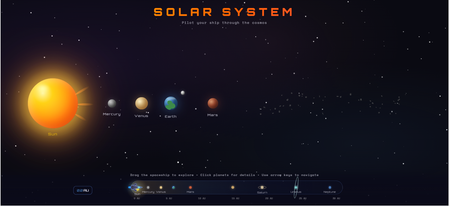
I find immense value in using the Code Block to quickly create stand-alone, complex interactions that would be too time-consuming to do manually. As an example, this Code Block, at its simplest, could have been a table. But instead, you get to kinda-sorta travel the solar system and get a sense of exploration and discovery to make learning fun. Plus, the visual gives you a sense of scale - understanding how much relative distance there is between Earth and Mars compared to Mars and Jupiter, etc. It's not perfect. For the life of me, I cannot get the labels for Earth and Jupiter to display on the navigation scale. Were this a real course, I could imagine including images of the real planets, following it up with a quiz, maybe giving the learner specific quests or making the exploration even more fun by including small clickable items to collect in specific (or random) buttons where the learner must try to collect all 10, etc. to encourage self-exploration. https://share.articulate.com/hZGb9Vn1vAWbmRDKRICxl It was very fun to make though. All code written via maybe 10-11 back-and-forth prompts with Claude 4.5 Opus (and maybe 7-8 more trying to get the Earth and Jupiter labels to display - unsuccessfully). I attached the code here in case anyone wanted to use or play around with in Rise themselves. If you do, uncheck Auto Resize and set the Height to the max possible value.546Views10likes2Comments3D MacBook Pro Short Product Tour
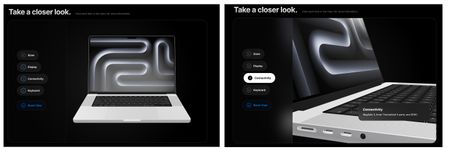
MacBook Pro Short Product Tour Review Link --- Inspiration Apple’s design philosophy has always been a major inspiration for me. Their ability to balance minimalism with high-performance functionality is something I wanted to capture in this short interactive product tour. I wanted to create a digital experience that felt as premium as the hardware itself. This is my first time I have done a 3D model like this using code. --- Tools Building this required a blend of 3D assets and prompting: AI: I used Gemini and developed a prompt to architect the logic, refine the UI, and tackle complex CSS challenges. 3D Modeling: I used a high-fidelity 3D model of the MacBook Pro that I downloaded from https://sketchfab.com/. Infrastructure: To ensure fast loading and reliable delivery, I hosted the .glb 3D file on AWS (Amazon Web Services). --- Key Lessons Learned The biggest takeaway from this project was the "Desktop vs. Mobile" reality check. A layout that looks breathtaking on a large monitor can completely break on a handheld device. I learned that: Spatial Awareness Matters: On mobile, you have to fight for every pixel. I had to implement a custom "slow-scroll" script to ensure the model stayed in view when users interacted with the menu. Contextual UI: I had to write (and rewrite a lot 🙃) the prompt so that there was logic to move text overlays (like the Connectivity box) so they wouldn't block the very features (the ports) they were trying to describe. Iteration is Key: Design isn't "one and done." It’s a constant loop of tweaking, testing on different screens, and refining the code until it feels right everywhere. --- The HTML zip file is below.310Views5likes2CommentsEnglish School - Code Block Demo
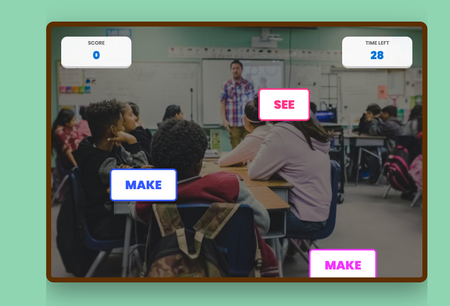
Premise English irregular verbs are like that one "eccentric" relative at the Christimas family dinner: they follow absolutely zero rules, change their entire identity without warning, and seem specifically designed to ruin your day, but after a few awkward encounters, you eventually learn their quirks and stop calling them by the wrong name. That´s why I created this demo using Code Block in Rise, to help students to learn english in a fun and gamified way. Prompt To create it, I used this prompt with Gemini: "Write HTML, CSS, y JavaScript for an excercise like call of duty to use in Rise 360 Code Block. Use blue and green and yellow as main colours. It´s a shooting game. You will have to shoot the irregular verbs that you find. If you hit a irregular verb, you win 5 points, if you hit a regular verb you lose 10 points. It´s an excercise in elearning for english students." I twisted along to way to add the background music, and later on in Rise I altered the code to change colours, fonts, timer, speed of the words appearing, etc. Course Demo You can check the course here: https://360.articulate.com/review/content/39bd6260-4647-4cd7-84c9-731a83677417/review166Views5likes0CommentsWizard Maze Game
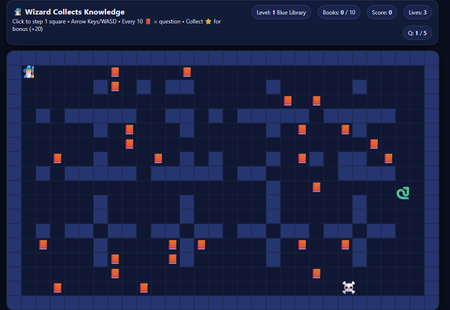
I've seen some people have been successful making 8 bit games while vibe coding so I wanted to give it a go! This was a fun one to build and adjust! I really wanted a character to go through a maze and try to collect the books. After 10 books, you answer a question and it continues through 3 levels of maze over 5 questions (if you get them right). Code Build-a-thon: Maze Game Knowledge Check | Review 360 I was inspired by the Hoppy Adventures Coin Capture Hoppy Adventures: Coin Capture | Articulate - Community. Kudos to desterly1kenobi! This build was a roller coaster. First, ChatGPT said I couldn't do it. Fought me. Once I found the Hoppy Adventures, I saw that it CAN be done! So, I started a new chat with ChatGPT and within one prompt, I got a game. I kept adjusting til I got everything I wanted in place. There's some minor tweaks I want to make but, I'm pretty happy with it and it's fun! I'll have to find a project to incorporate it in.702Views5likes2CommentsTop-Down game mechanics in Storyline
I was fooling around with the new API and created a proof of concept for some mechanics of a top-down game. You can use the WASD keys to move the robot around. If you roll close to objects, I set a variable that allows a layer to open. Unfortunately, the built in Intersection triggers don't work when you move objects with API method, so you need it to do it through JavaScript. If you move the robot off screen to the right, it will go to the next screen in the correct position it left. Try going back higher up and see how it works. The current demo only allows you to go to slide (or room) 3 and back. I can get the coordinates of a character object and then since you know the slide size, you can trigger variables to get you to the next slide and back. I also built some logic in to prevent the robot from going too far up or too far down. On the last slide that you can get to through the menu, you will notice a demo of a platform concept. Move the oval using the keys and notice that we can simulate gravity like any game engine. I imagine if I implemented the same positional logic that we could create a simple platformer but haven't got there yet. Full disclosure: All assets are generated using ChatGPT 4.0 except for the ovals and the rectangles. 😉 Take a look here. https://360.articulate.com/review/content/6104372d-85cf-41cc-8f81-6f42e3a6c061/reviewSolved1KViews4likes5CommentsCMY Mix Lab
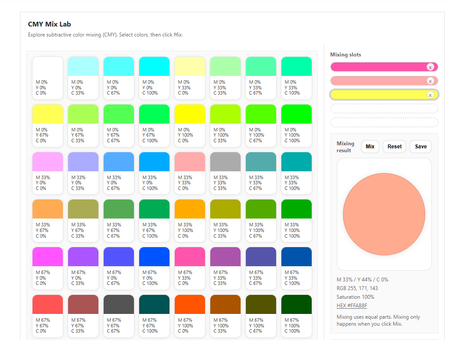
An experiment in pushing Articulate Rise beyond fixed variables and linear flows. What this is The CMY Mix Lab is an interactive experiment built in Articulate Rise to explore what happens when you are no longer limited to a fixed set of variables. Unlike standard Rise blocks, and even compared to Storyline, this approach allows for a virtually unlimited number of variables and states within a single interaction. For this challenge, I wanted to build something that cannot be created in Rise in any other way. The mixer relies on continuously changing values, combinations, and outcomes rather than predefined slides, layers, or triggers. Everything happens inside one custom block, driven by logic. How it was made Full transparency: I’m not a programmer. This project was very much vibe coded. I built it by experimenting, tweaking values, breaking things, and fixing them again with the help of AI and a lot of curiosity. Working this way felt very different from building in Storyline or standard Rise blocks. Instead of defining all states upfront, the interaction reacts to whatever values the learner creates in the moment. That shift in thinking was a big part of the experiment. The challenge One of the biggest challenges has been (and still is) accessibility. Mouse interaction works well, but I do not have a stable, fully keyboard-accessible version to show you yet. Improving this is something I am actively working on and continuing to refine. This challenge is also part of what makes the project interesting to me. It clearly shows both what Rise can already do and where its current limits are, especially when you start working with many dynamic variables. Why this build This build is not about delivering a perfect or finished solution. It is about exploring possibilities, learning by doing, and testing how far you can push Rise without relying on Storyline or predefined interaction patterns. If this experiment inspires other Rise users to think differently about variables, logic, or custom code, then it has done exactly what I hoped it would do. Vote If you like this experiment or find the idea behind it interesting, I’d really appreciate your vote. https://share.articulate.com/aWvCo417oehOA2FTwbHLA Oh... one last thing! Try mixing with "white". You'll be surprised. :D137Views3likes0CommentsChicken Noodle Soup
Inspiration It feels like yesterday that I remember smelling the sweet scent of vegetables cooking in the kitchen when I asked my mom to teach me how to make chicken noodle soup for the first time. Last week, I happened to get a call from a younger sibling asking if I had that very recipe. The problem is, my mom rarely wrote down a recipe. Being a true chef through and through, she always thought of a recipe as more of guidelines than anything. There are many ways to prepare any dish, but the cooking skills you learn in between each one are what are so valuable. I thought this was a great recipe to teach some of those basics, and I thought it would be a unique challenge to try to think of some fun ways to use the code blocks to teach Entry Link: https://360.articulate.com/review/content/1630401d-4e73-47a1-bb7a-cb6dab63dd75/review Prompting process If you’d like to see the actual prompts I used to generate each of the code blocks throughout the course, please check out the final lesson “About this recipe”, where I have included each prompt that was used to generate the code. This isn’t where my process began. Having some basic knowledge of coding, I first began by writing down descriptions of the skill I was trying to teach, along with listing the various components and mechanics behind the vision for the interaction. I began by using ChatGPT to feed it this information and help it understand each component of the overall training. Occasionally, I would use it to help focus the vision behind a block's design and ensure that I was ideating with the capabilities of custom AI-generated code for the web. Tools Due to limitations with free accounts and the imperfection of AI, I worked with several tools to help get the results I was looking for. (Mostly because I ran out of free tokens constantly) Articulate Rise ChatGPT BoltAI ClaudAI Mom’s chicken noodle recipe Block Design Get ready checklist - Looking up recipes on the web can sometimes feel like a nightmare, and everyone prepares their article differently. I thought it might be nice to not only have a list of ingredients you’ll need, but an easy way to create a list of what you still need to go to the store for. Mirepoix Visualizer - When making the mirepoix, my mom could always tell if she needed more of an ingredient just by looking at what she cut up. While an even dice for an even cooking time is crucial, it also helps visualize the ratio of vegetables you’re preparing. Since the size of most vegetables at your local grocery store can vary from location-to-location or even week-by-week, the amount you prepare can change. This is why for this activity, I wanted to create something that can help visualize the ratio you are preparing (assuming your diced veggies are roughly the same size). Spice Blend Activity - I’ll be honest with you all, I rarely measure out my spices. I was taught to taste as I go since you can always add more spices but can’t take any out! Recently, I was inspired by some cooking videos on TikTok where chefs were talking about how different ingredients interact with each other. I wanted this tool to give learners an idea of how different ratios of spices can lead to different results. I will admit I don’t know enough cooking science to build out all the intricacies of flavor, but I felt like the AI provided a great proof of concept. Chef Consulting Chatbot - Inspired by some chatbot examples I have seen on the ELH forms, I wanted to re-create a teaching moment I experienced when I was younger. Home cooking often requires you to balance what you have time and energy for, with how tasty you want your results to be. Because of this, I often havea few processes for each recipe I make to give myself the ability to swap out techniques. Instead of teaching someone each technique, it's easier to recommend one that will fit their needs —hence, where the inspiration for the chatbot fits great!371Views3likes1Comment