rise 360
13 TopicsIn Case You Missed It (ICYMI): Accessibility Updates in Q3 2026
Welcome to our Q3 2026 update! This quarter, we made it easier to add captions and structure content in Rise while improving caption workflows, alt text guidance, and screen reader experiences in Storyline. We also had the chance to talk about accessibility together at Articuland Orlando. Our Accessibility Group has reached 1,042 members! That’s 72 more people since our last update, and it means we’ve crossed the 1,000-member mark. Thanks for being here, sharing what works, and helping one another create more accessible training. Let’s take a look at what’s new this quarter! Highlights This Quarter This quarter’s accessibility updates centered around three themes: Making content easier to navigate and understand In Rise, authors can adjust heading levels within labeled graphic markers. A clear heading structure helps screen reader users understand and navigate content. The custom block audio player also received accessibility improvements. Making captions easier to create and manage Rise can now generate captions for uploaded videos and AI Avatars in custom blocks. In Storyline, authors can export all closed captions for a project at once or from the Video Tools Options tab. We also fixed issues that could cause captions to disappear or fail to update after media was edited. Connecting at Articuland Orlando I loved being at Articuland Orlando, hosting a session, and having accessibility conversations with customers and colleagues. Meeting people in person gave us another opportunity to hear about the work you’re doing and the questions you’re navigating. Thanks to everyone who stopped to talk! Product Updates Rise Enhanced: Adjust heading levels within labeled graphic markers to give content a clearer structure. Enhanced: The custom block audio player received accessibility improvements and a compact layout. Enhanced: Automatically generate captions for uploaded videos and AI Avatars in custom blocks. Enhanced: Rearranging blocks in the editor now uses less motion. Storyline Enhanced: Export all closed captions in a project at once, or export captions from the Video Tools Options tab. Enhanced: Alt text with exactly 150 characters no longer triggers the accessibility checker’s action to shorten it. That recommendation now appears at 151 characters or more. Fixed: Closed captions could be removed after editing a video. Fixed: Authors couldn’t separate closed captions to separate instances of the same video. Fixed: JAWS announced an object’s noobject’s te alt text instead of its selected-state alt text when learners navigated with the arrow keys. Fixed: Closed captions for AI text-to-speech did not update when narration was edited. Fixed: Closed-caption text could be missing after an AI voice was updated or regenerated. Fixed: The focus indicator highlighted an inactive area when tabbing through an Invalid Answer message. Other Updates Customer Story Artisan Learning Builds Accessible Training for Every Learner With Articulate 360 Artisan Learning shares how it considers accessibility while creating training for a wide range of people and projects. Its story is a reminder that choices such as adding captions, writing alt text, and supporting keyboard navigation can help more learners take part. Updated Articles Rise 360: Our Accessibility Journey Storyline 360: Our Accessibility Journey Accessibility Index33Views0likes0CommentsiFrame video becoming a keyboard trap
We have several Rise tutorials that use YouTube content embedded using iFrames. Doing accessibility testing, we recently discovered that these become keyboard traps. Users can tab into the content and play it, but the standard guidance of using esc to navigate out of the video isn't working and tabbing through also doesn't seem to work. Does anyone have insight into what we need to do to make this content fully keyboard accessible? Has anyone else had this issue? Thanks!911Views3likes9CommentsEndless Loop in Labeled Graphic Block
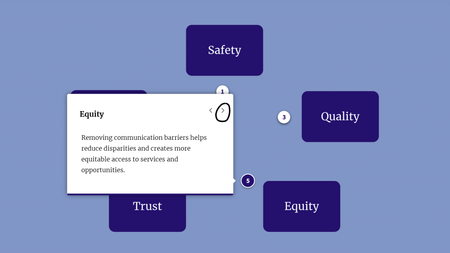
Hi everyone, I'm currently evaluating keyboard navigation for a course using NVDA. I'm having trouble getting stuck in an endless loop around a labeled graphic block, and unsure if: There's something I'm not adjusting in Rise 360 This is a "me problem" with NVDA navigation I didn't have this issue with another labeled graphic block, but I'm not sure what the difference is. When testing with NVDA, I'm using Tab to navigate to the Next button of each Marker's description. But then after Marker 5, instead of exiting to the next Continue button outside of the block, it just keeps me going around and around in an endless loop. (I originally had each marker styled as a plus sign, but had hoped numbering them would fix the issue.) Unfortunately, I didn't find the Accessibility Info section of the Rise 360: Using Labeled Graphic Blocks particularly helpful.92Views2likes1CommentAccessible PDFs in Rise360
Hi everyone, Any insight very much appreciated! Context: I used Adobe Acrobat Pro to make two PDFs accessible by adding tags and adjusting the reading order, etc. Everything works smoothly with NVDA when opening each PDF. The Issue: The trouble starts when I link to the PDFs within my course under a "Further study and resources" type section. The PDFs open in the browsers I've tested, but NVDA simply says things like "Document loading complete. You are on page 1. frame. document content region." I've tried navigating via headings, links, interactive elements, and even just Ctrl + directional arrows, but none of the content appears tagged or readable. The Ask: I'm not sure where to go from here... Add the PDFs as Attachment blocks instead (but then every learner has to download to view)? Add a note at the top of the resources section ("For the best screen-reader experience, please download PDFs and open in Adobe Acrobat Reader.") and then put something like "Accessible, tagged PDF" after those files? A third and much better option that someone can recommend? Thank you!!Solved97Views0likes2CommentsIn Case You Missed It (ICYMI): Accessibility Updates in Q2 2026
Welcome to our Q2 2026 update! This quarter continued our focus on supporting the creation of accessible training and improving the learner experience. From new capabilities for identifying accessibility improvements to refinements for screen reader users, keyboard navigation, and color contrast, these updates reflect our ongoing commitment to accessibility across Rise and Storyline. Our community continues to grow. We now have 970 members, an increase of 54 this quarter. We’re glad you’re here. Let’s take a look at what’s new this quarter! Highlights This Quarter This quarter's accessibility updates centered around three themes: Identifying accessibility improvements earlier Storyline Labs introduces an experimental Color Contrast Check that helps identify color contrast issues across an entire project, while updates to Rise theme colors ensure contrast is calculated correctly across supported theme elements. Giving authors more control Storyline now lets you choose which objects are visible to screen readers, giving you greater control over how your training is presented to assistive technologies. Improving the learner experience Across Rise and Storyline, we refined screen reader support, keyboard navigation, focus management, and question interactions to provide a more predictable experience for learners using assistive technologies. Together, these updates continue our focus on supporting accessible training and improving the experience for everyone who creates and completes it. Product Updates Rise Enhanced: To improve accessibility, we've globally applied WCAG 2.1-compatible contrast to theme color elements that previously had contrast calculated incorrectly. Enhanced: Improved screen reader focus behavior so that, after answering a knowledge check, focus moves directly to the next relevant content. Enhanced: Improved tooltip behavior so that only meaningful tooltips are displayed for interactive elements like the block selector and sorting activity. Enhanced: Preview now opens the entire course, with full navigation. Enhanced: The video player is now consistent across the app and provides a refined experience with better responsiveness on mobile devices. Storyline New: Easily control which objects should be visible to screen readers with a new accessibility toggle in the timeline. New: Storyline Labs is here! Access experimental features early from the Labs button in the File or View tab. Available in Labs: Color Contrast Check helps identify color contrast issues across an entire project using the accessibility checker. Fixed: Screen readers announced extra text when certain question types were used. Fixed: A trigger designed to fire with a user click incorrectly executed when using a screen reader. Fixed: Text-entry fields didn't follow the defined custom focus order during preview. Fixed: Windows Narrator read bulleted and numbered list items twice. Fixed: Screen readers didn't correctly announce nested list items in the Notes panel. Fixed: The accessibility checker incorrectly reported issues on screen recording slides where all objects were hidden from accessibility tools. Fixed: The focus order was incorrect for screen readers when the Transcripts tab was opened. Fixed: Drop-down question choices didn't display a scrollbar when the list couldn't fit all choices. Other Updates Updated Articles Storyline 360: Working with Buttons Rise 360: How to Use Process Blocks Rise 360: Our Accessibility Journey Storyline 360: Our Accessibility Journey Storyline 360: Working with Variables Storyline 360: Working with Triggers Storyline 360: Pick-One Questions Accessibility Index93Views1like0CommentsRise 360 Q1 2026 Accessibility Updates
We recently posted a new update in the Rise 360 Accessibility Journey, highlighting some of the accessibility improvements and enhancements delivered during Q1. From the new and improved sorting activity to expanded audio support, this work reflects our ongoing commitment to building more inclusive learning experiences for all learners. The update also includes links to our revamped conformance reports and maturity plans for both Storyline and Rise. Accessibility is never a one-time effort, and we’re grateful for the feedback, insights, and conversations from this community that help shape our work. Do you have a Rise accessibility improvement or resource you'd like to see next? Let me know in the comments! Read the full update here: Rise 360: Our Accessibility Journey143Views0likes1CommentIn Case You Missed It (ICYMI): Accessibility Updates in Q4 2024
Welcome to 2025! Since my last update, this accessibility group has grown by 61 members, bringing its total to 403 members. The first ICYMI edition was published on October 23, 2024, and established a foundation, but we can keep it short and sweet from now on. Product Updates: Rise 360 New: Immerse all learners in customizable interactive experiences with accessible scenario blocks that offer alternative text, screen reader support, and a visible focus indicator. New: Select the source course language when exporting your training for translation. Enhanced: Select the text of a hyperlink to apply formatting, including changing the color of the text. Enhanced: Line height and letter spacing are now available in the text formatting toolbar. Storyline 360 Enhanced: Expand your reach with a new AI text-to-speech model that supports Hungarian, Norwegian, and Vietnamese in addition to the 29 other languages already supported. Enhanced: You can now add text-to-speech narration and sound effects to markers. Fixed: Text alignment wasn't preserved in existing projects. Upcoming accessibility features: We've released Rise Accessible Drag-and-Drop Questions (Q1 2025, but released before posting this) and added Rise Math Equations. Current accessibility items on our feature roadmap include: Storyline Accessibility Checker Storyline Math Equations Rise Math Equations Updates in articles, documentation, resource center, or training: Refreshed: Storyline 360: Working with Hyperlinks New blog: What Is Section 508? A Quick Guide to Section 508 Compliance Upcoming webinar: Beginner's Guide to NVDA and Storyline for Accessibility Testing New entry in Storyline 360: Our Accessibility Journey - Accessibility Enhancements to Kick Off 2025436Views2likes2CommentsLink Purpose not clear in topic heading in Menu
The purpose of the link is made unclear, this ensures users are unaware on where the link actually takes them. Using Jaws, the screen reader repeats the title of the module on menu as "Link: Title of the Menu". When we click on the Link, it takes us to the Home Page/Cover Page of the Course. Hence it should clearly mention that the link takes to the Cover Page of the course. This is an accessibility issue. Are there any way to make the screen reader say the exact location where the menu Title links takes the learner. Any solution to this appreciated414Views0likes1CommentScreen reader focus placed at the bottom of new content
Hello! I perform accessibility evaluations for my organization and recently noticed a screen reader barrier than I had not seen in previous Rise 360 trainings. When completing a section within a module and selecting Continue, the screen reader focus is placed at the bottom of the content, making it appear as though no new content has loaded unless the user navigates backwards or to the top of the page and through all of the previously loaded content. This doesn't happen when hitting Continue to load more content within a section, only when completing one section and moving into the next. (I apologize for not knowing platform specific terms, I haven't built a course myself!) I'm wondering if anyone else has encountered this, and whether it might be due to one of the recent updates, since this was a training newly exported in the past week. Thank you to anyone who might know more!541Views0likes3CommentsWrong Aria label for Radiobutton groups in RISE 360
Radiobutton groups: The aria-label attribute is not allowed as the generic role; The paragraph element is not expected inside the radiogroup role. Steps to produce the issue for Radio button group: Find radiobuttons, open dev tools , launch ARC Toolkit and run tests. Are there any solution to correct the aria tag206Views0likes2Comments