rise 360
9 TopicsValentine's Express: The Romance Master Class
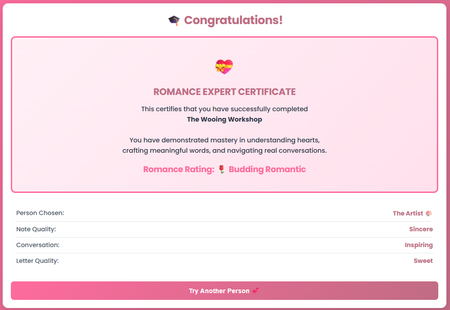
It's February, the month of love. And I bet you're wondering: how do I express my feelings authentically? How do I say what matters most in a way that truly lands? So I built something for that. This is my entry for the Code Block Build-a-thon! Valentine's Express is an interactive experience where users navigate through personality-based scenarios and craft handwritten notes and love letters. They choose a personality type (The Dreamer, The Artist, The Intellect, The Adventurer, or The Kindred Spirit), then receive personalized feedback as they write. This is my first time building with code blocks in Rise, and I'm blown away by what's possible. The interactivity, the personalization, the ability to create something that feels truly custom, all within a code block. What's Inside 5 unique personality profiles with custom feedback Interactive note and letter writing with real-time scoring localStorage integration for seamless progression across 4 code blocks Automated Romance Expert certificate upon completion Why I'm Sharing This I'm uploading the code so you can try it, remix it, and explore what's possible. Whether you build something romantic, playful, or educational, the interaction patterns here can work for any content. Ready to express your heart? Check it out here and let me know what you think! 💕637Views4likes5CommentsAccessibility Reality Checker (3 - minute Simulator)
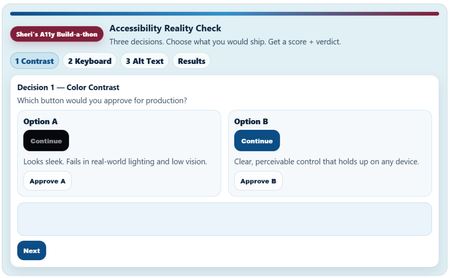
Link to Rise Course (Quick Share) Accessibility Reality Checker Copy /Paste Link: https://share.articulate.com/kdeNT__CFskcknh1QTeIp Project overview I created this project because most accessibility training fails in a predictable way. It explains rules, but it doesn’t change decisions. Teams ship inaccessible experiences because the tradeoffs are invisible in the moment. I worked to build something that puts some of those tradeoffs out into the open. Instead of building a tutorial, I built a short decision simulator: three common, high-impact accessibility choices (contrast, keyboard navigation, and alt text). I framed each choice under the question “Which would you ship?” The simulator allows the review to choose and get immediate consequences, then see an “accessibility” score. I made the simulator small, fast, and opinionated because that is how product decisions and learning content approval happens in the real world. This is not and was not intended to be a comprehensive accessibility course. It’s a pressure test for everyday judgment. Prompts and constraints The Build-a-thon prompt was to explore what the Rise Code Block can really do. My personal guide was: “Can I build something that feels like a real product review decision instead of another accessibility checklist?” My constraint and format drivers were: No long explanations up front No hidden scoring Do not pretend or ignore nuances The review must make a decision and live with the result Tools and implementation Built entirely in Articulate Rise 360’s Code Block Plain HTML, CSS, and JavaScript only Custom UI, state management, scoring logic, step flow, results meter, and share text are all handled in the Code Block Intentionally used: Semantic HTML Keyboard-operable controls Visible focus states High-contrast color choices The experience itself is designed to model the behaviors it’s teaching. The experience had to go beyond just talk about the experiences. What I learned I need to spend a lot more time upskilling on HMTL and JavaScript. Vibe Coding can be fun. Rise’s Code Block is capable of much richer, multi-step interactions than I use it for. Using the Code Block require you to be disciplined about structure, focus management, and state. Small UX decisions (focus order, feedback timing, contrast, visual hierarchy) have a big impact on whether a user experience feels accessible, useable, or sloppy. Accessibility cannot be taught in 5 minutes, but a quick accessibility review can expose bad decisions and highlight options for better user experiences instincts This type of tool/ format is good for awareness, decision calibration, but not for deep technical training. I like to call this a “feature” of the simulator not a bug. I acknowledge simulator has some real limitation for real work use in it’s current state.3.2KViews30likes11CommentsSpace Explorer
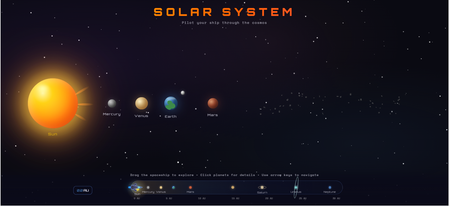
I find immense value in using the Code Block to quickly create stand-alone, complex interactions that would be too time-consuming to do manually. As an example, this Code Block, at its simplest, could have been a table. But instead, you get to kinda-sorta travel the solar system and get a sense of exploration and discovery to make learning fun. Plus, the visual gives you a sense of scale - understanding how much relative distance there is between Earth and Mars compared to Mars and Jupiter, etc. It's not perfect. For the life of me, I cannot get the labels for Earth and Jupiter to display on the navigation scale. Were this a real course, I could imagine including images of the real planets, following it up with a quiz, maybe giving the learner specific quests or making the exploration even more fun by including small clickable items to collect in specific (or random) buttons where the learner must try to collect all 10, etc. to encourage self-exploration. https://share.articulate.com/hZGb9Vn1vAWbmRDKRICxl It was very fun to make though. All code written via maybe 10-11 back-and-forth prompts with Claude 4.5 Opus (and maybe 7-8 more trying to get the Earth and Jupiter labels to display - unsuccessfully). I attached the code here in case anyone wanted to use or play around with in Rise themselves. If you do, uncheck Auto Resize and set the Height to the max possible value.561Views10likes2CommentsAgentic Diagnostics: A 3-Tier AI Career Consultant for Personalized Learning Paths
The Problem: Most organizations know they need to train everyone on AI, but they don't know the specific pain points of their different roles. Standard surveys are slow, have low response rates, and often miss the "in-the-moment" hurdles learners face. The Solution: risecodeblockbuildathon For my Rise Code Block Build-a-Thon submission, I’ve built a tool that replaces the "one-size-fits-all" curriculum with an Agentic Diagnostic Engine. How it Increases Interactivity & ROI: Bespoke Consultation: After foundational training, learners don't just see a list of courses. They meet a "Consultant Bot" where they must describe a real-world hurdle they face with AI. Intelligent Prescription: Using Gemini 2.0 Flash, the tool analyzes their specific problem statement and prescribes the single best path from a 36-course catalog. Zero-Survey Insights: This is the game-changer. Because learners must enter their problem to proceed, the system collects qualitative data in real-time. Real-Time Data Dashboard: While the learner gets their custom path, L&D admins get a live "Hurdle Heatmap" in a private Google Sheet. Instant Analytics: No need for separate surveys. Targeted Strategy: Admins can see exactly which departments are struggling with "SME timelines" or "Technical Integration" as it happens. Security-First Architecture: ☁️ Google Cloud Function: Server-side Python keeps the Gemini API Key 100% hidden from the browser. 📜 Google Apps Script: Manages the secure bridge and logs the diagnostic data. 📂 Clean Frontend: Modern index, css, and script files provide a premium UX within Rise. We’ve moved from "guessing what people need" to "knowing exactly what they face"—all while they learn.293Views0likes2Comments3D MacBook Pro Short Product Tour
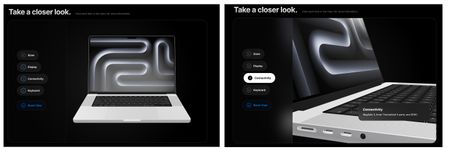
MacBook Pro Short Product Tour Review Link --- Inspiration Apple’s design philosophy has always been a major inspiration for me. Their ability to balance minimalism with high-performance functionality is something I wanted to capture in this short interactive product tour. I wanted to create a digital experience that felt as premium as the hardware itself. This is my first time I have done a 3D model like this using code. --- Tools Building this required a blend of 3D assets and prompting: AI: I used Gemini and developed a prompt to architect the logic, refine the UI, and tackle complex CSS challenges. 3D Modeling: I used a high-fidelity 3D model of the MacBook Pro that I downloaded from https://sketchfab.com/. Infrastructure: To ensure fast loading and reliable delivery, I hosted the .glb 3D file on AWS (Amazon Web Services). --- Key Lessons Learned The biggest takeaway from this project was the "Desktop vs. Mobile" reality check. A layout that looks breathtaking on a large monitor can completely break on a handheld device. I learned that: Spatial Awareness Matters: On mobile, you have to fight for every pixel. I had to implement a custom "slow-scroll" script to ensure the model stayed in view when users interacted with the menu. Contextual UI: I had to write (and rewrite a lot 🙃) the prompt so that there was logic to move text overlays (like the Connectivity box) so they wouldn't block the very features (the ports) they were trying to describe. Iteration is Key: Design isn't "one and done." It’s a constant loop of tweaking, testing on different screens, and refining the code until it feels right everywhere. --- The HTML zip file is below.312Views5likes2CommentsStop guessing code, perform the Ritual of AI 🐦⬛
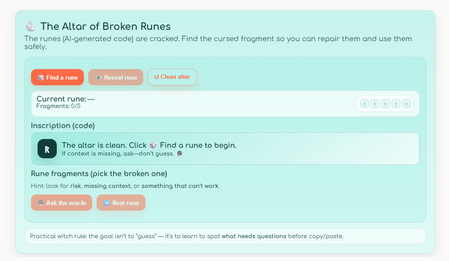
Try it here! Do you feel like a witch casting mysterious spells every time you use AI to create code? This little Rise is a bit about that: when vibe coding, it’s easy to copy/paste something that looks right… but has a tiny crack hidden inside. And unlike real magic, code doesn’t “kind of” work. So, why not turning that feeling into a ritual you can trust? You’ll meet a handful of “broken runes” (small AI-generated code snippets). Your job is to inspect the inscription, pick the fragment that is broken, and then ask the oracle to reveal what went wrong and, most importantly: how to fix it. The point isn’t to guess correctly on the first try. The point is to train your eyes to spot the things that deserve a second look: mismatched names, missing context, and logic traps that run but lie. By the end, you’ll have a simple review habit you can use anytime AI hands you code: trace what triggers what → check names → check assumptions → check logic. No smoke, no mirrors. Just practical witchcraft for safer vibe coding. ^^ Psss: ✨ From witch to witch: if you spot an error in my code or explanations, please correct me. This is a shared circle of learning and we definitely don’t want to accidentally invoke a malignant entity. 🐦⬛96Views3likes0CommentsEnglish School - Code Block Demo
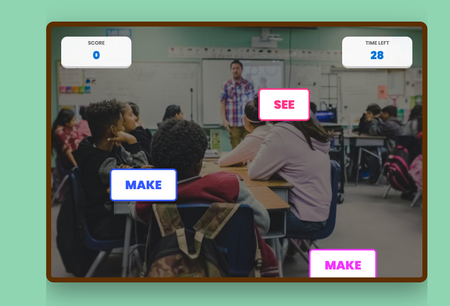
Premise English irregular verbs are like that one "eccentric" relative at the Christimas family dinner: they follow absolutely zero rules, change their entire identity without warning, and seem specifically designed to ruin your day, but after a few awkward encounters, you eventually learn their quirks and stop calling them by the wrong name. That´s why I created this demo using Code Block in Rise, to help students to learn english in a fun and gamified way. Prompt To create it, I used this prompt with Gemini: "Write HTML, CSS, y JavaScript for an excercise like call of duty to use in Rise 360 Code Block. Use blue and green and yellow as main colours. It´s a shooting game. You will have to shoot the irregular verbs that you find. If you hit a irregular verb, you win 5 points, if you hit a regular verb you lose 10 points. It´s an excercise in elearning for english students." I twisted along to way to add the background music, and later on in Rise I altered the code to change colours, fonts, timer, speed of the words appearing, etc. Course Demo You can check the course here: https://360.articulate.com/review/content/39bd6260-4647-4cd7-84c9-731a83677417/review166Views5likes0CommentsMindfullness 101
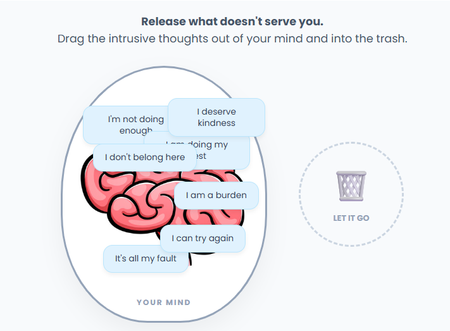
Premise Mindfulness 101 begins with the realization that thoughts are just passing clouds; letting go of the "bad" ones isn't about forcing them away, but rather observing them without judgment until they drift out of view on their own. With this exercise I wanted tocreate a gamified way of "clearing out" your mind, removing negative thoughts. Prompt I used this prompt in Gemini: "Write HTML, CSS, y JavaScript for an excercise like operation in Rise 360 Code Block. It´s a activity game. It´s an activity for people studying with depression. We have a vector of a human head, with many sentences in their mind, good things and bad things. The learner has to take the bad things and move them to a trash can." Then I twisted the code to add the brain image and change fonts and colours. Demo Find here the result of this code block demo, hope you like it! ❤️ Demo: https://360.articulate.com/review/content/181ce585-e5bd-4ba6-9fb8-836ee3a6483a/review97Views3likes0CommentsFlip Card Sample
Hello all! From an old Telehealth project, I used the Flip Card sample from Stephanie Harnet's "Growing List of Cool Code Block Examples" and used the image as the front and text on the back of the cards. I also saw an example of the arched cards - shout-out to Member: DanBoylandUK | Articulate - Community - Where he provided the "Reveal" cards. https://360.articulate.com/review/content/13390855-2224-4ea0-a363-47beebec8cbc/review This was fun! Cassandra Wiley473Views2likes0Comments