storyboarding
26 TopicsCreating a Prompt Library
We have about 20 or so folks across the organization using Articulate 360. I want to start a prompt library that we can all contribute to for code block prompts, AI images, etc. For those of you who have done something similar, what has worked best for you?143Views1like4CommentsID Toolbox
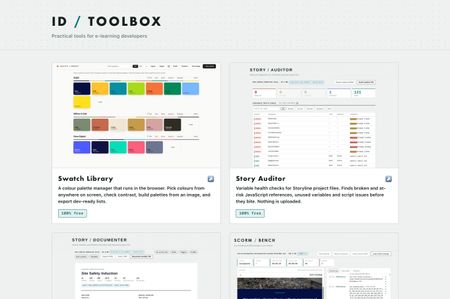
Practical tools for e-learning developers… Over the past several months I've built a set of browser tools for the bits of Storyline and Rise that used to cost me hours. Eleven of them, all completely free, no signup, no accounts, nothing to install. They run entirely in your browser. Nothing is uploaded anywhere, which for me was the whole point, I wasn't keen on posting client content to a website just to check something… ID Toolbox251Views10likes3CommentsWhat tools do you use?
What are your go to tools you use everyday and wouldn't be without in your authoring process? Here's mine. There's one thing they all have in common, and for me it's the important bit, nothing gets uploaded. They're plain HTML and JavaScript running in your browser. When you drop a .story file, an image or a SCORM zip on one of these, it gets read in memory on your own machine and that's the end of it. No server, no account, no sign up. Most of what I work on is client material and I'd rather not be posting it to a third party site. I suspect I'm not alone in that. They're all completely free, no trial, no limits, no nonsense! Story Auditor Variable health checks Storyline project files. Finds broken and at risk JavaScript references, unused variables and script issues before you ship. Story Documenter A complete written specification from a .story file. Every slide, every trigger in plain English, every quiz answer etc, ready to print or share with clients. Great for creating storyboards. Image Press Resize, compress and convert images in the browser. E-learning size presets, a target file size, batch zip download, and image metadata stripped on output. Great free tool for managing images for projects. SCORM Bench Run a SCORM package against a logging LMS runtime, without uploading it. Every API call visible, live data model, the manifest checked. Works with SCORM 1.2 and 2004. And a quick question; what's the thing in your workflow that still doesn't have a tool? These only existed because I moaned about something enough and then got annoyed enough to fix it!154Views2likes1Comment✨ Friday Fun Prompt: The Blank Slide Moment
You know that moment… You’ve got the topic. You’ve got the request. You open a new project. And then… Where do you actually start? 💬 What’s the hardest part of starting a new course for you? Is it: • Defining objectives? • Organizing messy source content? • Figuring out structure? • Just getting momentum? Bonus: What’s one thing that helps you move past that starting point?160Views0likes0CommentsFast AI Moodboards in Visily.ai
In this short tutorial, I walk through how I use Visily.ai to create a polished 12-slide AI moodboard for training and instructional design projects. The workflow is simple: gather your inspo, align with brand assets, write a clear prompt in Grok 4.1, and let Visily.ai generate high-fidelity layouts that guide the entire visual direction of the course. This approach helps you explore concepts quickly and present a strong visual foundation before moving into development. You can watch the full breakdown here: https://youtu.be/AcndXNYe7DM?si=kCcFqOon9vyBZuf1162Views1like0CommentsInstructional Design for Financial Services: Lessons from the UAE
Hello Articulate Community, I’m reaching out to connect with fellow learning designers, educators, and organizations exploring fresh ways to drive professional development through impactful e-learning. I’m an Instructional Designer based in Dubai, specializing in designing and developing training solutions and digital learning experiences using Articulate tools. Over the years, I’ve had the opportunity to scale large-scale training programs across the UAE, particularly in the financial sector, including banks and insurance companies. What makes my approach unique is the balance between instructional creativity and scalability. I’ve not only crafted engaging modules but also rolled out end-to-end learning journeys, covering classroom, digital, and blended formats, ensuring they align with compliance standards, industry regulations, and organizational goals. Some areas I’m passionate about include: Designing custom e-learning modules (SCORM-compliant) that seamlessly integrate into existing LMS. Building training frameworks that can scale from a single team to entire institutions. Creating learning content that bridges complex financial concepts with learner-friendly, practical delivery. I’m now exploring freelance opportunities to collaborate with organizations that want to reimagine their learning, scale their programs, and maximize learner engagement. If your organization is looking for instructional design expertise with proven UAE financial sector experience, I’d be happy to connect and discuss how we can work together. Feel free to reach out here or connect directly. Looking forward to learning and collaborating with this inspiring community!176Views0likes0CommentsDo You Storyboard Before Building in Rise?
When I'm starting a new Rise course, I often sketch out a quick outline first. Other times, I build right in Rise (especially now with AI!) and organize as I go. Lately, I've been wondering how others approach it—especially when it comes to storyboarding or outlining content ahead of time. If you build Rise courses, I'd love to hear: Do you typically create a storyboard or outline before jumping into Rise? 📝 (And if you do, what does it usually look like—simple notes, a spreadsheet, something more detailed?) I'm gathering some insights for an upcoming community project and would love to learn from your processes! 🙌🏼2.6KViews2likes30CommentsBest way to get feedback/workshop content with SMEs
I'm starting a project that involves a lot of SMEs contributing content, and I know there will be plenty of back and forth to get the language just right. What’s the best way to handle this? In the past, we’ve used Word storyboards with track changes, but it’s hard for SMEs to visualise, and it takes ages to format. I’ve also used Review 360 in Rise, but the feedback screenshots often end up in the wrong spot, making it confusing to know what the SME is referring to. A colleague suggested Storyline might be better for reviews. Is that true? Or should I just export as a PDF and get feedback that way?523Views1like2Comments