storyline 360
101 TopicsManaging sensitive data in Storyline simulations, including AI-assisted workflows
Our source systems may contain confidential information that can't appear in simulations. How are others handling this? Synthetic/test data before recording? Redaction or replacement after capture? Edited screenshots instead of recordings? AI-assisted redaction, data replacement, or generation of realistic synthetic data? We're looking for a workflow that balances security, realism, efficiency, and maintainability.9Views0likes0CommentsBest practices for maintaining a large library of Storyline system simulations
We’re exploring Storyline for building a library of software simulations, including processes that move between multiple systems that share data. For teams doing this at scale: How do you structure simulations for easier maintenance when applications change? Do you use screen recordings, screenshots, custom-built interactions, or a hybrid? What reusable templates/components have worked well? Are you using AI to identify UI changes, update simulations, or reduce maintenance effort? We’re particularly interested in approaches that remain manageable as the simulation library grows.6Views0likes0CommentsSocial interactions for a remote, digital audience?
I'm curious how others have used Storyline or have thought about using Storyline to promote social learning and social situations between remote learners? At least with the audiences I've largely helped in my time as an instructional designer, remote workers have been an outstanding majority. I was part of a team that developed a "two-player" eLearning, each person played the role of either a caller or a customer service representative, and the course was structured to guide them through the call in discrete steps. It was one eLearning with two pathways--cooperative Battleship in some ways. Learners would call each other over the phone and navigate the scenarios together. The Storyline course was essential to the entire thing working so well and really enabled the social interaction in the first place. I currently have in development a three-player resource management game, each player shipwrecked on a distinct island in an archipelago. All three need to work together to build a new ship and continue their voyage. Winning requires the players exchange resources between their games/eLearnings/islands. So how to exchange resources without paying for and configuring a server? A "courier" system--a popup form in the game into which the player says what they want to send, how much, and to which island to send it. That generates an encrypted short-code for the sender to give to the recipient. When the intended recipient enters that code into their receive-courier popup, the "sent" resources are added to the inventory. Some additional JavaScript maintenance adds the code to a list blocking any duplicates, and additional encryption when codes are generated ensures they can only be used by their intended recipients. It's shaping up to be a very effective team-building exercise (the principal design goal) made possible through the text input objects and a little JavaScript, and so (to restate) I'm curious how others have used Storyline or have thought about using Storyline to promote social learning and social situations between remote learners?18Views1like0CommentsWhat’s in a name?
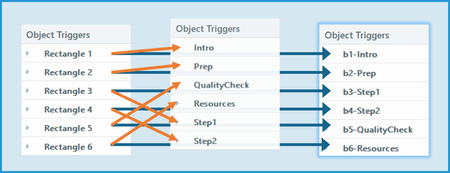
To paraphrase Shakespeare’s Juliet: “What’s in a name? A button by any other name would click as well.” When you insert a new object on a slide, Storyline names it. Duplicate it or insert another new object of the same type, and Storyline adds an incremented number to the default name. Storyline also gives default names to motion paths, layers, and variables. And that’s how your slide might end up with Rectangle 1, Rectangle 2, Rectangle 3, etc., etc., etc. Keeping the default names leads to one of the most common mistakes I’ve seen in the community: selecting the wrong item in a trigger. The simple solution? If something will be involved in an interaction, take the time to give it a meaningful name. It’s not as important to rename non-interactive objects. However, that can make it easier to adjust accessibility settings. So what is in a name? Use whatever naming convention works for you—and your colleagues if you share files. Below are some naming conventions I like. Identify the type. Storyline shows Object Triggers alphanumerically. When you’re creating or editing a trigger, Storyline also sorts selectable objects, motion paths, layers, and variables that way. To keep certain items grouped together, I like to start the custom name with an identifier. Here are some examples of how I start custom names: “b-” for buttons (Note: I use this for any clickable object, not just the official “Buttons” provided in Storyline.) “L-” for layers (Note: I use an uppercase L because a lowercase l can look like the number 1 in some fonts.) “go-” for motion paths After that initial identifier, I add a meaningful descriptor. Include numbers if the sequence is important. Useful descriptors might not be “in order” when sorted alphanumerically. That’s why I add a number after the identifier when the sequence is important. Provide useful info, but keep it short. I want the descriptive part of a name to tell me about the thing being named. But I keep it as short as possible. That makes is easier to read and simply takes up less space in a trigger. Here’s an example. In the list on the left, the objects have default names. (Those will appear in order if you create them in the proper sequence.) In the middle list, the objects have been given short but meaningful names. However, they don’t appear in the desired sequence. Also keep in mind that non-interactive objects could appear in-between these objects when making a selection in a trigger. In the list on the right, the names start with identifiers and sequence numbers. This keeps them in a group that appears in the desired order. And here’s what makes proper naming worth the effort: good names make it much easier to troubleshoot. In fact, I’d say you’re less likely to enter the wrong item in a trigger when everything is well named. What naming conventions work for you?38Views1like0CommentsDisplay issues on slides with multiple layers
Is anyone else having this issue? In Storyline, when I have a slide with multiple layers, the contents of the last layer appear over the base layer. It makes no difference how many layers I have, the same thing happens. In story view, the slide appears as it should and when I preview, the slide works as it should. It is just when I click on the slide in story view to work on it in detail that the last layer appears over the base slide content. I cannot select any of the layer contents in base slide view, it just hides whatever is on the base slide. The timeline shows only the base slide contents and still allows me to select them, but I can't SEE the base slide item because the layer items appear over them. It's making it very hard to fine tune items on the base slide. And it's very weird. It is happening on ALL slides with multiple layers and even in different files. I've attached a screenshot of the error. The story view on the left is the way the slide should appear and the slide view is actually the last of five layers for this slide. Anyone know how to fix this?Solved55Views0likes3CommentsTips for working with icons in Storyline 360
I am looking for some tips on the easiest way to work with icons in Storyline 360. I often place an icon inside a shape, such as a circle or rounded rectangle. The challenge comes when I later want to move or adjust just the icon. I’ve tried selecting the icon through the Timeline, but it can still take quite a bit of time to select, separate, and reposition the icon without moving the shape behind it. Is there a better or more efficient way to work with icons so that individual elements are easier to select and move?164Views2likes7CommentsHow to Build a Rotating Video Carousel in Articulate Storyline
2 min read Three videos. Click a side tile and the whole set glides across, the outer tiles scaling and blurring back into depth. It loops in both directions and never dead-ends. Try the live demo first. Then here is how it goes together. The videos stay in Storyline They sit on three slide layers, Vid01, Vid02 and Vid03, as ordinary Storyline video. That matters. You keep your seekbar, your accessibility settings and your normal publish pipeline. Swapping in your own footage is just right click, Change Media. The carousel is a web object A small folder of HTML, CSS and JavaScript sits on top and draws the three tiles. The front tile lines up exactly behind the real video, so what learners click is Storyline, not a picture of Storyline. The look and motion live in one file Open config.js in Notepad. Tile size, swing distance, tilt, blur, fade, speed, play button colour and background are each one line with a plain-English comment. Change a number, save. There is no code to write. The folder rule nobody expects This is the step that may trip up almost everyone. Storyline copies the web object folder when you insert it, so pointing it back at the same folder shows you the old version no matter how many times you save. Rename the folder, repoint the web object at the new name, then publish. Why it looks blank in Preview Web objects do not render in Storyline Preview. You have to publish to see the carousel run. This is normal Storyline behaviour and nothing is broken. See it running Open the live carousel demo and click the side tiles to feel how the motion reads. Watch the full tutorial on YouTube for the complete build.86Views1like2CommentsLocalization verification - but verifiers will not use the Review360 function.
Looking for some advice, workarounds, and eventually, a solution to a hurdle we have been thrown. We are localizing multiple (over 100) courses using Articulate localization. Each translation must be verified by our in-house localization team; however, they will NOT use the Review360 method for verification. The verification team has requested Excel spreadsheets of each Rise and Storyline element for side-by-side comparison and editing. I can't export Rise or Storyline like that, I can't copy/paste from the Review360 verification sidebar, and the XLIFF file I was able to export does not line up with the source language file. Thoughts? Ideas? Any help or insights would be appreciated.35Views0likes0CommentsBest Video Dimensions and Export Settings for Articulate Storyline (Premiere Pro)
Hi everyone, I'm creating videos in Adobe Premiere Pro for use in Articulate Storyline and would appreciate some advice on best practices. Currently, I'm exporting videos at 960 × 540 px, which seems to match the size of the video area in my course. However, I'd like to ensure I'm getting the best possible quality while keeping file sizes reasonable. My questions are: Is 960 × 540 px still the recommended export resolution for Storyline? What export settings in Premiere Pro have you found work best for Storyline projects? Are there any best practices for maximizing video quality and avoiding blurry text, graphics, or screen recordings after publishing? Have you noticed any limitations or compression issues in Storyline that I should account for when exporting videos? Thanks in advance for your recommendations!125Views0likes3CommentsSL Template Slide for importing questions
Hello, I'm new to Storyline and currently preparing to import over 1,000 multiple-choice questions from text files. Before doing so, I’d like to set up a basic slide template to streamline the process and avoid repetitive adjustments afterward. Specifically, I want to predefine essential layers (such as correct, incorrect, and review), choose the desired font type and size, and possibly include a few custom states. My goal is to ensure that once the questions are imported, they automatically adopt the formatting and structure I've set in the template. Please please please help me!161Views0likes4Comments