Forum Discussion

AI Text-to-Speech Generating Captions Even When Box Unchecked
Hello,
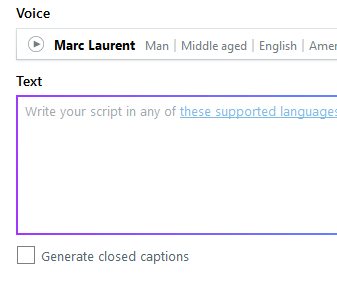
Has anyone else experienced Storyline generating CC with the AI text-to-speech tool even when the box is unchecked (screenshot attached)? Storyline is adding them regardless of whether I check the box. It takes the text as entered and uses those for the caption. I prefer them to not be generated this way because:
- I add punctuation, caps lock, and syntax to the text to manipulate voice emphasis, pauses, etc., that I don't want in the captions
- Generating captions via Manage Captions -> Generate with AI after the fact tends to group and space caption blocks more appropriately
- Not auto-captioning helps the review process, as the accessibility checker flags captionless bits
I couldn't find any other posts on this so I'm wondering if it's a universal bug or just my install.
Hi Everyone!
I'm happy to share that we've just released a new update for Storyline 360!
In version 3.111.36309.0, we've included essential fixes and new features. One of the bugs we've fixed is:
- The Closed Captions editor showed captions for Text-to-Speech narration even though caption generation was turned off.
Launch the Articulate 360 desktop app on your computer to take advantage of this update, and click the Update button next to Storyline 360. You'll find our step-by-step instructions here.
Please let me know if you need any additional help!

2 Replies
- RonPricePartner
Yes - This is a known issue. Keep checking for updates to see when it is addressed.
Hi Everyone!
I'm happy to share that we've just released a new update for Storyline 360!
In version 3.111.36309.0, we've included essential fixes and new features. One of the bugs we've fixed is:
- The Closed Captions editor showed captions for Text-to-Speech narration even though caption generation was turned off.
Launch the Articulate 360 desktop app on your computer to take advantage of this update, and click the Update button next to Storyline 360. You'll find our step-by-step instructions here.
Please let me know if you need any additional help!

Related Content
- 20 days ago
- 25 days ago
- 25 days ago