Forum Discussion
AI Voice Changed Accent
- 5 months ago
Hello AnneLanaway,
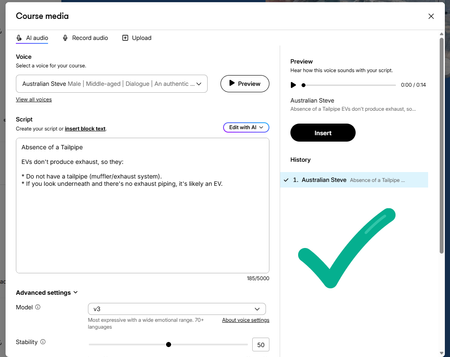
I understand you're using AI TTS Audio with Australian Steve's voice in Rise 360, and it doesn't sound as expected. I can confirm that we have this behavior logged with our team. Happy to learn more about your specific setup!
- Do you experience this change with any other voices or just Australian Steve?
- Is this happening in more than one course, or just this one?
I noticed in your screenshot that you are using model v3 when generating audio. As a troubleshooting step, you can select an earlier version each time you generate audio.
Here’s how:
- Open the AI text-to-speech window.
- Advanced settings.
- Next to Model, select Multilingual v2.
- Select Generate to preview the voice again.
Here's a quick visual of my experience when changing models!
Please let me know if this resolves the issue, and if you have any questions!


Hi AnneLanaway,
I know you've already marked this resolved, but I wanted to chime in with some tips that have helped me.
- Anchor a statement in the beginning of the script that is unmistakably Australian such as "G'day mate!".
- Use Australian vocabulary when possible.
- Avoid words that are strongly American or British.
- Avoid sounding overly formal, try a more relaxed and conversation tone instead.
- Increase the Stability setting.
Hope this helps!
~ Frankie
- AnneLanaway5 months agoCommunity Member
Thank you so much for those tips, Frankie!
I am going to play around some more with it today and I shall report back!
- SamHill4 months agoLegend
Thanks for the tip. I tried a few things, but adding "G'day mate, Australian Paul here." forced the correct results for me when using "Paul - Australian Professional Presenter" for anybody else struggling with this.

Related Content
- 5 months ago
- 1 year ago
- 1 month ago