Forum Discussion

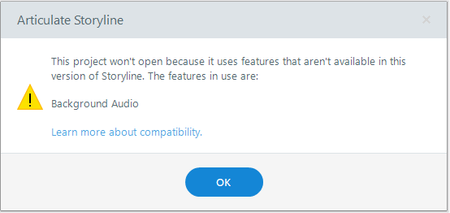
Background Audio Compatibility Error in Storyline 3

Hi uaumbetov!
Sorry to hear you're struggling to open a Storyline 360 project, in Storyline 3!
Great to see Ron has been helping you. I've opened a support case on your behalf, so our support engineers can work with you directly on this issue. Also, I've sent you an e-mail containing steps on how to share a copy of the affected .story file privately with our team.
We'll delete it from our system as soon as we finish troubleshooting!
Hi StevenBenassi,
Thank you for having opened the support case !
I've uploaded the affected .story file.
- LucianaPiazza9 months agoStaff
Hello uaumbetov,
I see that our colleague Darrell has been helping you in your case. You're in excellent hands!
We'll continue the conversation in your case, so everything is in one spot!
- uaumbetov9 months agoCommunity Member
Hi Luciana,
Could you pls help me to find this case related conversation ?
- KellyAuner9 months agoStaff
Hi uaumbetov,
I'm happy to help out!
I checked the support case my teammates StevenBenassi and LucianaPiazza mentioned, and see that Darrell sent you a reply on August 15th. After testing the .Story file you provided, they were able to replicate the issues you described. From what they found, the project was last saved using Storyline 360 Update 102, which includes features that aren't available in Storyline 3.
To help resolve this, Darrell made a few adjustments to your test file to restore compatibility with Storyline 3. They confirmed that it opens correctly in Storyline 3 Update 20. I won't share that file here in case you prefer to keep that private.To locate this conversation with Darrell in your email, please check your Spam/junk folder and try searching your email for a message from support@articulate.com. I've requested that we resend the most recent email.
Please let us know if you have trouble locating it!


Related Content
- 4 months ago
- 1 year ago
- 5 months ago