Forum Discussion

Bullet color insists on white!
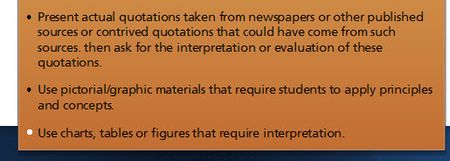

Wow!
This post is 11 years old and the issue still isn't fixed. Interesting that this same thing happens in PowerPoint. You'd think someone could write a couple of lined of code that makes the bullet color match the text color unless otherwise specified by the user.
- JoseTansengco2 years agoStaff
Hello Richard,
If you're seeing the same behavior happen in PowerPoint, then the issue might have something to do with special formatting that is applied to your text. Try copying and pasting your text using the text only option and then recreating the bullet points to see if this helps.
Let me know if clearing any formatting from the text helps!
- RichardSlate2 years agoCommunity Member
It happens regardless of where the text comes from.
Richard Slate
Technical Training Developer
[cid:image001.png@01D97DBA.F053E7C0]- JoseTansengco2 years agoStaff
Hi Richard,
I'd like to get our support team involved so we can get more eyes on this behavior.
I tried replicating the issue in a new Storyline 360 project file but I am unable to do so using basic white/black text with some bullet points.
Would you be willing to share a project file that contains the issue file with me? You can either upload it here, or by opening a case with our support team. Being able to observe the behavior first hand will help point is in the right direction in terms of getting a clearer idea of what's causing it.

Related Content
- 8 months ago
- 5 months ago
- 8 years ago