Forum Discussion

Funky Menu States and Quiz Scoring
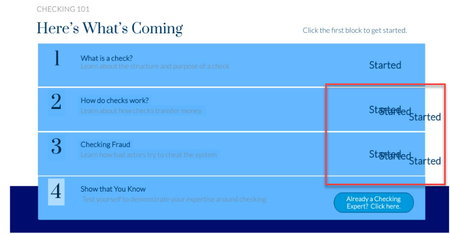

Hello Jean Marrapodi, I reviewed your SL and file and here is what I found so far:
Issue 1: On slide 2.1: Topics in this course: For items 2,3, & 4 apart from the blue rectangle, the text boxes have individual states. Delete those extra states and you can get rid of the repeating words.
Issue 2: On the results slide, select the Review Quiz button, edit the highlighted trigger and double click on that trigger. On the pop up screen, uncheck the Show correct/incorrect responses when reviewing. Thus you can get rid of the excess text displayed on the quiz slides.
Issue 3: Change the reference text to display the Quiz score points. Delete the existing reference text and add a new reference variable by selecting the right one from the built in variables.
Let me know if you need any further help and I'll be glad to help you with!!
- JeanMarrapodi-c2 years agoCommunity Member
Bless you!! I never thought to check the states of the text. That fixed it. Now to fiddle with the quizzes. You've absolutely made my day @Sandeep. Thanks so much.

Related Content
- 1 month ago
- 9 months ago